Section 7.3. Building a Static Routing Table
As we have seen, the minimal routing table works to reach hosts only on the directly connected physical networks. To reach remote hosts, routes through external gateways must be added to the routing table. One way to do this is by constructing a static routing table with route commands.
Use the Unix route command to add or delete entries manually in the routing table. For example, to add the route 207.25.98.0 to a Solaris system's routing table, enter:
# route add 207.25.98.0 172.16.12.1 1

add net 207.25.98.0: gateway crab
The first argument after the route command in this sample is the keyword add. The first keyword on a route command line is either add or delete, telling route either to add a new route or delete an existing one. There is no default; if neither keyword is used, route displays the routing table.
The next value is the destination address, which is the address reached via this route. The destination address can be specified as an IP address, a network name from the /etc/networks file, a hostname from the /etc/hosts file, or the keyword default. Because most routes are added early in the startup process, numeric IP addresses are used more than names. This is done so that the routing configuration is not dependent on the state of the name server software. Always use the complete numeric address (all four bytes). route expands the address if it contains fewer than four bytes, and the expanded address may not be what you intended.[3]
[3] Some implementations of route expand "26" to 0.0.0.26, even though "26" could mean Milnet (26.0.0.0).
If the keyword default is used for the destination address, route creates a default route.[4] The default route is used whenever there is no specific route to a destination, and it is often the only route you need. If your network has only one gateway, use a default route to direct all traffic bound for remote networks through that gateway.
[4] The network address associated with the default route is 0.0.0.0.
Next on the route command line is the gateway address.[5] This is the IP address of the external gateway through which data is sent to the destination address. The address must be the address of a gateway on a directly connected network. TCP/IP routes specify the next hop in the path to a remote destination. That next hop must be directly accessible to the local host; therefore, it must be on a directly connected network.
[5] Linux precedes the values on the route command line with keywords; e.g., route add -net 207.25.98.0 netmask 255.255.255.0 gw 172.16.12.1. Check your system's documentation for the details.
The last argument on the command line is the routing metric. The metric argument is not used when routes are deleted, but some older systems require it when a route is added; for Solaris 8, the metric is optional. Systems that require a metric value for the route command use it only to decide if this is a route through a directly attached interface or a route through an external gateway. If the metric is 0, the route is installed as a route through a local interface, and the G flag, which we saw in the netstat -i display, is not set. If the metric value is greater than 0, the route is installed with the G flag set, and the gateway address is assumed to be the address of an external gateway. Static routing makes no real use of the metric. Dynamic routing is required to make real use of varying metric values.
7.3.1 Adding Static Routes
As an example, let's configure static routing on the imaginary workstation rodent. Figure 7-1 shows the subnet 172.16.12.0. There are two gateways on this subnet, crab and horseshoe. crab is the gateway to thousands of networks on the Internet; horseshoe provides access to the other subnets on books-net. We'll use crab as our default gateway because it is used by thousands of routes. The smaller number of routes through horseshoe can easily be entered individually. The number of routes through a gateway, not the amount of traffic it handles, decides which gateway to select as the default. Even if most of rodent's network traffic goes through horseshoe to other hosts on books-net, the default gateway should be crab.
Figure 7-1. Routing on a subnet
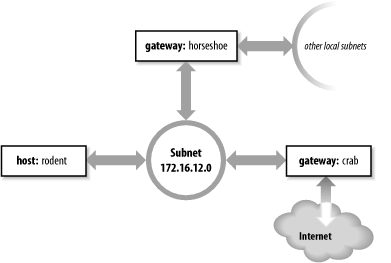
To install the default route on rodent, we enter:
# route add default gw 172.16.12.1
The destination is default, and the gateway address (172.16.12.1) is crab's address. Now crab is rodent's default gateway. Notice that the command syntax is slightly different from the Solaris route example shown earlier. rodent is a Linux system. Most values on the Linux route command line are preceded by keywords. In this case, the gateway address is preceded by the keyword gw.
After installing the default route, examine the routing table to make sure the route has been added:[6]
[6] Solaris always uses netstat to examine the routing table. Linux can use either netstat or route, but route is more common.
# route -n

Kernel IP routing table

Destination   Gateway       Genmask         Flags Metric Ref Use Iface

172.16.12.0   0.0.0.0       255.255.255.0   U     0      0     0 eth0

127.0.0.0     0.0.0.0       255.0.0.0       U     0      0     0 lo

0.0.0.0       172.16.12.1   0.0.0.0         UG    0      0     0 eth0
Try ping again to see whether rodent can now communicate with remote hosts. If we're lucky,[7] the remote host responds and we see:
[7] It is possible that the remote host is down. If it is, ping receives no answer. Don't give up; try another host.
% ping 207.25.98.2

PING 207.25.98.2: 56 data bytes

64 bytes from ruby.ora.com (207.25.98.2): icmp_seq=0. time=110. ms

64 bytes from ruby.ora.com (207.25.98.2): icmp_seq=1. time=100. ms

^C

----207.25.98.2 PING Statistics----

2 packets transmitted, 2 packets received, 0% packet loss

round-trip (ms)  min/avg/max = 100/105/110
This display indicates successful communication with the remote host, which means that we now have a good route to hosts on the Internet.
However, we still haven't installed routes to the rest of books-net. If we ping a host on another subnet, something interesting happens:
% ping 172.16.1.2

PING 172.16.1.2: 56 data bytes

ICMP Host redirect from gateway crab.wrotethebook.com (172.16.12.1)

 to horseshoe.wrotethebook.com (172.16.12.3) for ora.wrotethebook.com (172.16.1.2)

64 bytes from ora.wrotethebook.com (172.16.1.2): icmp_seq=1. time=30. ms

^C

----172.16.1.2 PING Statistics----

1 packets transmitted, 1 packets received, 0% packet loss round-trip (ms)  min/avg/max = 30/30/30
rodent believes that all destinations are reachable through its default route. Therefore, even data destined for the other subnets is sent to crab. If rodent sends data to crab that should go through horseshoe, crab sends an ICMP Redirect to rodent telling it to use horseshoe. (See Chapter 1 for a description of the ICMP Redirect Message.) ping shows the ICMP Redirect in action. The redirect has a direct effect on the routing table:
# route -n

Kernel IP routing table

Destination   Gateway       Genmask         Flags Metric Ref Use Iface

172.16.12.0   0.0.0.0       255.255.255.0   U     0      0     0 eth0

127.0.0.0     0.0.0.0       255.0.0.0       U     0      0     0 lo

0.0.0.0       172.16.12.1   0.0.0.0         UG    0      0     0 eth0

172.16.1.2    172.16.12.3   255.255.255.0   UGHD  0      0   514 eth0
The route with the D flag set was installed by the ICMP Redirect.
Some network managers take advantage of ICMP Redirects when designing a network. All hosts are configured with a default route, even those on networks with more than one gateway. The gateways exchange routing information through routing protocols and redirect hosts to the best gateway for a specific route. This type of routing, which is dependent on ICMP Redirects, became popular because of personal computers (PCs). Many PCs cannot run a routing protocol; some early models did not have a route command and were limited to a single default route. ICMP Redirects were one way to support these clients. Also, this type of routing is simple to configure and well suited for implementation through a configuration server, as the same default route is used on every host. For these reasons, some network managers encourage repeated ICMP Redirects.
Other network administrators prefer to avoid ICMP Redirects and to maintain direct control over the contents of the routing table. To avoid redirects, specific routes can be installed for each subnet using individual route statements:
# route add -net 172.16.1.0 netmask 255.255.255.0 gw 172.16.12.3

# route add -net 172.16.6.0 netmask 255.255.255.0 gw 172.16.12.3

# route add -net 172.16.3.0 netmask 255.255.255.0 gw 172.16.12.3

# route add -net 172.16.9.0 netmask 255.255.255.0 gw 172.16.12.3
rodent is directly connected only to 172.16.12.0, so all gateways in its routing table have addresses that begin with 172.16.12. The finished routing table is shown below:
# route -n

Kernel IP routing table

Destination   Gateway       Genmask         Flags Metric Ref Use Iface

172.16.6.0    172.16.12.3   255.255.255.0   UG    0      0     0 eth0

172.16.3.0    172.16.12.3   255.255.255.0   UG    0      0     0 eth0

172.16.12.0   0.0.0.0       255.255.255.0   U     0      0     0 eth0

172.16.1.0    172.16.12.3   255.255.255.0   UG    0      0     0 eth0

172.16.9.0    172.16.12.3   255.255.255.0   UG    0      0     0 eth0

127.0.0.0     0.0.0.0       255.0.0.0       U     0      0     0 lo

0.0.0.0       172.16.12.1   0.0.0.0         UG    0      0     0 eth0

172.16.1.2    172.16.12.3   255.255.255.0   UGHD  0      0   514 eth0
The routing table we have constructed uses the default route (through crab) to reach external networks, and specific routes (through horseshoe) to reach other subnets within books-net. Rerunning the ping tests produces consistently successful results. However, if any subnets are added to the network, the routes to these new subnets must be manually added to the routing table. Additionally, if the system is rebooted, all static routing table entries are lost. Therefore, to use static routing, you must ensure that the routes are re-installed each time your system boots.
7.3.1.1 Installing static routes at startup
If you decide to use static routing, you need to make two modifications to your startup files:
Add the desired route statements to a startup file.
Remove any statements from the startup file that run a routing protocol.
To add static routing to a startup script, you must first select an appropriate script. On BSD and Linux systems, the script rc.local is set aside for local modifications to the boot process. rc.local runs at the end of the boot process so it is a good place to put in changes that will modify the default boot process. On our sample Red Hat Linux system, the full path of the rc.local file is /etc/rc.d/rc.local. On a Solaris system, edit /etc/init.d/inetinit to add the route statements:
route -n add default 172.16.12.1 > /dev/console

route -n add 172.16.1.0 172.16.12.3 > /dev/console

route -n add 172.16.6.0 172.16.12.3 > /dev/console

route -n add 172.16.3.0 172.16.12.3 > /dev/console

route -n add 172.16.9.0 172.16.12.3 > /dev/console
The -n option tells route to display numeric addresses in its informational messages. When you add route commands to a Solaris startup file, use the -n option to prevent route from wasting time querying name server software that may not be running. The -n option is not required on a Linux system because Linux does not display informational messages when installing a route.
After adding the route commands, check whether the script starts a routing protocol. If it does, comment out the lines that start it. You don't want a routing protocol running when you are using static routing. On our Solaris sample system, the routing software is started only if the system has more than one network interface (i.e., is a router) or the /etc/gateways file has been created. (More on this file later.) Neither of these things is true; therefore, the routing daemon won't be run by the startup process and we don't have to do anything except add the route statements.
Before making changes to your real system, check your system's documentation. You may need to modify a different boot script, and the execution path of the routing daemon may be different. Only the documentation can provide the exact details you need.
Although the startup filename may be different on your system, the procedure should be basically the same. These simple steps are all you need to set up static routing. The problem with static routing is not setting it up, but maintaining it if you have a changeable networking environment. Routing protocols are flexible enough to handle simple and complex routing environments. That is why some startup procedures run routing protocols by default. However, most Unix systems need only a static default route. Routing protocols are usually needed only by routers.


