Hack 41 Turn Toward a Point


Many games and simulations require the player's ship to rotate toward a point. Use angular motion to turn a sprite so it faces a target.
Computer animation is different from real life in a number of ways. A computer graphic can move in any direction, whereas, in real life, an object usually has to turn in a particular direction before it can move in that direction. Furthermore, if a real object is already moving, it cannot change direction instantaneously. Due to inertia, it turns in the new direction over time, thus traversing a curved path until it is facing the new direction.
You can make a computer graphic appear to be moving more realistically in several ways:
Cheat by making your graphic look as if it is always facing in the right direction, such as by using a ball that is radially symmetrical and therefore "directionless" or a flying saucer that seems capable of moving in any direction without turning.
Constantly move the target point your animated clip is trying to get to. If your movie clip is trying to get to a point on the screen that is moving in an intelligent or complex way, your movie clip will appear to be moving in the same way. The hack is to design your application in such a way that the code need not create the intelligence or complexity. In most games, the enemies chase the player's character. Because the player is (hopefully!) moving intelligently, the enemies' motion also seems intelligent.
Create a graphic with a cardinal direction, but simulate turning in a way that merely approximates or implies the underlying physics. In real life, the rate at which an object can turn without skidding or tumbling depends on numerous attributes (velocity, friction, the object's mass and center of gravity, the terrain, etc.). In a real-time simulation (especially one in a weightless environment such as space), you can approximate all these effects by simply defining a constant turn rate, as discussed later.
Following a Moving Target
You can make a clip move to a point (in this case, toward the mouse cursor location) as follows:
// Create a ball clip

this.createEmptyMovieClip("ball", 0);

ball.lineStyle(50, 0x0, 100);

ball.moveTo(0, 0);

ball.lineTo(0, 1);

// Animate ball to follow the mouse

ball.onEnterFrame = function( ) {

  this._x -= (ball._x - _xmouse) / 4;

  this._y -= (ball._y - _ymouse) / 4;

};
This code creates the ubiquitous mouse follower with inertia (dividing the difference in the X and Y positions by 4 ensures that the ball doesn't jump right to the mouse cursor location). It moves the ball to the last mouse position in a straight line (or series of straight-line segments if the target is moving). This animation depends in part on the fact that the ball is radially symmetrical (i.e., as discussed earlier, it is directionless).
This hack shows the minimum code to create realistic motion that appears to take into account turning and arcing, although the code actually addresses neither of them.
This simple trick can be expanded by changing the direction that the clip appears to be facing without needing to model rotation, but instead switching between several predrawn graphics or animation sequences. For example, in cases in which a character lives in a 3D world, you'll need to use different animations for each direction of character movement [Hack #28] .
Facing Toward a Point
Imagine a ship that turns toward a target before firing (assuming the ship always fires its weapons in the direction it is pointing). The following code creates a line pointer and keeps it facing the mouse position:
// Create tracker movie clip

var tracker:MovieClip = this.createEmptyMovieClip("tracker", 0);

// Draw a line within tracker

tracker.lineStyle(0, 0x0, 100);

tracker.moveTo(0, 0);

tracker.lineTo(100, 0);

tracker._x = Stage.width / 2;

tracker._y = Stage.height / 2;

// Set radian-to-degree conversion ratio

var RAD_DEG:Number = 180 / Math.PI;

tracker.onMouseMove = function( ) {

  // Rotate this movie clip in the

  // direction of the mouse pointer.

  var angle:Number = Math.atan2(_ymouse - this._y, _xmouse - this._x);

  this._rotation = angle * RAD_DEG;

  updateAfterEvent( );

};
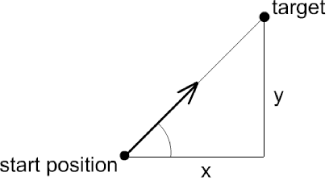
The code uses Math.atan2( ), a method that returns the angle to which the line must turn to face a point at the specified distance in X and Y (note that the method accepts the Y distance, not the X distance, as the first parameter). The geometry is summarized in Figure 5-17.
Figure 5-17. Geometry for turning toward a point
All Flash trigonometric functions return angles in radians, so we must convert the value to degrees, which are the units used by the MovieClip._rotation property.
The preceding code makes the clip turn instantaneously toward the mouse position. To slow down the turn, simply limit the turn rate (in this case, to +/- 5 degrees) by changing the onMouseMove( ) event handler as follows:
tracker.onMouseMove = function( ) {

  // Rotate this movie clip in the

  // direction of the mouse pointer.

  var targetAngle:Number = Math.atan2(_ymouse - this._y, _xmouse - this._x);

  var errorAngle:Number = targetAngle * RAD_DEG - this._rotation;

  if (Math.abs(errorAngle) > 5) {

    if ( ((errorAngle > 0) && (errorAngle < 180))

         || (errorAngle < -180) ) {

      this._rotation += 5;

    } else {

      this._rotation -= 5;

    }

  }

};
The nested if statement in the preceding code checks errorAngle because the _rotation property is in the range -180 to +180, not 0 to 360. If you increment the _rotation property by 1 every frame, it changes, as follows, during a full rotation:
1, 2, 3, ... 179, 180, -179, -178, ... -2, -1, 0
Therefore, the if statement causes the tracker clip to rotate in the direction that traverses the shortest arc to reach to the desired direction. In other words, if the clip is pointing at 12 o'clock and needs to rotate to 9 o'clock, it turns 90 degrees counterclockwise rather than 270 degrees clockwise.
Adding Inertia
Now assume we want to add inertia so that the clip moves in an arc as it rotates. To make our pointing line move in an arc, add movement in the direction it is pointing at each instant. Try this:
function drawBlip(clip) {

  // Draw a small line graphic in a clip to indicate direction

  clip.lineStyle(0, 0x0, 100);

  clip.moveTo(0, 0);

  clip.lineTo(10, 0);

  clip._x = Math.random( ) * Stage.width;

  clip._y = Math.random( ) * Stage.height;

}

function realMove( ) {

  // Calculate the distance from this clip's current

  // position to the target position (the mouse pointer).

  this.xDist = _xmouse-this._x;

  this.yDist = _ymouse-this._y;

  // Calculate the angle from the clip's current position

  // to the target position and the difference between this

  // angle and the desired heading (errorAngle).

  var targetAngle:Number = Math.atan2(this.yDist, this.xDist);

  var errorAngle:Number = targetAngle * RAD_DEG - this._rotation;

  // Turn the clip based on errorAngle

  if (Math.abs(errorAngle) > 10) {

    if ( ((errorAngle > 0) && (errorAngle < 180))

       || (errorAngle < -180) ) {

      this._rotation += 10;

    } else {

      this._rotation -= 10;

    }

  }

  // Move the clip, taking into account the angle

  // at which it is currently pointing.

  this._x += Math.cos(this._rotation / RAD_DEG) * 20;

  this._y += Math.sin(this._rotation / RAD_DEG) * 20;

}

// Set radian-to-degree conversion ratio

var RAD_DEG:Number = 180/Math.PI;

// Create tracker clips

for (var i:Number = 0; i < 100; i++) {

  var tracker:MovieClip = this.createEmptyMovieClip("tracker" + i, i);

  drawBlip(tracker);

  tracker.onEnterFrame = realMove;

}
As long as you keep moving the mouse cursor, the movement appears almost organic, like a flocking or group movement.
If you stick with one tracker clip, you get something that looks a lot like a homing missile, especially if you give it a fading exhaust that is spewed out in the direction opposite to the line of travel.
Final Thoughts
There's more than one way to simulate real motion. Turning toward the target point and simulating inertia in the direction of movement provides a basis for animations with realistic motion.


