Starting Premiere for the First Time: To A/B or Not to A/B?
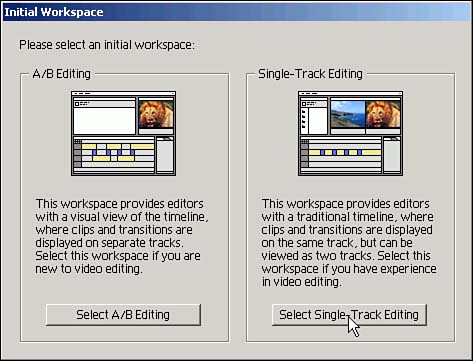
When you first fire up Premiere it immediately presents the first of many options, as shown in Figure 2.3. The standard take on this is that A/B editing is the most intuitive for first-time editors and single-track editing is best for experienced video producers.
Figure 2.3. A/B or single-track editing? The standard take is for neophytes to select A/B. I disagree. Select single-track editing and don't look back.
I disagree. I think everyone should use single-track editing. I'll explain why in a moment. First, a bit of background.
A/B editing is old-school, film-style editing. Film editors frequently use two reels of film?an A-roll and a B-roll, usually duplicates made from the same original. The two-reel approach permits nice, easy-on-the-eyes cross-dissolves, gradually fading down the images from one reel while fading up the other.
Still "Grabbing B-Roll" After All These YearsIn the TV news business?back when everyone used film and didn't have time to make duplicate reels?the A-roll typically was the interview and the B-roll was everything else. They relied on two reels because the audio and images were not synced in the same place on the film. Older film projectors use a sound track that is 20?26 frames (about a second) ahead of the associated images because the sound pickup in the projector is not in the lens. If you've ever threaded a film projector you know how important it is to get just the right size loops to ensure the sound syncs to the images. So in the old TV news film era, to get a sound bite to play audio at the right time, that clip had to play "behind" the B-roll for about a second to allow enough time for the sound to reach the audio pickup device. Only then would a director cut to the A-roll image to play the interview segment and then would cut back to the B-roll once the sound bite ended. Despite this now-outmoded means of editing or playing back news stories, news photographers still say they're going to go "grab some B-roll." When stations began switching to ENG (electronic news gathering) video gear, there was no longer a need to use A/B-rolls. Audio and video are on the same place on videotape, but the only way to do those smooth cross dissolves was to make a copy of the original videotape (leading to some quality loss), run it on a second VCR, and make the cross-dissolve with an electronic "switcher." That was a time-consuming and cumbersome process fraught with timing problems. Older VCRs frequently were not "frame accurate" and you ended up with spasmodic-looking dissolves. DV changes that. No more dubbing, no more generation loss, no more timing problems, and no more need to edit using ancient A/B-roll methods. |
But that was film and this is video. So, when you open Premiere for the first time and note the choice between A/B editing and single-track editing, choose single-track.
 |
I'm guessing that this advice may be after the fact because you've probably already given Premiere a brief run-through. (It offers this option only once, skipping past it when you subsequently start Premiere.) If that's the case, I'll explain how to change your workspace into single-track editing in Hour 3. |
The second reason to choose single-track will become apparent once you get past the next setup screen?Project Settings. If you choose single-track editing, Premiere's editing workspace defaults to two monitor windows versus an A/B Editing default setting of only one monitor. Two is better than one. I'll explain why in a few paragraphs.
Video Alphabet SoupDeciphering digital video acronyms can put Premiere in perspective. I'll briefly go over video compression, DV formats, and NTSC. Video Compression Probably all the video you will edit using Premiere will be compressed. The reason is simple?uncompressed video requires massive data storage. One second of uncompressed NTSC video at its standard 720-by-486 pixel resolution consumes about 30MB of storage. A minute requires more than 1.5GB; an hour about 90GB. All that data requires unbelievably massive calculations to perform even simple transitions and special effects?number crunching that is beyond the capabilities of even the highest-power PC or Mac?thus the need for video compression. All video codec (compression/decompression) schemes reduce data while attempting to preserve video quality. Some codecs analyze video by looking for differences from frame to frame and storing only that relatively small amount of information. Others simply reduce frame size or frame rate to reduce data. Each codec typically has some unique feature. Some are better at compressing video with lots of action, others offer smooth data flows rather than peaks that may cause stuttering during playback on Web pages, and some focus on preserving sound quality over image quality. No matter how well a codec works, all are "lossy." All compressed video loses some quality when compressed. MPEG-2 is the de facto standard codec for DV compression. It dramatically reduces the standard DV data rate from 3.6MBps down to 1MBps. DVD and digital satellite systems use MPEG-2, and the quality is excellent. But MPEG-2 is not geared to editing because it's one of the codecs that analyzes video frames for differences and stores only that information. Therefore, MPEG-2 frame-specific editing is impractical. Digital Video (DV) Compression and Formats I extolled the virtues of DV in Hour 1, "Camcorder and Shooting Tips." Now I want to clarify DV compression. DV comes in at least six flavors: DV25, DVCAM, DVPRO, DV50, DV100, and DigiBeta. DV25 (Standard DV, MiniDV, or Digital8) is the consumer/prosumer variety. DVCAM and DVPRO offer slightly better quality, and DV50, DV100, and DigiBeta are geared for broadcast and professional video production. Despite the high quality of each of these formats, they are all compressed. DV25, the format you will probably work with, needs only 13GB per hour (versus 90GB for uncompressed analog video). Yet DV25 still looks great. The compression comes through reduced color sampling. All NTSC video use four pieces of information to illuminate one pixel on your TV screen: chrominance (red, green, blue) and luminance (light value from white through shades of gray to black). The human eye is much more sensitive to changes in luminance than chrominance. So reducing the chrominance data while retaining luminance information maintains most of the video quality. DV25 removes color information from three of every four consecutive pixels?so-called 4:1:1 color sampling. The resulting compressed video requires 25 million bits per second (3.5MB, including uncompressed audio data), thus the name DV25. One thing DV25 does not do well is chroma-keying?taping someone in front of a blue or green screen and electronically replacing that solid color with another image or video. TV weather people are "keyed" all the time (see Hour 14, "Compositing Part 1?Layering Images and Clips"). DV25 leaves slightly jagged edges through which the key color sometimes "bleeds." Higher-quality DV systems key cleanly. DV50 (50Mbps) uses 4:2:2 color sampling (there are two samples of chrominance data for every four samples of luminance data), and DV100 is used for High-Definition TV. DigiBeta (Digital Betacam) is a high-end broadcast-quality digital video codec compatible with existing analog Beta SP tapes. NTSC What's with this crazy 29.97 frames per second? In the United States (as well as Japan and a few other places), alternating current runs at 60 cycles per second. In early black-and-white TV days engineers decided that half that rate would work well for TV (that is, 30 frames per second). That was a little faster than film at 24 fps, so the image looked smooth. Then along came color TV. Instead of creating a new standard, the industry thought it best to ensure backward compatibility with B&W TVs, so they piggybacked chrominance data on top of the existing luminance signal. That increased the data in each frame by .1%, which led to the slightly slower 29.97 fps rate. This all played out more than 50 years ago, and we've been stuck with this oddity ever since. To further clarify this: 29.97 fps means that instead of 108,000 frames every hour (the old 30 fps x 60 seconds x 60 minutes), color NTSC displays 107,892 frames every hour. In other words, if you create a one-hour project using 30 fps non-dropped-frame timecode, your project will be 3.6 seconds (108 frames divided by 30 frames per second) longer than an hour. That's why you need to select "dropped-frame timecode" if you work with NTSC and want to create an accurately timed project. Much ado about nothing? |


