News-Style Editing: Using J-Cuts and L-Cuts
Frequently you'll want to start a clip by having its sound play "under" the previous video clip and then transition to its associated video. This is a great way to let your audience know that someone is about to say something or that a transition is coming. It's kind of like foreshadowing. This is called a J-cut.
Conversely, another slick editing technique is to let the audio tail off under the next video clip. This is an L-cut.
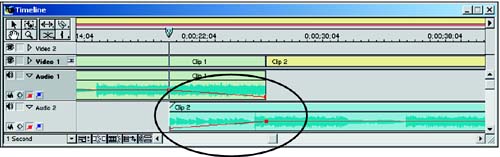
Because you know how to use the Link/Unlink tool, the Selection tool to trim clips, and the Cross-fade audio tool, I won't go over all the detailed steps. Figure 7.21 shows a J-cut.
Figure 7.21. A J-cut. Used to lay audio under a preceding video clip and gradually increase its volume to the point where its associated video pops onscreen.
Here's the basic approach to making J- and L-cuts:
Place two clips adjacent in the Video 1 track. Make sure you have enough spare frames available to extend the audio to create the sound-under.
Unlink the clip you want to extend.
Drag the audio for the clip you want to extend down to a different audio track (usually Audio 2, but it can be any audio track other than Audio 1 in this case).
Drag the end of that audio clip either under the end of the previous clip (J-cut) or under the beginning of the next clip (L-cut). Remember, don't slide the audio clip. That will unsync it. Rather you are extending the duration of that audio clip by using the Selection tool to drag its end.
Place a cross-fade from the first clip to the second. Done.
Now play your edited selection to see how that sound-under style works. If you want to adjust volume levels, it's a simple matter to open the audio waveform portion of the audio track and drag the red rubberband handles around.
 |
When editing clips in the Source window, holding down the Alt (Windows) or Option (Mac) key and dragging the in and/or out-points will split them into separate video and audio in/out-points, allowing for an L- or J-cut before the clips are even in the timeline. While the modifier key is held down, the in and out-points for audio and video are edited separately. Once released, they will move together with the newly created offset. This tip is provided by Adobe Systems Premiere evangelist Daniel Brown. See Hour 16, "Tips, Tricks, and Techniques: Part 1," for seven more of his expert tips. |


