11.1 Isolated Storage Explained
Many applications need to write data to a persistent store so that it's available each time the application runs. Data, such as user preferences and application state, is generally user-specific and needs to be stored in such a way that other users, and possibly other applications, cannot access and modify it. On the Windows platform, there has been no standard method of doing this, and therefore different applications have taken different approaches. These include using the Windows registry, configuration files (such as .ini files), or databases.
Windows features such as role-based security, ACL-based file permissions, user profiles, and the registry's HKEY_CURRENT_USER hive make it relatively easy for code to store data that other users cannot access. However, it is not so easy to ensure that applications run by the same user cannot read and modify each other's data. This presents significant security risks, especially with the increase in the use of mobile code and dynamically downloaded components.
Isolated storage provides a controlled and structured mechanism through which code can write data to the hard drive in a way that prevents access by other users and managed applications. When you use isolated storage in your programs, you do not have to worry about the mechanics of isolation and you do not have to choose a storage location that will not conflict with those used by other applications. In addition, isolated storage can leverage the capabilities of Windows-roaming user profiles, ensuring that a user's data is available to them regardless of which machine they use.
Before managed code can save data to isolated storage, it must obtain a store. A store is a compartment within isolated storage that has an identity derived from the identity of the user and code that created it. When code tries to obtain a store, isolated storage first looks for an existing store with the correct identity to pass to the code. If one does not exist, isolated storage creates a new store automatically. The use of stores means that each time code runs, it has access to any data that it previously saved to isolated storage. Because different applications run by the same user have different identities, they each obtain unique stores. We describe how isolated storage determines the user and code's identity later in Section 11.1.1.1.
Isolated storage provides a more secure data storage alternative than granting code direct access to selected areas of the hard drive. Different code-access permissions control access to isolated storage and normal hard disk access, simplifying security administration and ensuring that code granted access to isolated storage can't gain unforeseen access to other areas of the hard disk. In addition, each store appears to be a root-level container for the code using it. Within its own store, code is free to create files and directories as if it was working directly with the filesystem, but code cannot manipulate file or directory paths to access data in other stores, or other areas of the hard drive.
Isolated storage also allows security administrators to configure quotas that limit the maximum size of each store, ensuring that no application can create a store so large that it fills the entire hard disk. Isolated storage enforces these quotas as code writes data to its store. In summary, it is a relatively low-risk decision to give any code permission to use isolated storage, even code downloaded from unknown and untrusted sources. Isolated storage provides a perfect data storage solution for use by controls downloaded from the Internet.
11.1.1 Levels of Isolation
Isolated storage manages the isolation of application data automatically, always ensuring that one user cannot access the data of another. However, the level of isolation (isolation scope) between different applications run by the same user is configurable when the application obtains a store. Isolated storage supports two primary levels of isolation scope:
Isolation by user and assembly
Isolation by user, assembly, and application domain
You can configure each of these isolation scopes to support roaming users as long as the application is running on a platform that supports Windows-roaming profiles. In the following sections, we discuss these two isolation scopes and describe where each is preferable. First, we describe how isolated storage determines the identity of users and code on which it bases the isolation of stores.
11.1.1.1 Determining user and code identity
User-level isolation is implicit in isolated storage because of the structure of the underlying file store. A user's isolated storage data is stored in his Windows profile directory, and is always separate from all other user's data and protected by Windows file permissions. The storage location of a users' profile is dependant on the version of Windows and whether roaming profiles are being used. The .NET Framework SDK documentation lists the storage location used for each version of Windows.
Isolated storage achieves isolation at the assembly and application domain level by assigning each store an identity derived from the code that created it. Isolated storage uses the evidence possessed by the creating code to establish the store's identity; we discussed evidence in Chapter 6. Only code that presents the same evidence values can obtain the store in the future.
With user and assembly isolation, one piece of evidence from the assembly is used. When isolating by user, assembly, and application domain, isolated storage uses one piece, of evidence from the assembly and one from the application domain for the stores identity. This list shows the order in which isolated storage will use available evidence objects (all from the System.Security.Policy namespace):
Publisher
StrongName
Url
Site
Zone
In the unlikely event that an assembly or application domain has none of these evidence objects, the runtime will throw a System.IO.IsolatedStorage.IsolatedStorageException when code tries to obtain a store.
11.1.1.2 Isolation by user and assembly
When code obtains a store isolated by user and assembly, isolated storage returns a store with an identity based on the current user and the assembly that made the call to obtain the store. As shown in Figure 11-1, if an assembly is loaded into different application domains within a single application, the assembly will obtain the same store as long as it presents the same evidence. Even if the assembly is loaded into entirely different applications or Windows processes, as long as it presents the same evidence, it will obtain the same store. This kind of store sharing is most likely to happen if the assembly presents Publisher or StrongName evidence.
Figure 11-1. Isolation by user and assembly
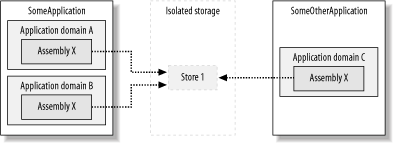
Isolation by user and assembly enables an assembly used in multiple applications to share data across those applications. In many instances, this is desirable behavior. For example, an assembly that implements spellchecker functionality that is used in both a word processor and a spreadsheet can save user preferences to affect the spellchecker behavior in both applications.
Used inappropriately, isolation by user and assembly can cause data leaks between applications. Depending on how the assembly uses isolated storage, this can result in an application gaining access to data that it should not have, or unpredictable behavior as one application overwrites the settings of another. Because of the risk of data leaks, the ability to obtain a store isolated by user and assembly requires a higher level of trust than obtaining a store isolated by user, assembly, and application domain. We discuss code-access permission requirements in Section 11.2.1 later in this chapter.
11.1.1.3 Isolation by user, assembly, and application domain
Isolation by user, assembly, and application domain limits the ability of an assembly to share or leak data across multiple applications. When code obtains a store isolated by user, assembly, and application domain, isolated storage returns a store with an identity based on the current user, the assembly that made the call to obtain the store, and the application domain in which the assembly is loaded. As shown in Figure 11-2, even if the same assembly tries to obtain a store, because each instance is loaded into an application domain with unique identities, isolated storage returns a different store. Unless there is a specific need to share data across multiple applications, you are best to use isolation by user assembly and application domain for the extra guarantee of isolation it provides.
Figure 11-2. Isolation by user, assembly, and application domain
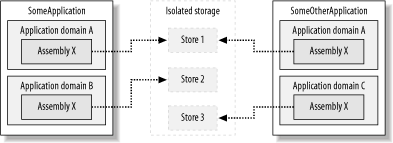
As Figure 11-2 also shows, if two application domains have the same identity, then it is still possible for applications to share data; see Section 11.1.1.1 for more details. However, this is not common and is unlikely to happen by coincidence, as it requires a high level of trust for code to manipulate the identity of an application domain (see Chapter 6 for details).
11.1.2 Limitations of Isolated Storage
As useful as isolated storage is, it is not the answer to every managed application's data storage requirements. Here are some examples of when the use of isolated storage is inappropriate:
- When valuable or secret data is used
-
Isolated storage is not secure and you should not use it to store sensitive or secret data without first encrypting that data. Although the .NET runtime ensures isolation of data between managed applications, any application that has direct access to the area of the hard disk that contains the isolated storage files can access the data they contain. This includes both native applications and managed applications with permission to access the hard drive. In addition, if data needs to be backed up, isolated storage should not be used unless you have a distributed backup tool, or use roaming profiles and accept the risk that a user's most recent data may not always be contained in the centralized roaming-profile store.
- When data between users is shared
-
The only way one user can access another user's isolated storage data is by using impersonation, which we discussed in Chapter 10. This is not a suitable mechanism for most data-sharing solutions, so you should use a shared network drive, or a database instead of isolated storage.
- When managed and nonmanaged code need application access
-
If both managed and nonmanaged code need to access shared data, storing it in isolated storage is not a good solution. Although the nonmanaged application can access the isolated storage files through direct access to the hard drive, isolated storage manages the structure of the file store to meet its own needs, and is not easy to work with directly.
- When there is no roaming-profile support
-
If you need the isolated storage data to be available to a user regardless of the machine he uses, but you do not have a network with Windows-roaming profiles enabled, you should not use isolated storage. Without roaming profiles, a user will have different data stored on every machine he uses.
- When used as a primary file store
-
You should not use isolated storage as the primary storage area for datafiles produced by your application. For example, it is inappropriate for email clients, word processors, and the like to store a user's files in isolated storage. The primary purpose of isolated storage is to store small amounts of noncritical data.
- When large amounts of data are used
-
You must take the number of different people that use an application and the use of roaming profiles into consideration, but it is generally not a good idea to store large amounts of data in isolated storage. If many people use an application that consumes large amounts of isolated storage, it can easily fill up the disk space because isolated storage enforces quotas at the individual store level, not across all stores cumulatively.


