6.3 Extending the .NET Framework
The standard .NET evidence classes represent the most commonly available and useful characteristics of an assembly. For most situations, these classes provide enough reliable information from which to determine a unique identity for an assembly, enabling you to configure your security policy. However, there are times when the systems you develop need to provide users, administrators, and programmers with additional criteria on which to base their security policy decisions. CAS supports the use of custom evidence to meet this requirement.
The creation of custom evidence is a simple task, but there are more steps before you can drive the policy resolution process using your custom evidence. In the following sections, we discuss the creation of a custom evidence class. We then continue our customization example with the development of custom membership conditions in Chapter 8.
6.3.1 Creating Custom Evidence
You can use any serializable class as evidence. There are no evidence-specific interfaces to implement, nor do you need to derive from a common base class (other than System.Object). However, here are some guidelines to consider when implementing custom evidence classes:
Make evidence simple. Evidence classes tend to be relatively simple classes that represent a single piece or type of information. Creating evidence classes that represent multiple or complex sets of data will result in security policy that is difficult for security administrators and users to configure and understand. If you need to represent multiple pieces of information, then create separate evidence classes for each.
Make evidence lightweight. When the runtime loads an assembly, it must instantiate the objects that represent the assembly's evidence. These objects stay in memory until the assembly is unloaded or the runtime terminates. Consider the amount of memory used by your evidence classes as well as avoid lengthy processing tasks, such as network, file, and database access during instantiation.
Make evidence serializable. Evidence classes must be serializable. Because of their simplicity, application of the System.SerializableAttribute is usually sufficient. Those evidence classes that have more complex serialization requirements must implement the System.Runtime.Serialization.ISerializable interface.
|

Make evidence noninheritable. It is safest to mark your evidence classes as sealed in C# and NotInheritable in Visual Basic .NET so that malicious code cannot subclass your evidence class in an attempt to change its behavior and subvert CAS.
Don't assume default values. You should consider whether it is appropriate for your evidence class to assume default evidence values if the caller does not explicitly set them during creation. The approach taken by the standard evidence classes is never to provide default values for evidence. None of the standard evidence classes implements a default (empty) constructor, nor do they make assumptions about the value of incorrectly specified arguments. In all cases, the evidence classes' constructor throws a System.ArgumentNullException if passed null arguments. If arguments have invalid values, the constructor throws a System.ArgumentException.
Make evidence immutable. Once created, the information held within an evidence class should be immutable. The evidence assigned to an assembly or application domain is accessible to many classes during policy resolution. It would cause problems if these classes could change the values of the evidence part way through the policy resolution process.
Override Object.ToString. All standard evidence classes override the Object.ToString method to display a simple XML representation of the evidence object. For consistency, you should consider taking the same approach. Being able to display the contents of evidence is invaluable when testing and debugging.
Grant identity permissions. To create evidence that will result in the granting of custom identity permissions, your evidence class must implement the System.Security.Policy.IIdentityPermissionFactory interface, which we discuss in Chapter 7.
6.3.1.1 Defining the Author evidence class
To demonstrate the creation and use of custom evidence, create the Author class shown in Example 6-3. The Author class provides evidence containing the name of the programmer who developed an assembly. Our ultimate goal is to assign code-access permissions to assemblies based on the assembly's Author evidence and to make runtime security decisions based on the assembly's Author using identity permissions.
In reality, you would be foolish to place any trust in evidence such as the Author class because it is susceptible to easy falsification. There is nothing to stop someone from assigning Author evidence that represents someone else to an assembly. However, Author is more than adequate for the purpose of our customization demonstration:
Example 6-3. Creating a custom evidence class
# C#

using System;
using System.Security;
using System.Reflection;

[assembly:AssemblyKeyFile("Keys.snk")]
[assembly:AssemblyVersion("1.0.0.0")]

namespace ORA.DotNetSecurity.Policy {

    [Serializable]
    public sealed class Author {

        private readonly string AuthorName = "";

        public Author (string author) {

            if (author == null) {
                throw new ArgumentNullException("author");
            } else {
                this.AuthorName = author;
            }
        }

        public string Name {

            get {
                return AuthorName;
            }
             }

        // Return string representation of the Author object
        public override string ToString(  ) {

            // Create a new "Author" element
            SecurityElement se =
                new SecurityElement(this.GetType(  ).FullName);

            // Add version of "1"
            se.AddAttribute("version", "1");

            // Add a child element to contain the author name
            if(AuthorName != "") {
                se.AddChild(new SecurityElement("Author", AuthorName));
            }

            // Render the SecurityElement to a string and return it
            return se.ToString(  );
        }
    }
}

# Visual Basic .NET

Imports System
Imports System.Security
Imports System.Reflection

<assembly:AssemblyKeyFile("Keys.snk")>
<assembly:AssemblyVersion("1.0.0.0")>

Namespace ORA.DotNetSecurity.Policy

    <Serializable> _
    Public NotInheritable Class Author

        Private AuthorName As String = ""

        Public Sub New(ByVal author As String)
            If author Is Nothing Then
                Throw New ArgumentNullException("author")
            Else
                Me.AuthorName = author
            End If
        End Sub

        Public ReadOnly Property Name(  ) As String
            Get
                Return AuthorName
            End Get
        End Property

        ' Return string representation of the Author object
        Public Overrides Function ToString(  ) As String

            ' Create a new "Author" element
            Dim se As SecurityElement = _
                New SecurityElement(Me.GetType(  ).FullName)

            ' Add version of "1"
            se.AddAttribute("version", "1")

            ' Add a child element to contain the author name
            If AuthorName <> "" Then
                se.AddChild(New SecurityElement("Author",AuthorName))
            End If

            ' Render the SecurityElement to a string and return it
            Return se.ToString(  )
        End Function
    End Class
End Namespace
The Author class implements many of the guidelines we outlined earlier, such as:
Author is sealed (C#) and NotInheritable (Visual Basic .NET), ensuring that nobody can create a subclass that behaves differently than we intended.
Author contains a single data member: a String named AuthorName, which contains the name of the author represented by the evidence object. AuthorName is a read-only private member that can be set only on instantiation and is retrievable only through the Name property, ensuring that Author is immutable.
Author is made serializable using SerializableAttribute. Because Author contains only a single String member, the default serialization capabilities provided by the SerializableAttribute are sufficient.
Author overrides the Object.ToString method to render an Author object to XML in a format consistent with the standard evidence types. Author builds the XML representation using the System.Security.SecurityElement class, which we discuss in the next section, before returning it as a String. The output of ToString for an Author object representing the author "Peter" is shown below. The version attribute identifies the format of XML output in case you decide to represent future versions of the Author class differently.
<ORA.DotNetSecurity.Policy.Author version="1">
   <Author>Peter</Author>
</ORA.DotNetSecurity.Policy.Author>
6.3.1.2 Using the SecurityElement Class
System.Security.SecurityElement is a utility class that implements a simple, lightweight XML object model for encoding .NET security objects. SecurityElement lacks the functionality required for general-purpose XML processing but is sufficient for use within the security system where only simple XML representations are required. When extending the .NET security system, you will frequently need to use SecurityElement, which is why understanding how it works is essential.
A SecurityElement object represents a single XML element and provides members that allow you to specify the following characteristics:
The element name or tag
Attributes of the element
Child elements (also represented by SecurityElement objects)
Text within the body of the element
SecurityElement also includes methods that allow you to perform simple searches of your XML element and its children, as well as static utility methods for manipulating and testing the validity of string values used within SecurityElement objects. The Author.ToString method demonstrates the use of SecurityElement, and we include additional examples in Chapter 7 and Chapter 8, where we develop further CAS extensions. Table 6-5 lists the members of SecurityElement.
|
|
Member |
Description |
|---|---|
|
Properties | |
|
Attributes |
Gets and sets the attributes of a SecurityElement using a System.Collections.Hashtable containing a collection of name/value string pairs representing the attributes. |
|
Children |
Gets and sets the child elements by providing a System.Collections.ArrayList of SecurityElements. |
|
Tag |
Gets or sets the tag of the SecurityElement. |
|
Text |
Gets or sets the text of the SecurityElement. |
|
Methods | |
|
AddAttribute |
Adds an attribute with the specified name and value to the SecurityElement. |
|
AddChild |
Adds the specified SecurityElement as a child element. |
|
Methods | |
|
Attribute |
Finds an attribute by name and returns its value, returning null (C#) or Nothing (Visual Basic .NET) if the attribute does not exist. |
|
Equal |
Tests two SecurityElement objects for equality by comparing tags, attributes, text, and child elements. This is different than the inherited Object.Equals method. |
|
Escape |
Static utility method for encoding invalid characters (that are invalid within XML) as valid escape sequences. Use the resulting string as a tag, attribute, or text value within the SecurityElement. |
|
IsValidAttributeName |
Static utility method that tests if a string represents a valid attribute name. |
|
IsValidAttributeValue |
Static utility method that tests if a string represents a valid attribute value. |
|
IsValidTag |
Static utility method that tests if a string represents a valid element tag. |
|
IsValidText |
Static utility method that tests if a string represents valid element text. |
|
SearchForChildByTag |
Searches the SecurityElement for the first child with the specified tag, returning the child as a SecurityElement. This method does not perform a recursive search; it searches only the immediate child elements. |
|
SearchForTextOfTag |
Searches the SecurityElement for the first child with the specified tag and returns the child's text. This method searches recursively through all child elements. |
|
ToString |
Returns a System.String containing the XML representation of the SecurityElement and its children. |
6.3.1.3 Building the Author evidence class
For reasons that we will explain shortly, Author.dll needs a strong name, so we have included the AssemblyKeyFile and AssemblyVersion attributes. We explained the purpose and creation of assembly strong names in Chapter 2. For this example, the AssemblyKeyFile attribute references a key file named Keys.snk, which we generated solely for this demonstration using the .NET Strong Name tool (Sn.exe). You should create the Keys.snk file and compile the Author class into a library named Author.dll using the following commands:
# C#

sn -k Keys.snk
csc /target:library Author.cs

# Visual Basic .NET

sn -k Keys.snk
vbc /target:library Author.vb
6.3.2 Using Custom Evidence
The previous section explains that the runtime recognizes two categories of evidence: host evidence and assembly evidence. Using custom evidence as host evidence at runtime is no different from using standard evidence; refer to Section 6.2 for details.
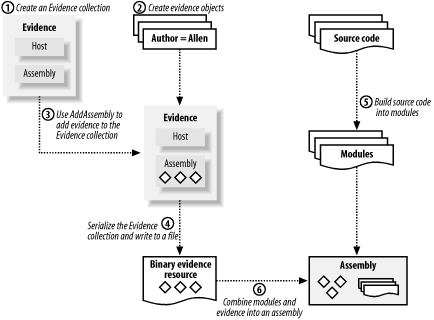
Because you must embed assembly evidence in the target assembly file, the use of custom evidence as assembly evidence involves additional steps during the build process of the assembly. You must prepare the custom assembly evidence programmatically, which you would normally do with a separate utility program, as we demonstrate later in this section. The process, illustrated in Figure 6-3, is as follows:
Create a System.Security.Policy.Evidence collection.
Create the objects you want to assign as assembly evidence.
Add the evidence objects to the Evidence collection using the AddAssembly method.
There is no benefit in using the AddHost method to add evidence, because the runtime simply ignores host evidence when loading an assembly.
Serialize the Evidence collection using an instance of the System.Runtime.Serialization.Formatters.Binary.BinaryFormatter class and write it to a file.
Build your code into a set of modules using the /target:module flag on the C# or Visual Basic .NET compiler.
Combine the modules and the evidence resource into an assembly using the Assembly Linker tool (al.exe). Use the /evidence:file flag to specify the file containing the serialized assembly evidence.
Figure 6-3. Embedding custom evidence in an assembly
In the following sections, we expand on this summary and demonstrate exactly how to use Author evidence as embedded assembly evidence, but first we must make Assembly.dll a fully trusted assembly.
6.3.2.1 Making the Author assembly a fully trusted assembly
Assemblies that provide CAS extensions (such as the Author.dll in the previous section) must be fully trusted by the security system. This avoids problems when the runtime loads the assembly during the policy resolution process. We discuss the need for fully trusted assemblies in Chapter 8for now, type the following commands:
gacutil -i Author.dll
caspol -user -addfulltrust Author.dll
caspol -machine -addfulltrust Author.dll
caspol -enterprise -addfulltrust Author.dll
The first command installs Author.dll into the global assembly cache; which you must do before you can make it a fully trusted assembly. This is why you had to give Author.dll a strong name when you built it. The other commands make Author.dll a fully trusted assembly in the user, machine, and enterprise policy levels. We explain policy levels in Chapter 8 and the Caspol.exe utility in Chapter 9.
6.3.2.2 Serializing evidence
To embed evidence in an assembly, you must serialize an Evidence collection that contains the evidence objects you want to use as assembly evidence. The .NET class library includes the System.Runtime.Serialization.Formatters.Binary.BinaryFormatter class, which makes the serialization of serializable objects a straightforward process.
Example 6-4 contains a simple utility named CreateAuthorEvidenceResource that creates an Author object using a name provided on the command line, adds the Author object to an Evidence collection, and then serializes the Evidence collection to a file. Running the command CreateAuthorEvidenceResource Peter results in the creation of the file named Peter.evidence that contains the serialized Evidence collection; you can then embed that file into the assembly.
Example 6-4. The CreateAuthorEvidenceResource utility
# C#

using System;
using System.IO;
using System.Security.Policy;
using System.Runtime.Serialization;
using System.Runtime.Serialization.Formatters.Binary;
using ORA.DotNetSecurity.Policy;

public class CreateAuthorEvidenceResource {

    public static void Main(string[] args) {

        // Create a new Evidence collection
        Evidence ev = new Evidence(  );

        // Create and configure new Author object
        Author auth = new Author(args[0]);

        // Add the new Author object to the assembly evidence
        // collection of the Evidence object
        ev.AddAssembly(auth);

        // Generate the name of the output file
        String file = auth.Name + ".evidence";

        // Serialize the Evidence object
        IFormatter fmtr = new BinaryFormatter(  );
        Stream strm = new FileStream(file,
            FileMode.Create,
            FileAccess.Write,
            FileShare.None);
        fmtr.Serialize(strm, ev);
        strm.Close(  );

            // Display result
            Console.WriteLine("Created author evidence resource : " +
                file);
    }
}

# Visual Basic .NET

Imports System
Imports System.IO
Imports System.Security.Policy
Imports System.Runtime.Serialization
Imports System.Runtime.Serialization.Formatters.Binary
Imports ORA.DotNetSecurity.Policy

Public Class CreateAuthorEvidenceResource

    Public Shared  Sub Main(ByVal args(  ) As String)

        ' Create a new Evidence collection
        Dim ev As Evidence = New Evidence(  )

        ' Create and configure new Author object
        Dim auth As Author = New Author(args(0))

        ' Add the new Author object to the assembly evidence
        ' collection of the Evidence object
        ev.AddAssembly(auth)

        ' Generate the name of the output file
        Dim file As String = auth.Name & ".evidence"

        ' Serialize the Evidence object
        Dim fmtr As IFormatter = New BinaryFormatter(  )
        Dim strm As Stream = New FileStream(file, _
            FileMode.Create, _
            FileAccess.Write, _
            FileShare.None)
        fmtr.Serialize(strm, ev)
        strm.Close(  )

            ' Display result
            Console.WriteLine("Created author evidence resource : " & _
                file)
    End Sub
End Class
If you use custom evidence classes, or provide them to third parties to use in their own application development, provision of a utility similar to CreateAuthorEvidenceResource makes everyone's life a lot easier.
Build the CreateAuthorEvidenceResource class into an executable using the following command; remember, there is a dependency on the Author.dll assembly:
# C#

csc /reference:Author.dll CreateAuthorEvidenceResource.cs

# Visual Basic .NET

vbc /reference:Author.dll CreateAuthorEvidenceResource.vb
6.3.2.3 Embedding evidence in an assembly
We now have a mechanism for creating serialized Evidence collections, but we need a target assembly in which to embed the evidence. The simple HelloWorld class listed here will do for the purpose of this example:
# C#

using System;

public class HelloWorld {
    public static void Main(  ) {
        Console.WriteLine("HelloWorld");
    }
}

# Visual Basic .NET

Imports System

Public Class HelloWorld
    Public Shared  Sub Main(  )
        Console.WriteLine("HelloWorld")
    End Sub
End Class
Embedding serialized evidence into your target assembly requires the use of the Assembly Linker tool (al.exe), which comes with the .NET Framework SDK. The Assembly Linker tool takes a number of modules and resources and combines them to create an assembly. You must first build your source into modules using the C# or Visual Basic .NET compilers and then combine the resulting modules, along with your evidence, into an assembly.
Assuming you have already built the Author.dll library and the CreateAuthorEvidenceResource.exe executable (as demonstrated in the previous sections), the following series of commands creates the HelloWorld.exe assembly complete with assembly evidence representing the author Peter:
# C#

CreateAuthorEvidenceResource Peter
csc /target:module HelloWorld.cs

al /target:exe /out:HelloWorld.exe /main:HelloWorld.Main
/evidence:Peter.evidence HelloWorld.netmodule

# Visual Basic .NET

CreateAuthorEvidenceResource Peter
vbc /target:module HelloWorld.vb

al /t:exe /out:HelloWorld.exe /main:HelloWorld.Main
/evidence:Peter.evidence HelloWorld.netmodule
The first command calls our CreateAuthorEvidenceResource utility, which creates a binary security resource file containing an Author evidence object for the author named Peter. Then you compile the HelloWorld source file into a module. Finally, you use the Assembly Linker tool to combine HelloWorld.netmodule and the Peter.evidence security resource to form the executable assembly named HelloWorld.exe.
Now run the LoadAndList utility developed in Example 6-1 to view the evidence assigned to the HelloWorld.exe assembly when it is loaded. For example, if you place HelloWorld.exe in the directory C:\dev, and run the command LoadAndList C:\Dev\HelloWorld.exe, you see output similar to that shown below (the Hash evidence is abbreviated). Notice the inclusion of the Author evidence in the assembly evidence collection:
HOST EVIDENCE:
<System.Security.Policy.Zone version="1">
   <Zone>MyComputer</Zone>
</System.Security.Policy.Zone>

<System.Security.Policy.Url version="1">
   <Url>file://C:/Dev/HelloWorld.exe</Url>
</System.Security.Policy.Url>

<System.Security.Policy.Hash version="1">
   <RawData>4D5A90000300000004000000FFFF0000B80000000000000040</RawData>
</System.Security.Policy.Hash>

ASSEMBLY EVIDENCE:
<ORA.DotNetSecurity.Policy.Author version="1">
   <Author>Peter</Author>
</ORA.DotNetSecurity.Policy.Author>
If you were to modify the CreateAuthorEvidenceResource class to write the Author evidence into the host subcollection of the Evidence class (using the AddHost method instead of the AddAssembly method), not only would the assembly evidence collection be empty, but the Author evidence would not be present in the host evidence of HelloWorld.exe because the runtime would ignore it.
6.3.3 The Next Steps in Customization
Now you have the Author evidence class that represents the programmer who developed an assembly. You can assign Author evidence as host evidence at runtime and embed it as assembly evidence during the build process. Unfortunately, you are not yet able to grant code-access permission based on the Author of an assembly. You will continue your extensions in Chapter 8, where you implement a custom membership condition so that you can assign permissions to assemblies using Author evidence.


