8.1 Security Policy Explained
Security policy is the set of configurable rules that provide a mapping between evidence and permissions. Specifically, the runtime uses security policy to determine which code-access permissions to grant an assembly or application domain based on the set of evidence that the assembly or application domain presentsa process known as policy resolution.
|

The security policy mechanism is flexible and extensible. It gives administrators and users fine-grained control over the operations and resources to which code has access. With a properly configured security policy, users can confidently run managed code from any source, knowing that the runtime will stop the code from performing undesired actions.
The flexibility provided by the security policy mechanism is essential; no single set of security restrictions can meet everyone's requirements. One user may never want to allow code from the Internet to write to the hard disk, another may only want applications written by Microsoft to write to the Windows registry, yet another may want an environment where all applications can do everything. The security policy mechanism is flexible enough to cater to all of these situations.
8.1.1 Security Policy Levels
As shown in Figure 8-1, .NET divides security policy into four levels: enterprise, machine, user, and application domain. The enterprise, machine, and user levels are configurable independently using administrative tools provided with the .NET Framework, which we discuss in Chapter 9. Because application domains exist only at runtime, it is not possible to configure them statically using tools; you must configure application domain policy programmatically, which we explain in Section 8.2 of this chapter.
Figure 8-1. Security policy levels
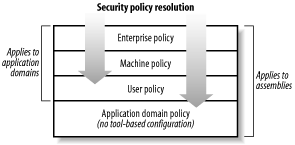
When the runtime loads an assembly or creates an application domain, it determines the permissions granted by the enterprise policy first, followed by the machine policy, and finally the user policy. In the case of an assembly, the runtime will also determine the permissions granted by the application domain to which the assembly is loaded. The runtime intersects the sets of permissions granted by each policy level to determine the final code-access permission set for the assembly or application domain. This means that each policy level can further restrict the permissions granted by previous levels but can never grant additional permissions. We provide a more complete description of this in Section 8.2.1.2.
The purpose of enterprise policy is to provide a corporate-wide security policy that is enforced on all machines, but both the enterprise and machine policies are machine- specific. Although we will discuss mechanisms for distributing enterprise security policy in Chapter 9, there are no mechanisms built into the .NET Framework to manage enterprise policy from a central location. User policy is user-specific; on a machine used by different people, each user will have his own user policy configuration.
The division of security policy into different levels complicates administration, but the flexibility it provides far outweighs the complexity, especially in corporate environments. With multiple levels of security policy, it is possible to delegate the task of security management. For example, the central IT or security department can use enterprise policy to enforce the minimum security standards of the organization, while giving departments, teams, or even individuals the autonomy to further restrict permissions to suit local needs with machine and user policy.
Each policy level contains three key elements:
Code groups
Named permission sets
Fully trusted assemblies
We discuss each of these elements in detail in the following sections.
8.1.1.1 Code groups
Code groups are the basic building blocks of security policy; they embody the logic that controls the policy resolution process. More specifically, code groups provide the mapping between evidence and permissions that the policy resolution process uses to determine which code-access permissions to grant an assembly or application domain.
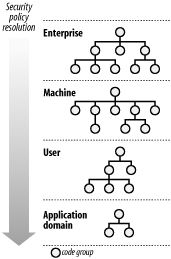
Each policy level consists of a set of code groups organized into a tree structure as shown in Figure 8-2. During policy resolution, the runtime traverses the tree of code groups in each policy level and compares the evidence presented by the assembly or application domain with the membership condition of each code group. If the evidence meets the code group's membership condition, then the runtime grants the assembly or application domain the permissions contained in the code group's permission set.
Figure 8-2. Code group hierarchies
We provide a detailed explanation of how the runtime uses code groups to resolve policy in Section 8.1.2, but first we explain a little more about the structure of code groups. Each code group has a name and a description and contains the following elements:
- Membership condition
-
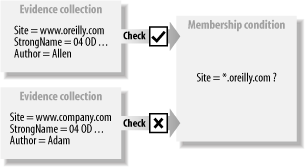
As shown in Figure 8-3, the membership condition defines the evidence that an assembly or application domain must have to qualify for membership to a code group. Membership conditions support all of the standard evidence types and can be extended to support custom evidence types such as the Author class developed in Chapter 6. Possible membership conditions include tests like Site = "*.oreilly.com," Zone = Internet, or Author = "Peter." A membership condition can also specify "all code," in which case any assembly or application domain is a member of the code group regardless of the evidence it presents.
Figure 8-3. Membership conditions
- Permission set
-
The permission set is the set of permissions to grant an assembly or application domain that qualifies for membership of the code group. When configuring security policy using the .NET administrative tools, this is a named permission set, which we discuss in the next section. If you are manipulating the code group programmatically, you can use any permission set, which we will demonstrate in Section 8.2.1.
- Child code groups
-
As shown in Figure 8-2, each policy level consists of a single tree of code groups with each code group having one or more child code groups. An assembly or application domain that is a member of a code group is tested for membership of the code group's children and so on down through the tree. We discuss the relationship between parent and child code groups when determining grant sets in "Policy Resolution." The use of code group trees and simple membership conditions is a flexible model that allows you to create complex security policies that remain easy to manage and understand.
- Attributes
-
There are two optional attributes that you can assign to a code group in order to modify the normal policy resolution process:
- Exclusive
-
The code group's permission set defines the maximum set of permissions that the assembly or application domain can get from the current policy level regardless of what other code groups it is a member of. Because the final permission set of an assembly or application domain is the union of the sets of permissions granted by each policy level, an Exclusive code group effectively limits the overall permissions available from the policy resolution.
- LevelFinal
-
The runtime will not evaluate any policy level below the current level other than the application domain level (when resolving assemblies).
We explain the effects of these attributes on policy resolution more in Section 8.1.2.1 of "Policy Resolution."
8.1.1.2 Named permission sets
As the name suggests, named permission sets are simply groups of permissions to which you assign a name. Each policy level maintains its own set of named permission sets that are valid only within the scope of that policy level.
When using the .NET administrative tools (discussed in Chapter 9) to configure the permission set granted by a code group, you must use a named permission set from the policy level to which the code group belongs. Named permission sets simplify the administration and auditing of security policy, and although this approach may initially seem restrictive, when you look at the interaction of code groups in Section 8.1.2, you will see that the model maintains a high degree of flexibility.
The default security policy defines a standard set of named permission sets for the enterprise, machine, and user policy levels, which we list in Table 8-1. All permission sets except the Everything set are immutable.
|
Permission set |
Description |
|---|---|
|
FullTrust |
Unrestricted access to all operations and resources. |
|
SkipVerification |
No access to any operation or resource other than permission to skip verification, which we discuss in Chapter 4. |
|
Execution |
No access to any operation or resource other than permission to execute. |
|
Nothing |
No access to any operation or resource, not even the permission to execute. |
|
LocalIntranet |
A set of permissions defined in the default security policy deemed by Microsoft to be appropriate for code loaded from the local intranet. See Chapter 9 for a more detailed description of the permissions included in this permission set. |
|
Internet |
A set of permissions defined in the default security policy deemed by Microsoft to be appropriate for code loaded from the Internet. See Chapter 9 for a more detailed description of the permissions included in this permission set. |
|
Everything |
The only modifiable standard permissions set. By default, Everything contains all permissions with unrestricted access except the SkipVerification element of the SecurityPermission. |
8.1.1.3 Fully trusted assemblies
.NET uses classes to represent all key elements of CAS. Some elements that we have discussed so far include evidence, policy levels, code groups, membership conditions, and permissions. During policy resolution, the runtime creates objects to represent the security information it is working with; this can involve the instantiation of classes from many different assemblies.
Under normal circumstances, as the runtime loads these assemblies, it would need to resolve the policy for each one to determine their permissions. However, if the policy resolution of these assemblies required the runtime to instantiate security classes contained within the same assemblies, the runtime would need to resolve the policy for the same assembly again, resulting in a never-ending policy resolution loop.
To overcome this problem, each policy level contains a list of fully trusted assemblies. When the runtime loads any of these assemblies during policy resolution, it automatically assigns them full trust within that policy level; they are not subject to the normal policy resolution process.
|
The default security policy defines a standard set of fully trusted assemblies for the enterprise, machine, and user policy levels. These lists include all of the standard .NET assemblies that contain classes required in the policy resolution process. You do not need to make any changes to the default lists unless you install extensions to CAS containing custom security classes. See Chapter 9 for a description of the default security policy.
To use a CAS extension, you must add the assembly containing your custom security classes and all the assemblies it references to the fully trusted assemblies list of the policy level in which you will use your extensions. If you create a custom evidence class, as we did in Chapter 6, you must add the assembly to the fully trusted list of every policy level, because every policy level will use it. Before you can add an assembly to the fully trusted list of a policy level, you must install the assembly in the global assembly cache; this requires the assembly to have a strong name. We discuss the global assembly cache in Chapter 2, and describe how to configure the fully trusted assembly lists using both graphical and command-line tools in Chapter 9.
8.1.2 Policy Resolution
The runtime uses only the enterprise, machine, and user policy levels when resolving the grant set for application domains. Other than this, the policy resolution process for assemblies and application domains is the same. To simplify the following explanation, refer only to assemblies.
|
When resolving policy for an assembly, the runtime starts at the enterprise policy's root code group and checks the assembly's evidence against the code group's membership condition. If the evidence meets the membership condition, the runtime grants the permissions specified in the code group's permission set to the assembly.
The runtime then traverses the code group tree by comparing the assembly's evidence with each child code group of the current code group. At any stage, if the assembly does not qualify for membership of a code group, then the runtime does not grant the code group's permission set to the assembly, and policy resolution moves on to the next peer-level code group, ignoring the current code group's children.
For example, Figure 8-4 shows a code group hierarchy and an assembly with the evidence Zone = My_Computer. Policy resolution begins by comparing the assembly's evidence collection to the membership condition of the root code group All_Code. The membership condition of All_Code is All_Code, and the assembly qualifies for membership, but receives no permissions because the permission set of All_Code is Nothing.
Figure 8-4. Policy resolution
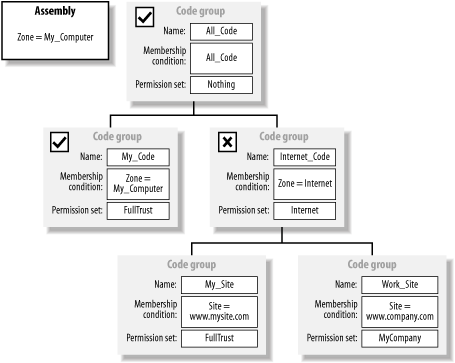
Because the assembly is a member of the All_Code group, the runtime compares the assembly for membership of each child code group: My_Code followed by Internet_Code. The Zone evidence of the assembly matches the membership condition of the My_Code group, and the runtime grants the assembly the FullTrust permission set. Even though the assembly now has FullTrust, policy resolution must continue in case another code group implements the Exclusive attribute, which may limit the assembly grant setsee Section 8.1.2.1 for details.
When the runtime compares the assembly to the Internet_Code group, the assembly's evidence does not meet the membership condition. The runtime ignores the children of the Internet_Code group, and because there are no further peer-level groups, policy resolution is complete. The final grant set for the policy level is the union of Nothing (granted by All_Code) and FullTrust (granted by My_Code), which is FullTrust.
In Figure 8-5, we show the same code group hierarchy, but this time the policy resolution is for an assembly with Zone = Internet and Site = www.company.com evidence. Policy resolution begins, as in the previous example, by comparing the assembly's evidence with the membership condition of All_Code. Again, the assembly meets the membership condition (All_Code), and the runtime compares the assembly for membership with the My_Code and Internet_Code child groups.
Figure 8-5. Policy resolution
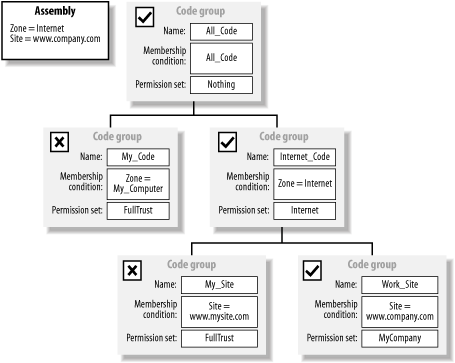
In this case, the assembly does not qualify for membership to the My_Code group, but it's Zone = Internet evidence means it is a member of the Internet_Code group, which grants it the Internet permission set. When compared to the child My_Site and Work_Site groups, the assembly's Site = www.company.com evidence qualifies it for membership to the Work_Site code group, and therefore the runtime grants the assembly the custom MyCompany permission set.
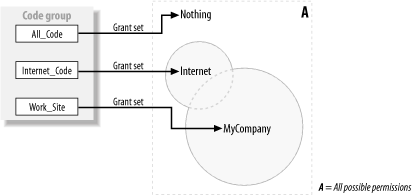
In this example, the assembly is a member of three code groups: All_Code, Internet_Code, and Work_Site. The shaded area in Figure 8-6 shows the final permission set for this policy level calculated as the union of the permissions contained in the Nothing, Internet, and MyCompany permission sets.
Figure 8-6. Calculating policy level permissions
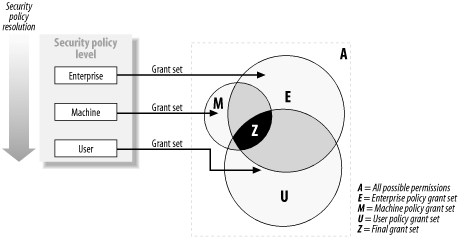
The runtime uses this process to determine the permissions granted by each policy level and then intersects them to calculate the final code-access permission set for the assembly. Figure 8-7 illustrates the intersection of permission sets from the enterprise, machine, and user policy levels (areas E, M, and U) to create a final grant set (area Z) for the assembly. For clarity, we have omitted the application domain policy.
Figure 8-7. Intersecting policy level grant sets
8.1.2.1 Code group attributes
We have mentioned that the Exclusive and LevelFinal code group attributes affect the policy resolution process. A code group can have none, one, or both of the attributes, but their effect is significant and you should consider their impact thoroughly before implementing either of them.
- Exclusive
-
The permissions specified in the code group's permission set are the maximum set of permissions that the assembly can receive from the current policy level. For example, in Figure 8-5, if we make the Internet_Code code group Exclusive, even though the assembly is also a member of the Work_Site group, it will receive only the permissions specified in the Internet permission set.
As shown in Figure 8-7, to determine the assembly's final grant set, the permissions granted by each policy level intersect to determine the assembly's final grant set, and a code group with the Exclusive attribute defines the absolute maximum set of permissions an assembly can be granted.
Exclusive code groups are useful if you want to single out applications with a specific characteristic (the Publisher or source web site, for example) and assign them an absolute set of permissions. This avoids the runtime inadvertently granting them additional permissions based on the other evidence they present.
|

- LevelFinal
-
If an assembly or application domain is a member of a LevelFinal code group, the runtime will not evaluate any policy levels below the current level. If resolving the permissions for an assembly, the runtime still evaluates the application domain policy regardless of whether the assembly is the member of a LevelFinal code group. For example, if the runtime resolves an assembly to be a member of a LevelFinal code group in the machine policy level, the runtime will skip the user policy level, but will still evaluate the application domain policy.
In environments that distribute security policy management between multiple people or groups, LevelFinal gives security administrators the ability to disable lower levels of security policy. This enables security administrators to stop people from using security policy to break applications. For example, if every machine in your organization needed to run a particular virus checker, you could create an enterprise-level LevelFinal code group based on Publisher or StrongName evidence that grants the virus checker the permission it requires. Nobody could use machine or user policy to restrict security policy further in order to stop the virus checker from running. By also making the code group Exclusive, you could ensure that the enterprise policy would not grant the virus checker more permissions than it needed.
8.1.3 Configuring Security Policy
Security policy is stored in XML files; there is one file for each of the enterprise, machine, and user policy levels. We discuss the location of these files in Chapter 9. There are four ways to configure security policy:
Using the .NET Framework Configuration tool (Mscorcfg.msc), a Microsoft Management Console (MMC) plug-in provided with the .NET Framework that provides a graphical interface with which to administer security policy
Using the Code Access Security Policy tool (Caspol.exe), a command-line tool provided with the .NET Framework
Programmatically, using the security classes contained in the .NET class library
Manually, by editing the XML contained in the individual security policy files
|
The only way to configure application domain policy is at runtime using the .NET security classes. The techniques for the programmatic manipulation of security policy are the same for all policy levels, and we discuss these in the next section. We explain how to use the .NET Framework Configuration tool and the Code Access Security Policy tool in Chapter 9.


