4.1 Finding a Hotspot
A hotspot is, simply enough, any place that allows you to get wireless connectivity via Wi-Fi. The hardest part of getting connected on the road can sometimes be finding a hotspot, and the simplest way to get connected is to find a for-fee public hotspot.
4.1.1 Public Networks
There are a number of web sites that can help you find public networks:
- http://www.80211hotspots.com/
- http://www.wifinder.com/
You'll occasionally get different results from each of these lists, although they all attempt to be comprehensive. When we searched each site for our nearby city of Santa Rosa, California, all showed the same six T-Mobile HotSpot locations at various Starbucks. A check of the T-Mobile HotSpot site (http://locations.hotspot.t-mobile.com/), however, showed seven Starbucks hotspots, and checking the Intel Centrino Hotspot Finder (http://www.intel.com/products/mobiletechnology/hotspots/finder.htm) showed an eighth T-Mobile HotSpot location (at a Borders Books and Music) that T-Mobile HotSpot didn't even appear to know about.
Finding the one independent hotspot required checking Surf and Sip (the wireless access provider for that hotspot, http://www.surfandsip.com/) or Boingo Wireless at http://www.boingo.com/, an aggregator that includes Surf and Sip; more about aggregators later in this chapter).
Wi-Fi ZONE (http://www.wi-fizone.org) is a new Wi-Fi Alliance project that aims to certify hotspots in the same way that the alliance currently certifies Wi-Fi equipment. When their Wi-Fi Finder is up and running, they plan to provide a worldwide database of all certified hotspots, which will allow users to look in one place for hotspots instead of several. In addition, you'll be ensured that the place selling you bandwidth has met certain criteria, including security and support. Figure 4-1 shows the Wi-Fi ZONE logo.
Figure 4-1. After the service is launched, this logo will signify a Wi-Fi ZONE certified hotspot
4.1.1.1 Fee-based wireless ISPs
Wireless ISPs (referred to as WISPs), generally contract with local venues such as cafés, coffee houses, hotels, and airports. The venue gets a cut of the proceeds, and the WISP maintains the network and handles the billing.
WISPs range in size from T-Mobile HotSpot (http://www.t-mobile.com/hotspot/), which at this writing has more than 2,700 locations across the United States, to Cafe.com (http://www.cafe.com/), which has just a dozen or so locations in southern California.
T-Mobile HotSpot is commonly found in Starbucks and at Borders Books and Music locations, which means that they are nearly ubiquitous across the U.S. In airports, they have contracts for wireless service at airport club lounges run by American, Delta, and United. When this chapter was written (October 2003), T-Mobile HotSpot offered four different payment plans:
Unlimited National Annual subscription plan: $30 per month with an annual contract ($20 a month if you are a T-Mobile cellular customer).
Unlimited National month-to-month subscription plan: $40 per month, payable month-to-month with a minimum one-month commitment requirement.
Wi-Fi DayPass: $10 for unlimited minutes during a 24-hour period.
Wi-Fi Metered Plan: $0.10 per minute, with a minimum user session of 60 minutes per login.
All of these plans include unlimited amounts of data transfer, a recent and welcome change. Because your usage is not metered by the amount of files that you transfer, you can upload or download everything you need without worrying that you will be charged extra for heavy use.
|

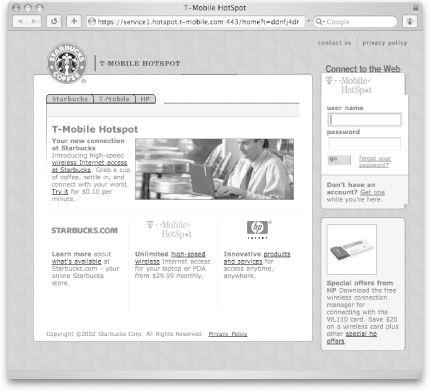
Signing up for most WISPs is simple: take your laptop to the hotspot and launch your web browser. As soon as you try to go to any web site, you'll automatically be taken to the WISP's signup or login page, referred to as a captive portal (shown in Figure 4-2). This is where you'll be prompted to sign up and enter your credit card information.
Figure 4-2. A captive portal page from a local Starbucks equipped with T-Mobile HotSpot service
|

If you're looking for a wireless ISP in your neck of the woods, a good place to start is BrainHeart Capital's mammoth worldwide list of WISPs (http://www.brainheart.com/main.asp?pageID=020503).
4.1.1.2 Community networks
Another type of WISP is the community network, generally founded by a group of people who figure that they've already got wireless access set up, so why not share it? If you've been unwired for a while and don't understand why there aren't just hotspots available everywhere you want to connect, you'll fit right in with these folks.
Your best bet for finding a community network is in one of the larger cities on the west coast. If you live in Portland, Oregon or Seattle, Washington, you're in luck. They're not the only places with community networks though, so it can be worth checking out Portland's Personal Telco's list of wireless communities (http://www.personaltelco.net/index.cgi/WirelessCommunities) to see if there might be one available where you're traveling.
Even if a network is community-based, you may still have to either sign up or pay for access to that network (although it is frequently free). As before, find a network via AirPort, launch a browser, and see if you're presented with a captive portal. If you are, read the rules and log in; if not, you're online.
If you're intrigued and thinking about setting up your own community network, you'll want to take a look at Rob Flickenger's book, Building Wireless Community Networks, Second Edition (O'Reilly). You might also want to check out NoCat.net (http://www.nocat.net/), makers of Linux-based NoCatAuth, a software application that handles registration and authentication for your potential wireless users. Another good source for community network information is the web site of one of the largest, Seattle Wireless (http://www.seattlewireless.net/).
The fun thing about wireless community networks is that you can get them started for a surprisingly small amount of money, certainly under $500. A few inexpensive base stations, some antennas to beam signals between the base stations, a bit of ingenuity, and you're on your way. An old PC running Linux rounds out the system if you want to run the NoCat.net authorization software. Otherwise, you can just run a completely open network.
4.1.1.3 Aggregators
If you're frequently on the road, it can be a pain to have to deal with multiple WISPs. The one at your hotel probably isn't the same as the one at the airport, and each WISP charges their own access fee and has their own signup and login process. Solving this problem is where an aggregator comes in.
The theory behind aggregators is that you can set up an account with a single company?the aggregator?who has already cut deals with multiple WISPs, allowing you to use all of their locations. The aggregator handles billing you, and you get a single signup process. The largest and best known WISP aggregator is Boingo Wireless, who contracts with everyone from the small Surf and Sip (mentioned earlier in Section 4.1.1) to the large Wayport (http://www.wayport.com/), which has numerous hotspots in airports and hotels.
Boingo provides software that will not only connect you to their affiliated hotspots, but will also sniff them out for you. Because it's one company handling the support and billing, you don't need to keep changing your settings?the Boingo software handles it all for you.
Boingo's current pricing structure has two individual options, which each charge based on what they refer to as "Connect Days." A Connect Day lasts 24 hours, starting from whenever you first get onto any hotspot on their system. However, that day applies only to usage at that same hotspot, so spending an hour online at the airport and another hour online in your hotel room counts as two Connect Days. Their two individual plan options are:
Boingo As-You-Go: This pay as you go plan has an initial charge of $8, which includes two Connect Days that can be used at any time. Additional usage is another $8 per Connect Day.
Boingo Unlimited: All-you-can-eat connectivity for $22/month for the first year, climbing to $40/month thereafter.
The bad news? As of this writing, Boingo's software does not support Macs; it only works with Windows and some PocketPC devices. Mac support "soon" has been promised since day one, but shipping always seems to be sometime next quarter. At last check, Boingo said that Mac OS X support would arrive in late 2003, but we're writing this in October and it isn't here yet. We'll be happy when they finally ship their software, but we're not holding our breath.
Another aggregator is iPass (http://www.ipass.com/), which already has Mac OS X software for their service. The company is focused more on selling its services to businesses than to end users who want quick wireless access, but that could change: iPass has cut a preliminary deal with Cometa Networks, a joint venture of AT&T, Intel, and IBM that promises to deploy more than 20,000 hotspots covering the 50 largest cities in the United States.
4.1.1.4 Private open networks
Remember that screenshot of the MacStumbler application (http://www.macstumbler.com/) back in Chapter 1 that showed several networks that were findable from the comfort of someone's Manhattan living room?
It's possible (although ethically questionable) to piggyback on anyone else's wireless network if they haven't turned on security.
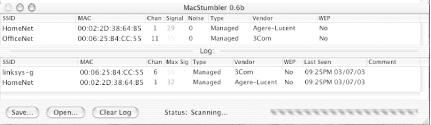
In Figure 4-3, MacStumbler shows two open networks, both of which are completely available to anyone within range who wants to use them (the key is that it says No in the WEP column). Assuming that you have the AirPort icon in your menu bar, all you have to do is choose the SSID of the AP you want from the pull-down menu, and you're on.
Figure 4-3. MacStumbler finding open networks
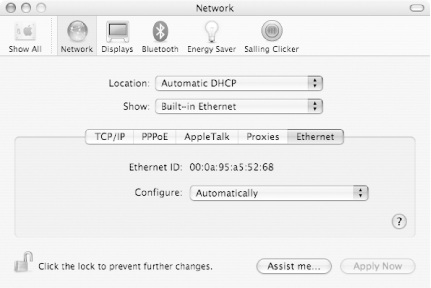
It's possible to see networks on the road that appear open (because WEP is not turned on) but that are still inaccessible to casual use. That may be because the AP is using MAC address control for its wireless clients. MAC, in this case, doesn't refer to Macintosh, but to the hardware address of the Wi-Fi cards in the client computers. This MAC address is unique for each Ethernet device on the network. Most APs allow you to filter access to the wireless network based on a list of MAC addresses. The AP can be set to allow access to just those MAC addresses that are listed, or to allow access to any client except the listed addresses.
Another access scheme for protecting wireless networks is known as 802.1x. It's a protocol that allows only one TCP/IP port on the wireless network to be accessed by a wireless client. That port is used only for authorization of the client; if the client passes authorization, they get access to other ports on the network (subject to the limits set by the network administrator) so that they can now use the network for email, web access, etc.
If you leave your network unprotected by any sort of access control, many people will assume that it is a public network, or at least that you don't mind if they use your network freely. The moral of this story: if you don't want people you haven't specifically authorized to ever use your network, turn WEP on, or use MAC address control. Chapter 5 covers the various methods you can use to protect both your Mac and your AP from others.
|
Figure 4-4. You can locate your computer's MAC address in the Network pane of System Preferences
4.1.1.5 Wardialing, wardriving, warwalking, and warchalking
The 1983 movie War Games gave rise to the phrase "wardialing," which referred to the lead character's hobby of setting up his modem to dial numbers until it found a computer to connect with. In the 20 years since, wardialing has given way to wardriving, warwalking, warchalking, and massive confusion about the prefix "war." Too many lazy journalists have assumed that if a word starts with "war," it must refer to an attack. In response, some people have attempted to create a back-formation that "war" stands for "Wireless Access Reconnaissance." It's a cute renaming, but as it hasn't caught on, the confusion and bad reputation persist.
As you might guess from the names, wardriving consists of driving in a car, running MacStumbler (or its equivalent for the OS being used), and waiting to see what wireless networks show up. Warwalking is similar, but on foot instead of by car. Depending on where you are, the number of hotspots you find with either method can vary from few to none (in our neighborhood in the boondocks) to jam-packed (in major techie cities such as San Francisco, New York, and Seattle).
Warchalking came about after Matt Jones, a designer and wireless aficionado from the United Kingdom, decided that it was a pain to always walk around with his laptop open. He figured it'd be simpler if warwalkers wrote a symbol in chalk (see Figure 4-5) on the wall nearest the signal to describe the type of AP available.
Figure 4-5. Warchalking symbols
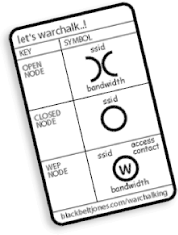
He borrowed the idea from hobo chalk language, in which hobos would write a code by someone's door advising future hobo visitors as to whether that house was worth a visit. In this case, the chalk marks signify whether the AP is open or closed, the password (if available), and how fast the bandwidth is. See http://www.warchalking.org/ to learn more about warchalking. While there was a lot of talk about this method when it was first introduced, warchalking marks are usually made by people advertising their own APs?it's rare to come across one in the wild. Consequently, we still haven't left the days of walking around with a laptop.
That's not to say that MacStumbler doesn't have any uses besides the sneaky ones. It's a great help if you're trying to figure out where to position your home AP, as just moving it a few feet often extends the range dramatically (which can be very helpful if you still have an old TiBook). In addition, before the introduction of Rendezvous and iChat, MacStumbler was used as an early type of chatting system. At the July 2002 Macworld Expo keynote, audience members changed their local network names continuously as a way of providing real-time commentary on the keynote. Anyone with a copy of MacStumbler could read along with the ad-hoc chat and see such edifying comments as "No AirPort access? WEAK!", "Typical Apple PR disaster", and "Newsflash: Jobs to wear black" (along with many less printable examples).
|


