Planning a Project
When creating a project that contains a generous amount of ActionScript, it's wise to do some planning up front. Dealing with problems in the idea stage makes a lot more sense than dealing with them in the development stage, where they often require more time and cause frustration before they are fixed. We guarantee you'll save time in the long run.
Many issues must be addressed before you even open Flash and start scripting. A good way to go about this is to ask yourself a series of questions.
What do you want to occur?
This is the most important question in the script planning process. Be as clear, informative, and visual as possible in your answer, but avoid going into too much detail.
For the project we discuss in this lesson, we want to create a scene that acts as a front end for paying an electric bill. We want the amount of the bill to be loaded into the movie from an external source, a text file. We want to allow the user to enter an amount to pay into a text box. When a button is pressed, the amount the user paid will be compared to the amount he or she owed, and a visual and textual representation (a custom message) of the resultoverpaid, underpaid, or paid in fullwill be presented. When the user releases that button, we want the visual and textual elements in the scene to return to their original state. The script that accomplishes this will be the main script in the project.
What pieces of data do you need to track?
In other words, what numbers or values in the application are integral to its function? In our case, that data is the amount of the electric bill. We will also need to keep track of the difference between what the user owes and what he or she has paid, so that we can display that value in custom messages.
What needs to happen in the movie prior to a script being triggered?
In our project, the amount of the electric bill must be established in the movie before anything else can happen. Because the primary goal of our project is to compare the amount of the electric bill with the amount the user chooses to pay, if the amount of the electric bill isn't established when the movie first plays, there will be nothing to compare when the script is executed. Creating and setting data prior to a script's being executed, or when a movie first plays, is known as initializing the dataa common practice in scripting and something that's usually transparent to the user.
At this point, you need to start thinking about how the datathe amount of the electric billwill get into the movie. You can place it within the movie when you author it, or you can have it loaded from an external source (for example, a server or text file) when the movie plays. For our project, we opt for the latter: We use a simple script to load a text file containing the amount of the electric bill into the movie. The text file loaded into the movie to provide data is known as a data source.
What event will trigger the main script?
In our case, the answer is obvious: a button press. However, all kinds of events can trigger a script in Flash, so it's important to give some thought to this question. Does something need to happen when a user moves, presses, or releases the mouse, or when he or she presses a key on the keyboard? How about when a movie clip first appears in the scene? Or does the event need to happen continually (the whole time the movie is playing)? We'll discuss such events in detail in the next lesson.
Are there decisions to be made when the main script is triggered?
When the main script in our movie is triggered, the amount the user enters to pay needs to be compared with the amount he or she owes to determine whether the payment amount is too much, too little, or right on target. The answers to these questions will determine the custom message to display as well as what other visual elements are visible on the screen.
What elements make up the scene? How do they function?
Our scene will be made up of a number of elements, some of which we need to name so that ActionScript can use, control, and/or interact with them. To trigger the script, our scene will need a button, which will look like a pay button found on many sites.
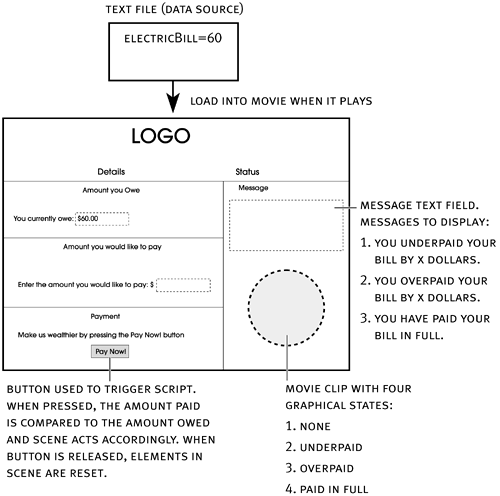
We also need a dynamic text field to display the amount of the bill; we'll name this text field owed_txt. In addition, we need an input text field where the user can enter the amount he or she wishes to pay; we'll name this text field paid_txt. We also need a dynamic text field to display the custom message generated by the script; we'll name this text field message_txt. Finally, we'll add a graphic of a rubber stamp in the form of a movie clip instance with four visual states. Initially, the stamp will not be visible. If the user has not paid enough, a stamp will appear, indicating underpayment. A stamp showing payment in full will appear if the user pays the exact amount, and another showing overpayment if the user overpays. This rubber-stamp movie clip instance will be named stamp_mc.
What will your scene look like?
Use whatever means you wantan illustration program or a pencil and napkinto create a rough graphical representation of your scene (both its appearance and the action that will take place), as shown in the diagram below. Include all the information you've gathered at this point. This important part of the planning process is often called storyboarding.
As you grow more proficient at ActionScript and develop additional projects, you'll soon be able to ask (and answer) the previous planning questions intuitively. However, no matter what your skill level, storyboarding remains an essential part of the planning process.