Using Local Variables and Creating Functions that Return Results
The variables you've created and used so far can be accessed at any time by any script in the Flash movie. In contrast, local variables are special variables you can create and use only within the scope of a function definition. In other words, a local variable is created within the function definition, used by the function when it's called, then deleted automatically when that function has finished executing. Local variables exist only within the function where they are created.
Although local variables are not absolutely required in ActionScript, it's good programming practice to use them. Applications that require many and frequent calculations create a lot of variables and will slow applications over time. By using local variables, however, you minimize memory usage and help prevent naming collisions, which occur when your project gets so big you unknowingly create and use variable names that are already in use. However, local variables in one function definition can have the same names as local variables within another function definitioneven if both definitions exist on the same timeline. This is because Flash understands that a local variable has meaning only within the function definition where the variable was created.
There is only one way to create a local variable manually, and you have been using this syntax for four lessons. Here's the syntax:
var myName:String = "Jobe";
This variable becomes a local variable by simply being declared within a function definition, using the keyword var.
To better grasp this concept, consider this example.
In the previous exercise, we declared (created) the variable currentChannel on Frame 1 of the main timeline using the following syntax:
var currentChannel:Number;
Because the line of script that created the variable was on Frame 1 of the main timeline, and it didn't exist within a function definition, currentChannel became a variable of the main timeline. If we place this exact syntax within a function definition, currentChannel is considered a local variable (belonging to the function only); it exists only when the function is called and is deleted immediately upon the completion of the function's execution. Think of local variables as temporary variables, for use within functions.
If you need to create a timeline variable from within a function, do not use the var syntax when declaring it. Declare the variable like this:
name = "Jobe";
TIP
It is best to create timeline variables outside of function definitions. Declaring a timeline variable outside of a function is considered good practice because you group all your timeline variables together. When coming back to your code months later or having another programmer look at your code, this variable organization will be appreciated.
Multiple local variables can be declared within a function definition on a single line using this syntax:
var firstName:String = "Jobe", lastName:String = "Makar", email:String = "jobe@electrotank.com";
Returning Results from a Function Call
Not only do functions simply execute sets of actions; you can also use them like mini-programs within your movie, processing information sent to them and returning values. Take a look at this function definition:
function buyCD(availableFunds:Number, currentDay:String):Boolean{

  var myVariable:Boolean;

  if(currentDay != "Sunday" && availableFunds >= 20){

    myVariable = true;

  }else{

    myVariable = false;

  }

  return myVariable;

}
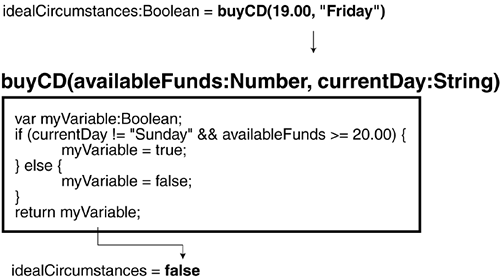
The values of two parametersavailableFunds and currentDayare sent to the function when it is called. The function processes those values using an if/else statement. At the end of this function, myVariable will contain a value of true or false. Using the return statement (as shown at the bottom of the function definition), the value of myVariable is returned to where the function was called. To understand this, take a look at how this function is called in the following script:
var idealCircumstances:Boolean = buyCD(19, "Friday");

if(idealCircumstances == true){

  gotoAndPlay("Happiness");

}else{

  gotoAndPlay("StayHome");

}
Pay particular attention to the line that reads:
var idealCircumstances:Boolean = buyCD(19, "Friday");
To the right of the = sign is our actual function call, which sends the values of 19 and "Friday" to the buyCD() function for processing. If you recall how our function was defined, these values are used to determine a true or false value for myVariable. Sending these particular values (19, "Friday") to the function causes myVariable to evaluate to a value of false. Because the last line of code in our function says return myVariable;, the value of myVariable is returned to the script where the function was called. So,
idealCircumstances = false;
In essence, we used a function call to assign a value to the variable idealCircumstances. This happens in a split second. After a value has been assigned, the value of idealCircumstances can be used in the rest of the script, as our example demonstrates.
TIP
You can use the return action to return any data types, including variable values, arrays, or any other objects.
Now that you understand that functions can return values, it's a good time to point out a minor addition to our function definition syntax. The first line of our buyCD() function definition looks like this:
function buyCD(availableFunds:Number, currentDay:String):Boolean{
Between the closing parenthesis and the curly bracket on the end, we've placed the syntax :Boolean. This addition is to indicate that the function returns a value whenever it is called. In this case, the function returns a true or false value, hence the reason for using :Boolean. A function set up to return a numeric value would be written this way:
function myNumberFunction(param1:Number, param2:Boolean):Number{

  //actions

}
A function set up to return a string value, this way:
function myNumberFunction(param1:Number, param2:Boolean):String{

  //actions

}
A function set up to return an Array object, this way:
function myNumberFunction(param1:Number, param2:Boolean):Array{

//actions

}
and so forth.
If a function doesn't return a value at all (like the functions used in this lesson's projects so far), the function should be written this way:
function myNumberFunction(param1:Number, param2:Boolean):Void{

  //actions

}
Notice the use of :Void to indicate that this function does not return a value.
Although the functions we used in this lesson have not made use of this syntax (they still work properly), using this syntax is considered good practice and should improve the speed of ActionScript execution. The speed increase may be noticeable only if your project contains many functions.
In this exercise, using both local variables and a function that returns a value, you'll script the cable box display in our project, which displays the name of the current channel. You will create a function that builds the text to be displayed on the cable box.
Open television3.fla.
This file continues where the last exercise left off. We'll focus on the movie clip that has an instance name of cableBox_mc (and which looks like a cable box). This movie clip instance contains a simple graphic and a text field with an instance name of cableDisplay_txt. This text field will be filled with different channel names, depending on the channel selected.
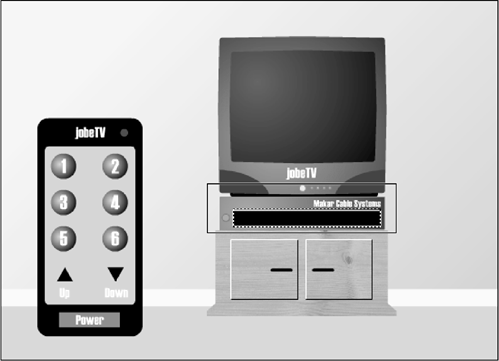
With the Actions panel open, select Frame 1 on the main timeline and enter this script just below where it says numberOfChannels = 6;:
var channelNames:Array = ["","News","Classics","Family","Cartoons","Horror","Westerns"];
You just created an array named channelNames. This array contains names that will be dynamically inserted into a string of text that will be displayed inside the cable box. The seven string elements in this array are separated by commas (the first may not be easily discernible because it's an empty string of ""). Each one of these elements has an associated index value, beginning with 0. For example, channelNames[0] = "" (empty), channelNames[1] = "News", channelNames[2] = "Classics", and so on. This is important to understand as we progress.
Let's create a function that uses the text elements in this array to display a message in the cable box.NOTE
For more information on arrays, see Lesson 6, "Creating and Manipulating Data."
With the frame still selected, enter this script at the end of all scripts on Frame 1:
function displayCableText():String {

  var displayText:String;

  if (currentChannel != 0) {

    displayText = "You are viewing "+channelNames[currentChannel]+".";

  } else {

    displayText = "";

  }

  return displayText;

}
NOTE
This is defined after the other functions but before the event handler assignments, but it really doesn't matter where it's defined. It's just a matter of preference to have it one place over another.
This script defines the displayCableText() function, which accepts no parameters. It is used to dynamically build a string of text that will eventually appear in the cableDisplay_txt text field within the cableBox_mc movie clip instance. The function then takes this string and returns it using the return action. The function contains a conditional statement that checks to make sure the television channel is not the channel associated with the TV being in the off state (0). If the condition is satisfied, a local variable named displayText is created, and a line of text is dynamically built from the channelNames array as well as the current value of currentChannel. For example, if the value of currentChannel is 4 at the time this function is called and executed, this would essentially be the same as the following:
displayText = "You are viewing " + channelNames[4] + ".";
Because Cartoons exists at index position 4 of the channelNames array, it can be broken down further:
displayText = "You are viewing Cartoons";
If the first part of the conditional statement is not satisfied (else), the local variable displayText is set with no value (or simply ""). The function ends by returning the value of displayText. But where does this value actually get returned to? We'll explain that in the next step. Because displayText has been specified as a local variable (using var), it's removed from memory as soon as its value is returned.With the Actions panel still open, modify the changeTheChannel() function by inserting this code after the fifth line of the function definition:
cableBox_mc.cableDisplay_txt.text = displayCableText();
You have modified changeTheChannel() so that each time a channel is changed and the changeChannel() function is called, the cableDisplay_txt text field (inside the cableBox_mc movie clip instance) will be updated with the correct text. This line of ActionScript sets the value of the text field instance cableDisplay_txt (which is actually the dynamic text field in our cable box) using the returned value of the displayCableText() function. Thus, the displayCableText() function is called, goes to work, and comes up with a value. That value is inserted after the = sign. This is what's meant by a function returning a value. The value the function comes up with is returned to the line of script that called the function. This is also a great example of how using functions can be a real time-saver. We've enhanced changeTheChannel() in a single location, but any script that calls the function will automatically execute this enhancement as wellvery efficient!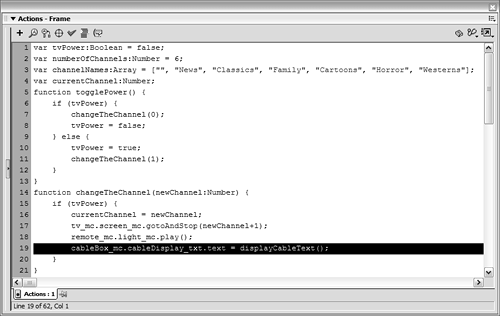
Choose Control > Test Movie. Select the Power button to turn the television on. Change the channel a few times.
Every time you select a button that changes the channel, the cable box is updated with the name of the channel you're watching. You have created a simple application that uses six functions to perform several tasks.

Close the test movie and save your work as television4.fla.
You're finished with this file. You'll apply what you've learned here in lessons to come.


