Targeting the Main Movie
The main (root) movie represents the main timeline of an SWF. All of your project's other timelines exist, in some way, inside this one.
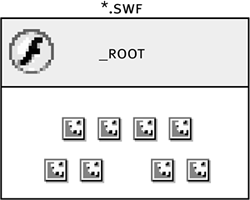
Targeting the main timeline is simple. The syntax is:
_root.play();
You can place this script on any timeline, exactly as shown, and it will always cause the main timeline to play.
NOTE
An external movie (SWF) loaded into a level is also considered a root timeline. In the section "Targeting Movies on Levels," we'll explain how this affects your scripting.
Open rootTarget1.fla in the Lesson03/Assets folder.
This file is identical to the one we just finished working on except that two buttons appear on the lower-right portion of the stage. We will script these buttons to resize the main timeline when they are clicked. We will then copy these buttons, place them inside our movie clip instances, andwithout modifying the target paths used in the scriptdemonstrate how you can use _root to target the main timeline apart from any other timeline in the SWF.With the Actions panel open, select the button with the minus sign over it and add the script:
on (release) {

  _root._xscale = _root._xscale - 10;

  _root._yscale = _root._yscale - 10;

}
When this button is pressed and released, the main timeline's size will be reduced by 10 percent. Because the button to which we're attaching this action resides on the main timelinewhich is also the timeline affected by the buttonthis script doesn't require a target path. We use an absolute target path here to demonstrate its universal effectiveness.With the Actions panel open, select the button with the plus sign over it and add the script:
on (release) {

  _root._xscale = _root._xscale + 10;

  _root._yscale = _root._yscale + 10;

}
This script is similar to the one in Step 2 except that when this button is pressed and released, the main timeline's size will increase by 10 percent.Drag-select both buttons and the text on top of the buttons and copy them. Double-click one of the movie clip instances on the stage to edit it in place. Paste the buttons on the Change root Buttons layer on the movie clip's timeline, and center them just below the current graphics.
Although these copies of the buttons on the main timeline exist within this movie clip timeline, the actions attached to them still target the main timeline because a _root target path always refers to the main timeline of the movie (the SWF).Choose Control > Test movie to test the project.
The first thing you'll notice is that every instance of our movie clip includes the buttons. In addition, the buttons appear in their original placementon the lower-right portion of the stage. Click any of these buttons (on the main timeline, or within a movie clip instance) and you get the same result: the main timeline is resized. As it resizes, however, something interesting occurs: the other timelines are resized as well. This resizing is due to the parent-child relationship between the main timeline and the movie clip instances on itwe'll discuss this topic in more detail in the next exercise.Close the testing environment to return to the authoring environment. Save the project as rootTarget2.fla.
We build on this file (with a few modifications) in the next exercise.


