Creating Arrays
Suppose you have a guest list for a party: You can store the information in ActionScript with variables like these:
var name1:String = "John Smith";

var name2:String = "Kelly McAvoy";

var name3:String = "Joyce Rendir";

var name4:String = "Tripp Carter";
If Kelly tells you she can't make it to your party, aside from being upset that only three people will be attending, you'll have to rename the variables beneath her name and shift them up your list. You can simplify this tedious taskas well as many other similar data storage and manipulation choresby using arrays.
Think of arrays as supervariables: While a regular variable can only contain a single value, an array can contain multiple valueswhich means you could store that entire guest list in a single array.
However, you must create an array in order to use it. Because arrays are objects (instances of the Array class), you use the Array class constructor method to create them. Here's the syntax to create an array:
var myArray:Array = new Array();
You can populate an array with values separated by commas when you create it, like this:
var guestList:Array = new Array("John Smith","Kelly McAvoy","Joyce Rendir","Tripp Carter");
Or you can use this syntax:
var guestList:Array = ["John Smith","Kelly McAvoy","Joyce Rendir","Tripp Carter"];
Each value in an array is identified by an index number0, 1, 2, and so onthat denotes its position in the array. In the array we just created, "John Smith" has an index number of 0, "Kelly McAvoy" has an index number of 1, and so on. To access a value in an array, you would use this syntax:
var myFavoriteGuest:String= guestList[1];
Here, the variable myFavoriteGuest is assigned a value of "Kelly McAvoy" because this is the value that exists at index position 1 in our guestList array.
The guestList array was created with four elements. You can add or modify elements at any time by referencing the specific element in the array. For example, this script will update the value at index 2 from "Joyce Rendir" to "John Rendir":
guestList[2]="John Rendir";
An array element can contain any data type, including strings, numbers, and Boolean values, as well as entire objects. An array element can even contain another array. You'll learn more about arrays and methods of the Array class in later lessons. The next exercisein which you'll use arrays to store groups of related information for each day of the weekrepresents just the beginning.
NOTE
You cannot use the var syntax when you're creating an array on an object unless you're building your own custom class of objects. This concept is discussed in Lesson 7, "Creating Custom Classes."
With newsFlash2.fla still open, select Frame 1 of the Actions layer. Add this script after the monday.date = "Monday, August 25 2003" variable set:
monday.weather = new Array();

monday.weather[0] = "Rainy";

monday.weather[1] = "Very wet";

monday.weather[2] = 85;

monday.weather[3] = 62;
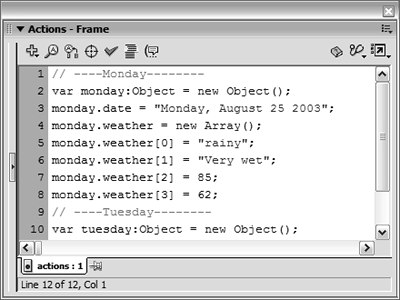
You created an array called weather that's used to store weather data. The array is on the object monday. Remember: you store all information pertaining to Monday on the monday object.
On the frames that contain graphics, you'll see a small weather icon (which currently displays the sun, as shown in the following figure). This icon is a movie clip instance whose timeline contains three frame labels that hold weather icons that correspond to three different weather conditions. The frame labels are Sunny, Rainy, and Stormy. The value of the first element (the 0th index) of the weather array will be used later to send this movie clip instance to the correct frame. Here it's set to "Rainy" because Monday is supposed to be rainy. The second element of the weather array contains a blurb about Monday's weather, which will be displayed later on the screen.
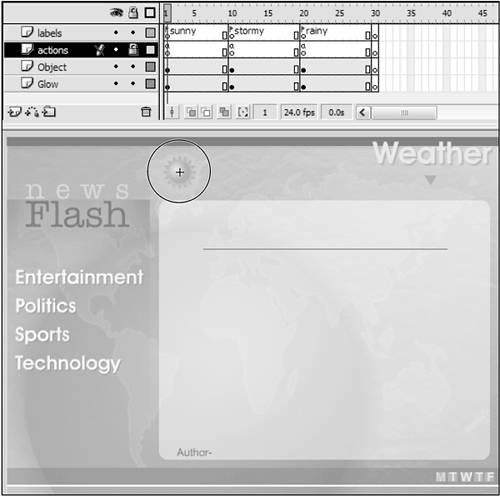
The high and low temperatures for Monday are stored in the third and fourth elements of the weather array, respectively. These values will be accessed later so that they can be displayed on the news page.
You have just created an array that stores four pieces of related information in a way that is easily accessible.With Frame 1 still selected, insert this script after tuesday.date = "Tuesday, August 26 2003";:
tuesday.weather = new Array();

tuesday.weather[0] = "Sunny";

tuesday.weather[1] = "Beautiful Day!";

tuesday.weather[2] = 90;

tuesday.weather[3] = 73;
You have created another array named weather, but this array is on the tuesday object. It contains weather information pertaining to Tuesday. The first element of this array contains the value "sunny" so that the weather icon movie clip instance will display a sun. The value of each array element here is different from that of the weather array for Monday, but the index numbers of corresponding values are the same: although the high temperatures for Monday and Tuesday are different, they're both stored at the Number 2 index position in each array.
Now that you've created and structured your weather data, it's time to create and structure some news stories.Create arrays to contain news articles for individual categories by entering this script after monday.weather[3] = 62:
monday.entertainment = new Array(); monday.entertainment[0] = "MTV is 22!"; monday.entertainment[1] = "The popular TV network MTV has now been on the air for 22 years
 ...";
monday.entertainment[2] = "Jobe Makar";
monday.politics = new Array();
monday.politics[0] = "Presidential Election 2004";
monday.politics[1] = "Candidates are preparing for a year-long campaign...";
monday.politics[2] = "Happy Camper";
monday.sports = new Array();
monday.sports[0] = "Head Tennis";
monday.sports[1] = "The Head Atlantis tennis racquet is one of the most popular racquets
in history...";
monday.sports[2] = "Jane Doe";
monday.technology = new Array();
monday.technology[0] = "BajillaHertz Processors!";
monday.technology[1] = "The BajillaHertz processor has just hit the shelves and is faster
than light...";
monday.technology[2] = "John Doe";
...";
monday.entertainment[2] = "Jobe Makar";
monday.politics = new Array();
monday.politics[0] = "Presidential Election 2004";
monday.politics[1] = "Candidates are preparing for a year-long campaign...";
monday.politics[2] = "Happy Camper";
monday.sports = new Array();
monday.sports[0] = "Head Tennis";
monday.sports[1] = "The Head Atlantis tennis racquet is one of the most popular racquets
in history...";
monday.sports[2] = "Jane Doe";
monday.technology = new Array();
monday.technology[0] = "BajillaHertz Processors!";
monday.technology[1] = "The BajillaHertz processor has just hit the shelves and is faster
than light...";
monday.technology[2] = "John Doe";
This news site can display four sections of stories: entertainment, politics, sports, and technology, as indicated by the navigation buttons on the left of the screen. For each of these sections, we created an array and stored information about one article for that Monday. In the first section of this step, we created an array called entertainment. The first element of the entertainment array stores the news story's headline; the second element contains the actual news article; and the third element stores the name of the author. The politics, sports, and technology arrays contain the same type of information (headline, story, and author) at the same index positions.
Although this information will be accessed on a later frame, by building a logical object-oriented storage structure for it now you ensure that it will be easy to access when needed.Add this news article script after tuesday.weather[3] = 73:
tuesday.entertainment = new Array();

tuesday.entertainment[0] = "Amazing Sci-Fi";

tuesday.entertainment[1] = "Sentrillion Blazers is the must see sci-fi movie of the year!...";

tuesday.entertainment[2] = "Jobe Makar";

tuesday.politics = new Array();

tuesday.politics[0] = "No Child Left Behind";

tuesday.politics[1] = "School systems protest the yearly testing criteria...";

tuesday.politics[2] = "John Doe";

tuesday.sports = new Array();

tuesday.sports[0] = "Ryder Cup Begins";

tuesday.sports[1] = "The European golf tournament you have been waiting for has just begun

...";

tuesday.sports[2] = "Jane Doe";

tuesday.technology = new Array();

tuesday.technology[0] = "KatrillaHertz Processor";

tuesday.technology[1] = "The KatrillaHertz processor is just out and is twice as fast as

 the BajillaHertz chip...";

tuesday.technology[2] = "John Doe";
This script stores the headlines, stories, and authors for the four news sections on Tuesday. The array names are the same as they were for Monday; the only difference is the information stored. Tuesday's information structure is exactly the same as that for Monday.Save your work as newsFlash3.fla.
You have created the information storage structure for your news site. Because all of the script we created so far is placed on Frame 1, this data will be created as soon as the movie begins to play. Next you will add the capability to retrieve the information and display it on screen.


