Creating a Class
The code for defining an ActionScript class exists in its own .as file (remember that the .as file extension stands for ActionScript). Only one class can be defined per file. If you create 13 classes, you have to create 13 .as files. A class file is nothing more than a text file containing ActionScript code. The name of each class file is the name of the class followed by the .as file extension. For example, if you create a TestClass class, it has to exist in a file with this exact name: TestClass.as.
NOTE
It's considered good coding practice to give classes a name beginning with an uppercase letter.
A class file can be created from within the Macromedia Flash authoring environment by opening the ActionScript editor (File > New > ActionScript File) or by using the text editor of your choice, such as Notepad. Using the built-in editor offers the advantage of built-in features such as code hinting that make the job of creating a custom ActionScript class much easier.
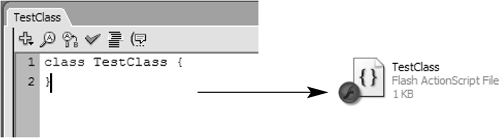
Simply creating a text file with an .as extension doesn't automatically make it a functional class file. The contents of the file must be ActionScript whose syntax defines the class (including its methods and properties). For example, the following code, inside the TestClass.as file, is the beginning of a valid class file:
class TestClass {

}
The statement class tells the compiler (the part of Flash that handles the creation of SWF files) that everything that follows in this file is considered part of a class definition (for defining the TestClass class). After the class statement is the name of the class being created: TestClass. The name of the class must be the same as the name of the .as file that contains the code defining the class; therefore, the TestClass class definition must be in a file named TestClass.as.
A class file defines characteristics about the class by creating properties and methods. The properties and methods of a class are referred to as members, and they are all defined within the outermost curly braces of the class. Consider the following example:
class Cube {

  var length:Number = 3;

  var height:Number = 2;

  var width:Number = 7;

  function getVolume():Number {

    return length * height * width;

  }

}
In this example, the properties length, height, and width and the method getVolume() are all members of the Cube class.
To create a new instance of a class to use its functionality in your project, the class must have a constructor method defined. The constructor must have the same name as the class. Let's modify the Cube class we just created to contain a constructor method and accept parameters so that we can create a custom cube instance:
class Cube {

  var length:Number;

  var height:Number;

  var width:Number;

  function Cube(tempLength:Number, tempHeight:Number,tempWidth:Number) {

    length = tempLength;

    height = tempHeight;

    width = tempWidth;

  }

  function getVolume():Number {

    return length * height * width;

  }

}
After coding the Cube class, you save it as an .as file named Cube.as in the same directory as your Flash authoring file. (Alternatively, you can place your .as class files elsewhere, which we'll discuss in a moment.) You would create a new instance of the Cube class on a frame in your Flash authoring file in the following way:
var myCube:Cube = new Cube(3, 2, 7);
You can then get the volume of the myCube object this way:
var volume:Number = myCube.getVolume();
By default, the properties and methods available to an instance of a class are fixed by the properties and methods defined in its class file. For example, the Cube class file defines three properties (length, height, and width) and one method (getVolume()). As a result, the myCube instance of the Cube class can access those particular properties and that method:
myCube.length //has a value of 3

myCube.height //has a value of 2

myCube.width //has a value of 7

myCube.getVolume() // returns a value of 42
The myCube properties can be set using the following syntax:
myCube.length = 6;

myCube.height = 4;
and so on. But if you attempt to add a property or method to the myCube instance that was not defined in its class file, such as:
myCube.color = "red";
an error will result when you export your movie. This principle helps you eliminate bugs in your code. Here's how. In your application, perhaps Cube instances shouldn't have color properties, and instead you meant to assign a color property to the myCup instance of the Cup class, which would have been acceptable. When you export your movie, Flash's compiler sees that you've set the color property for an instance of the Cube class. It then looks at the Cube class definition to see whether the color property has been defined there. If not, Flash assumes that the code is wrong, and an error results. This setup helps you to script object instances in a nearly foolproof manner; no object instance is allowed to perform an action unless that action is explicitly permitted by the class definition.
While this can be a great way to help you debug your applicationsbecause Flash displays an error when you attempt to use an object in the wrong waythere may be times when you do want instances of a custom object class to be able to add or access properties and methods that were not defined in its class file. This is possible, too. You would simply need to add the dynamic class modifier to the class definition (notice the first line):
dynamic class Cube {

  var length:Number;

  var height:Number;

  var width:Number;

  function Cube(tempLength:Number, tempHeight:Number, tempWidth:Number) {

    length = tempLength;

    height = tempHeight;

    width = tempWidth;

  }

  function getVolume():Number {

    return length * height * width;

  }

}
With the addition of the dynamic modifier, all instances of the Cube class, including the myCube instance we created earlier, can add any property or method, regardless of whether that property or method was originally defined in the Cube class file.
NOTE
Some of Flash's built-in classesfor example, MovieClip, LoadVars, and SharedObjectare dynamic classes, which is why you can dynamically add properties and methods to instances of these classes. Other built-in classessuch as TextField and Soundare not dynamic; if you attempt to add properties to instances of these classes, Flash displays errors when you export your movie.
There are a couple important points to note about classes and class members.
Although you're not required to use strong typing syntax (:Number, :Array, :String, and so forth) when creating a class, this strategy is highly recommended. Strong typing is useful because it helps prevent bugs.
You can create instances of a custom class from any timeline within your project, in the same manner as you do with any of Flash's built-in classes; therefore, an instance of our custom Cube class can be created on the main timeline, or any movie clip's timeline.


