IPSec Improvements
First introduced in Windows 2000, IPSec has undergone a number of improvements to make it more usable and more secure. One of the major drawbacks of IPSec in Windows 2000, for example, is the fact that IPSec/L2TP VPN tunnels cannot traverse a NAT device. This requires administrators to use their Internet firewalls (which usually perform NAT for network clients) as the endpoint of all L2TP/IPSec VPNs or to use the somewhat-weaker PPTP protocol for VPNs because PPTP could pass through NAT under certain circumstances. Windows Server 2003, however, extends the IPSec protocol to comply with new Internet Engineering Task Force (IETF) drafts that provide support for passing IPSec/L2TP tunnels through NAT devices. This new capability enables completely secure VPNs to originate behind NAT devices (most often firewalls) and to be directed to destinations behind NAT devices, creating more secure point-to-point tunnels of encrypted data.
Similarly, the Enterprise and Datacenter editions also provide NLB support for IPSec/L2TP tunnels, allowing you to create a farm of multiple VPN endpoint servers by using Windows Server 2003's bundled NLB software. This capability means that you can now create clusters of VPN servers to handle incoming user VPN connections; these clusters can be fault tolerant and will balance the incoming workload between themselves. If a user establishes a connection with a particular server and that server fails, another server in the cluster will be capable of adopting the connection and provide uninterrupted services to the user.
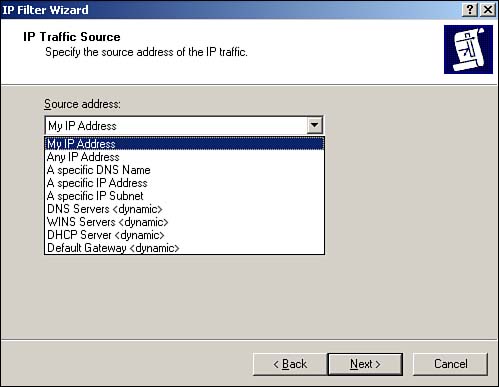
Another common problem with IPSec policies under Windows 2000 is that they have to be configured with specific IP addresses, making it impossible to create policies for servers that use DHCP to obtain dynamic IP addresses. In Windows Server 2003, source and destination addresses can be set to a specific IP address or be set to the DHCP server, DNS server, default gateway, or WINS server, enabling policies to automatically adjust to computers with dynamic IP addresses. Figure 10.1 shows the new configuration dialog box, including the new dynamic addresses. You can use the new dynamic policies to, for example, ensure packet encryption between any DNS or WINS server. This new capability is supported only by Windows Server 2003; these dynamic addresses are ignored by Windows 2000 and Windows XP computers, which can result in inconsistent application of your IPSec policies within your domain.
Figure 10.1. Dynamic addressing supports more complex and dynamic IPSec policies.
The IP Security Policies snap-in can now map computer encryption certificates to computer accounts in Active Directory, which is the same SChannel certificate mapping IIS and other PKI-enabled applications already use. After they're mapped, you can set up access controls using the settings for network logon rights. For example, an administrator can restrict access to a particular computer to other computers from a specific domain, computers with a certificate from a particular certification authority (CA), a specific group of computers, or a single computer. Only computers running Windows Server 2003 have this capability; computers running Windows XP or Windows 2000 ignore this extension to IPSec policy.
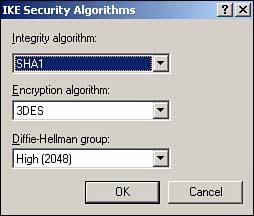
Finally, Windows Server 2003 includes support for 2,048-bit Diffie-Hellman key exchange, as described in the Internet draft, "More MODP Diffie-Hellman Groups for IKE." The practical upshot of this support is stronger encryption keys. The IP Security Policies snap-in provides the interface to configure this new setting for both local and domain-based IPSec policy. This support is provided only in Windows Server 2003; Windows 2000 and Windows XP computers ignore this setting. Figure 10.2 shows the new Diffie-Hellman group, which you can add as an active Internet Key Exchange (IKE) method by using the IP Security Policies snap-in.
Figure 10.2. 2,048-bit encryption is roughly twice as strong as the strongest encryption previously available in Windows.
New Tools
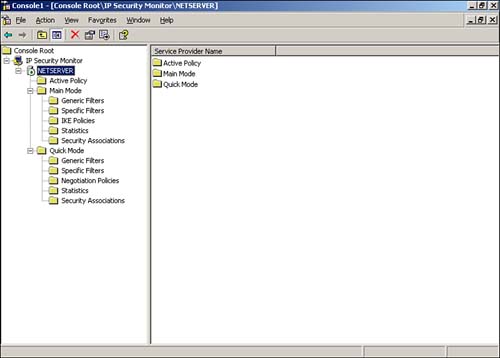
As shown in Figure 10.3, Windows Server 2003 also sports an all-new IPSec Monitor snap-in, providing a better administrative interface for monitoring IPSec policies and security associations. Windows Server 2003 also include the IP Security Policies console, which enables you to actually configure and manage IPSec policies, manage filter lists and actions, and so forth. The IP Security Policies snap-in is included in the Local Security Policy console, which is listed in the Start menu's Administrative Tools folder.
Figure 10.3. The new IP Security Monitor provides a tool for monitoring active IPSec policies.
To use the new snap-in, do the following:
Select Run from the Start menu.
Type mmc and press Enter.
From the File menu, select Add/Remove Snap-in.
Click Add.
Locate the IP Security Monitor in the list and double-click it.
Close all dialog boxes, and you'll be ready to work with the IP Security Monitor.
TipYou can use the IP Security Monitor to monitor remote computers, too. Just right-click IP Security Monitor and select Connect from the pop-up menu. You can monitor the IPSec policies on any computer you're an administrator of. |
The Windows 2000 Server Resource Kit includes Ipsecpol.exe, a command-line tool for administering IPSec policies. Windows Server 2003 replaces this tool by bundling IPSec administration into the Netsh.exe command-line tool. You can now use Netsh.exe to configure main-mode policies, quick-mode policies, settings, rules, and other parameters. Just open a command-line window and run netsh ?c ipsec to enter configuration mode.


