Metabase and Management Enhancements
IIS's metabase contains all of IIS's configuration settings. As was described earlier (and shown in Figure 7.3), the metabase can be accessed through a variety of administrative interfaces, including the familiar MMC snap-in, Microsoft Active Directory Services Interface (ADSI), Windows Management Instrumentation (WMI), and much more. By default, administrators cannot modify the metabase while IIS is running. Instead, changes to the metabase must come through a registered administrative interface such as the IIS console. However, as shown in Figure 7.16, you can modify IIS's properties to allow direct editing of the metabase XML file while IIS is running.
Figure 7.16. Direct metabase editing is off by default.
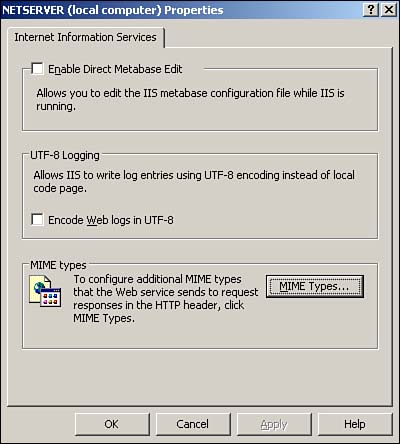
The ability to directly manipulate the XML metabase file can be useful for troubleshooting because the file enables you to see exactly which IIS settings are configured and how they are configured. The fact that the metabase is XML based enables Microsoft and third-party vendors to more easily extend the metabase to meet future application needs. Note that IIS 4 and 5 binary metabase files will upgrade to the new XML file with no problems when you install Windows Server 2003.
The metabase automatically keeps a history of changes, making it easy to track configuration changes made to IIS and to more easily roll back to a prior version of the metabase. By default, IIS stores the current metabase in a file named Metabase.xml, along with a version number. A copy is saved in a History folder each time the metabase is changed, and each copy is given a unique version number. You can directly view or edit any of these files in a simple text editor, such as Windows Notepad.


