Administration
Windows Server 2003 brings several much-needed administrative enhancements to Active Directory, including improvements to Active Directory's administrative tools and features that enable you to change what used to be one-time, irreversible domain design decisions.
Administrative Tool Enhancements
All the Active Directory administrative tools have been updated with new features. These features are most noticeable in Active Directory Users and Computers, which is where administrators typically spend most of their time. These features include
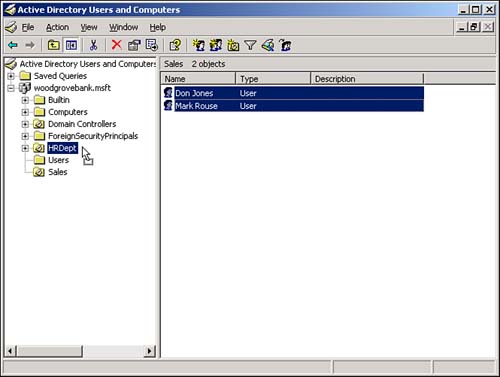
Drag and drop? Finally, you can drag and drop items in Active Directory. For example, Figure 5.3 shows several users being dragged from one organizational unit (OU) to another. This change makes Active Directory administration much faster and more intuitive.
Figure 5.3. Drag and drop makes keeping your domain organized easier.
Show effective permissions? This feature enables you to select an object and see the effective permissions a given security principal will have on that object. Extremely useful for security troubleshooting, show effective permissions is a fast way to sort through complex chains of permissions inheritance to see exactly which permissions a user or group has.
Show inheritance parent? This feature shows the parent from which an object inherits its permissions. Previously, Active Directory simply showed you which permissions were inherited; it didn't show you from where the permissions came. This new feature makes locating the source of an undesired permission and correcting it easier.
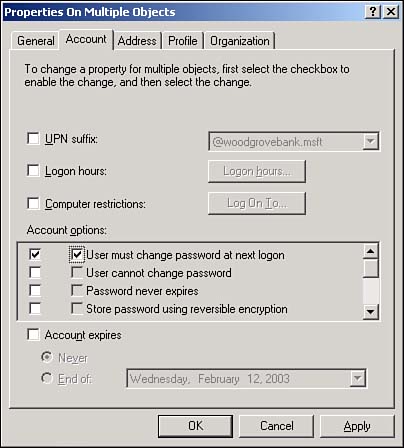
Multiselect? You can now select multiple objects in Active Directory and change specific attributes for all the objects at once. For example, Figure 5.4 shows several user objects selected and the resulting Properties dialog box. You can use check boxes to determine which attribute changes will be applied to all the selected users.
Figure 5.4. Multiselect lets you quickly change several objects' attributes to a consistent setting.
These new improvements seem relatively minor, but they will make a big difference in your day-to-day administrative tasks.
Saved Queries
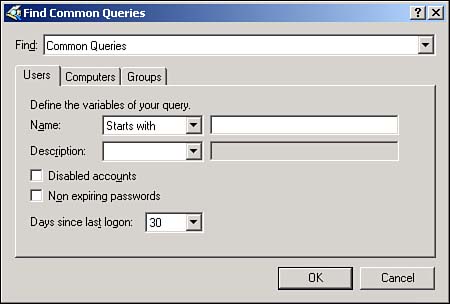
Anothervaluable new feature in Active Directory Users and Computers is Saved Queries. This feature lets you create Active Directory queries, effectively filtering Active Directory for specific objects. You can then save the queries and execute them as often as necessary. Query results appear in the right pane of the console, where you can use multiselect to immediately alter the objects' attributes. For example, Figure 5.5 shows a saved query that selects all users who haven't logged on in the past 30 days. You could then multiselect those users and disable their accounts, expire their passwords, and so on.
Figure 5.5. Saved queries are an efficient way to quickly locate and work with a subset of objects in Active Directory.
Resultant Set of Policy
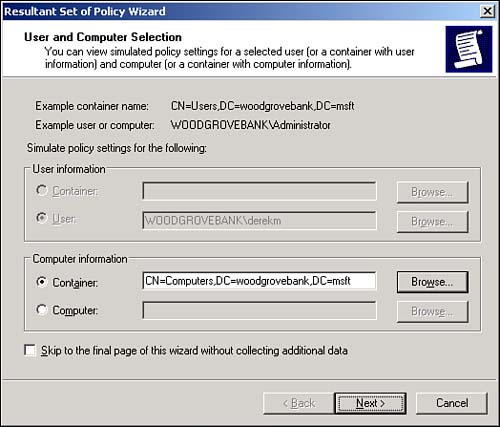
A new feature of Active Directory Users and Computers, Resultant Set of Policy (RSOP) lets you quickly analyze the policies that would apply to a specific security principal given their locations in a specific container in Active Directory. To start the tool, you can click any container or security principal and select RSOP (Planning) from the pop-up menu. You'll see a screen similar to the one in Figure 5.6, which enables you to select both a user and a computer account or a container in which you want to place a user or computer account.
Figure 5.6. The new RSOP tool works with both user and computer accounts in Active Directory.
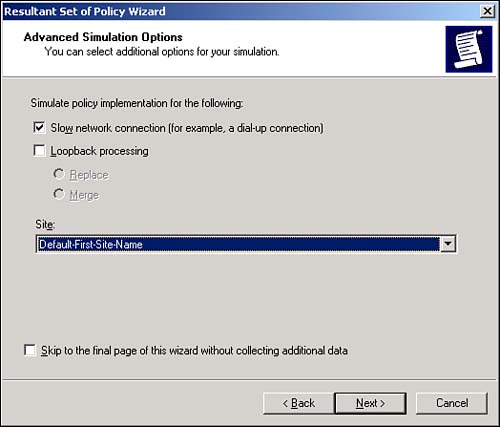
Next, you can set various options. For example, in Figure 5.7, you can decide whether to simulate the security principal being dialed in or over a slow network connection. Keep in mind that Active Directory now supports slow link detection and therefore doesn't send the same policies over a slow link that it would over a higher-speed link. The RSOP tool has about a half-dozen option screens. When you've selected all the options you want, check the Skip to the Final Page check box to accept the defaults on the remaining options.
Figure 5.7. Simulating various logon conditions enables you to fine-tune your RSOP results.
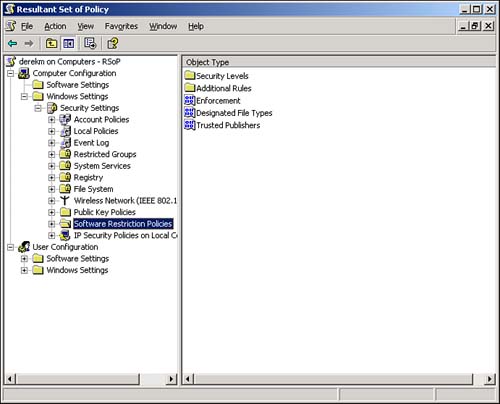
Finally, you'll see a screen similar to the one in Figure 5.8. This is a standard security template editor console, where you can browse the policies that will apply to your security principal under the conditions you've specified. You'll be able to see the exact results of their locations in Active Directory, their logon conditions, and so forth?all without moving (or even having) an actual user or computer account.
Figure 5.8. RSOP results are displayed in their own window.
The RSOP tool is a great time-saver and can help you avoid embarrassing mistakes that result from misapplied Group Policy.
Domain and Domain Controller Rename
For domains running in the Windows Server 2003 functional level, you can rename domain controllers. Previously, this was an impossible task: To rename a domain controller, you had to demote it, rename it, and then repromote it to domain controller status. Now, you can use a simple command-line utility to rename the domain controller. The process includes reregistering the domain controller with DNS and all other steps necessary to keep the domain controller functioning smoothly. For detailed steps on renaming a domain controller, consult Windows Server 2003's online Help and Support Center.
CautionDon't try to rename a domain controller without carefully reading the instructions and precautions first. You need to be aware of several things about domain controller renames depending on your environment and operational needs. |
You can also rename entire domains, provided your forest is in the Windows Server 2003 functional level. Renaming domains enables you to restructure domains in your forest. For example, you could rename east.braincore.net to research.west.braincore.net, perhaps responding to a change in your organization's political structure.
Renaming a domain, however, isn't something you do casually; it's a serious process with a number of different steps. You'll need two tools that are provided on the Windows Server 2003 CD but are not installed; they're located in the \Valueadd\Msft\Mgmt\Domren folder on the CD. You'll also need the step-by-step instructions provided by Microsoft. Those instructions are provided online; refer to the Readme document included with the domain rename tool on the CD-ROM for the current URL.
TipThe Microsoft link also provides a download for the latest version of the domain rename tool. We strongly recommend using the version from the Web site rather than the one on the Windows CD because the one on the Web site contains all the latest bug fixes and improvements made by Microsoft. |
One of our most frequently asked questions is, "Does domain rename work?" After all, it's a pretty novel concept in the world of Microsoft domains, and it seems like a serious operation. The answer is, "Yes, it does work." Of course, that's provided you carefully read the instructions and follow them to the letter. Because renaming a domain requires so much information in Active Directory and DNS to change, the process can be time-consuming, so you should allow the necessary time. You should also test the rename process by using an offline backup domain controller to ensure your domain doesn't contain any data that will cause the process to fail halfway through.


