Common Security Holes
Have you thought about how the network services in your environment might be used against you and how Windows Server 2003's components offer features to protect your network? A good security administrator?a role that is increasingly recognized as a standalone job task within larger environments?has to be constantly paranoid. Even the most seemingly innocent and beneficial network services can be used against you. The next few sections cover some examples to get your paranoid juices flowing. Windows Server 2003 provides options to secure almost all the services against common security attacks, but you'll have to take it upon yourself to implement more secure configurations. Although Windows Server 2003 is more secure out of the box than any previous version of Windows, some security configurations require a trade-off in functionality, so they're not always included in the defaults.
DNS
DNS is your network's phone book, providing a means for computers to resolve easy-to-remember computer names to more functionally useful IP addresses. Windows Server 2003 provides a Dynamic DNS (DDNS) service, which accepts dynamic DNS record registrations from computers that have dynamic IP addresses. DDNS ensures that all computers can be accurately listed in the DNS database. DDNS, however, provides a potential security flaw: If an intruder can insert a bogus DNS record, she can redirect legitimate traffic to a different computer. For example, if an intruder were able to replace the IP addresses of a domain controller, she could easily gain access to authentication traffic and potentially user passwords.
Fortunately, the worst-case scenarios are pretty hard to imagine. Windows's Kerberos protocol helps ensure that client and server computers can validate one another's identities, making it nearly impossible for intruders to capture traffic (at least, between Windows 2000 and higher computers; older Windows versions don't use Kerberos and can be fooled into sending traffic to an unintended computer).
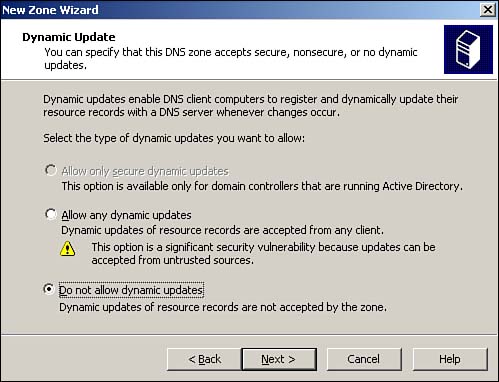
Intruders could still insert new records into DDNS, however, and potentially use those records in an attack against your network. In fact, when you create a new zone Windows Server 2003's DNS service warns you that allowing just any old dynamic updates is a significant security vulnerability, as shown in Figure 4.10. The DNS service does offer an option for secure updates that accepts updates only from computers that have successfully authenticated to the domain. However, the secure option is available only when the DNS service is running on an Active Directory domain controller, thereby providing DNS with access to authentication information. For that reason alone, we always recommend that your DNS servers also be Active Directory domain controllers and that you enable DNS to use secure DDNS updates.
Figure 4.10. Secure updates are possible only on a domain controller.
When you install the DNS service on a Windows Server 2003 computer, a new DNS-specific event log is added, along with the built-in application, security, and system event logs. A regular part of your maintenance routine should be to analyze the DNS log for potential security problems such as a large number of unauthenticated update attempts, which can indicate a potential security attack.
Dynamic Host Configuration Protocol
Dynamic Host Configuration Protocol (DHCP) doesn't offer many security vulnerabilities because its only task is to hand out DHCP addresses. However, some especially secure organizations, including banks and government agencies, often take steps to deny DHCP services to network intruders. By preventing DHCP from providing an IP address to unknown computers, intruders have that much harder a time working on the network. Of course, an intruder can always make up an IP address; finding one that will work and that isn't already in use can take time, though, and might discourage some attackers.
Securing DHCP in this fashion requires that you configure your computers to use DHCP and then configure DHCP with a reservation for each computer. By ensuring that each DHCP scope contains just enough addresses to fulfill your reservations, you ensure that no extra computers will be capable of obtaining addresses. Of course, using reservations in this fashion largely defeats the "dynamic" part of DHCP; what you're really doing is reverting to static IP configurations that are centrally managed on the DHCP server. This isn't a step most organizations feel is necessary, but it's available as an option if your organization needs to use it.
Network Monitor
Network Monitor (NetMon) is a network packet-capture tool included with almost every version of Windows since Windows NT (it's not included with Windows 9x versions). We won't go into NetMon's operations in detail; the product has been around since early versions of Windows NT and is also included in Microsoft Systems Management Server. What you need to be aware of is how NetMon can be used to compromise network security.
NetMon captures and displays raw network data, meaning anyone with NetMon can analyze practically anything that crosses your network. The most obvious concern, then, is it giving attackers the ability to pick up passwords from your network. For domain authentication, that's not a worry because even older versions of Windows NT and Windows 9x use some pretty powerful encryption techniques. However, for any internal Web sites, FTP sites, or other services that might not use Windows-integrated authentication, password stealing is a very real problem. NetMon also makes pulling other confidential information across the network relatively easy. For example, if someone in your human resources department copies a salaries spreadsheet to a file server, an intruder could capture the traffic with NetMon and reassemble what should have been confidential information.
Microsoft helps prevent NetMon abuses in a couple of ways. First, the version included with Windows captures only traffic sent to or from the machine on which NetMon is running. That limits the user to capturing whatever is coming and going from his own computer, so he won't likely pick up anything he couldn't have accessed otherwise. However, the so-called "full" version of NetMon, included with Systems Management Server, can pick up anything that passes on the network segment, making it a much more dangerous tool. The full version isn't actually hard to come by apart from Systems Management Server; several Microsoft Official Curriculum courses in the past included it, and several less-than-legitimate Web sites make it available for download.
Fortunately, Microsoft anticipated that unauthorized use of NetMon might be a problem. Every running copy of NetMon sends out occasional packets in a special protocol called bone. The protocol name is actually something of an in joke: NetMon's product code-name is "Bloodhound," so naming its internal protocol "bone" is intended to be cutesy. The practical use of the bone protocol is that it enables you to see other copies of NetMon running on your network. You should regularly run the full version of NetMon (yes, you'll probably need to purchase Systems Management Server to get a legal copy) and check for bone broadcasts from other copies. To do so, follow these steps:
Perform a network capture with NetMon. Let it run for several minutes, at least.
View the completed capture and add a new filter by clicking the Filter icon in the toolbar.
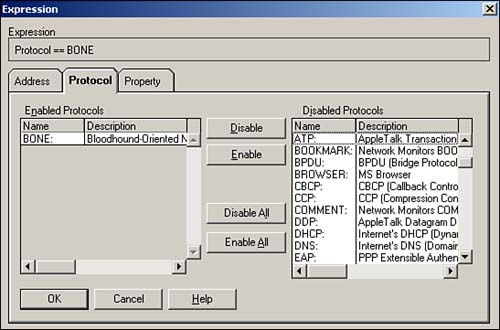
Double-click the filter's Protocol line and disable all but the bone protocol, as shown in Figure 4.11.
Figure 4.11. Disabling all but bone makes spotting bone packets in a large capture easier.
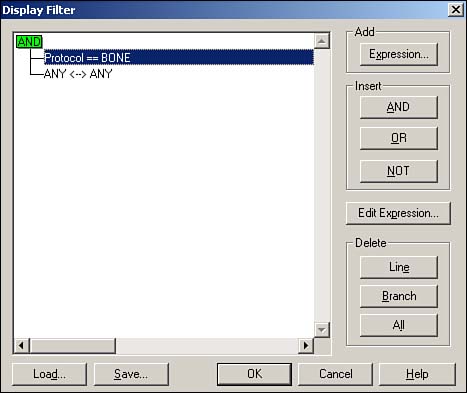
Close the dialog box, and ensure that your filter looks like the one in Figure 4.12.
Figure 4.12. A properly configured filter makes spotting bone broadcasts without missing any important data easier.
Review any packets shown in the capture. Bone packets include the IP address of the computer that sent it, helping you to track down the unauthorized user.
CautionDon't see any bone frames in your capture? Don't relax. Even the full version of NetMon can capture only the traffic on your local network segment, so you'll need to perform a capture on each segment. In a switched environment, you can usually configure your switches to forward all traffic to one switch port, where you can plug in your NetMon computer to capture everything. |
Finally, keep in mind that NetMon is not a unique product. Even though it's relatively easy to acquire, plenty of other commercial packet sniffers are available that an attacker can use to pull information from your network as it passes by on the wire. Not all these other products include something similar to the bone protocol, so you won't be able to detect their use. The best way to keep these packet capture tools under control is to firmly control what software your users can run on their computers and to guard all physical connections to your network that an intruder might use to gain access.
Internet Information System
IIS has come to be known as one of Microsoft's more serious security flaws, primarily because it's installed by default on so many operating systems. Several viruses, including the now-famous "Code Red" worm, attack IIS directly, set up shop on the attacked computer, continue to attack other computers from there, and eventually spread throughout the network.
Although IIS isn't installed by default on Windows Server 2003, it's still the default option on older versions of Windows. You can go a long way toward securing your environment by removing IIS from computers on which it isn't necessary and by applying the latest service packs and security updates to computers that must run IIS. A vigorous antivirus plan, including frequent updates to virus definitions, can help protect both servers and clients from viruses that attack IIS.


