Other Networking and Communications Improvements
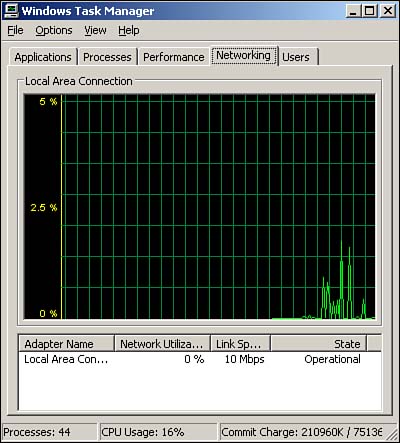
One of the coolest new networking features is the Networking tab on the Windows Task Manager. As shown in Figure 10.9, this new tab displays a real-time graphical chart of network utilization, as well as summary statistics for all network interfaces in the computer. You can use the new tab to easily see which network adapters in your servers are working the hardest, spot initial signs of over utilization, and so forth.
Figure 10.9. The new Networking tab is just one of the additions to the Windows Server 2003 Task Manager.
Windows Server 2003 includes several networking enhancements that were originally introduced in Windows XP. Remember, Windows XP is the client equivalent of Windows Server 2003, so a great deal of feature parity exists between the two operating systems, despite their dissimilar names and user interfaces. The major enhancements are discussed next.
Network Location Awareness
Windows Server 2003 is capable of notifying applications when network settings change. Some built-in services, such as Internet Connection Sharing, disable themselves when the computer is moved to a different network. This behavior ensures that applications function only when attached to the network for which they are configured and provides a more seamless experience on computers that are frequently moved between different networks.
New Group Policies
These new policies, which are applicable to Windows Server 2003 and Windows XP computers, allow administrators to designate specific users as members of the Network Configuration Operators Group. Members of this group can modify their local TCP/IP properties, giving advanced users the flexibility to manually configure the network connections. You can also use the new group policies to block the local Administrators group of a computer from modifying ICS, ICF, network bridging, and general network settings, providing better control of computer configurations.
Native Support for PPPoE
This new support eliminates the need for third-party software when connecting Windows Server 2003 to PPPoE connections, which are most often broadband cable or xDSL connections. By including PPPoE support in Windows Server 2003, Microsoft hopes to improve the stability and reliability of these broadband connections, which previously had to rely on poorly written software provided by ISPs. Native PPPoE support also makes leveraging other native features, such as ICS and ICF, with broadband connections easier.
Network Bridging
Network bridging allows Windows Server 2003 to act as a bridge between dissimilar network architectures. For example, a small office might support both a wired network and a wireless network. By attaching a Windows Server 2003 computer to both networks and bridging the connections, Windows Server 2003 can join the two networks to create a single logical network. Any native network connection can be bridged, including Ethernet, wireless, phone line, and IEEE-1394 (FireWire). To bridge two connections, simply select them both in the Connections Manager window, right-click, and select Bridge Connections from the pop-up menu.
IEEE-1394 (FireWire) Support
This new feature allows Windows Server 2003 to treat IEEE-1394 connections as network connections. Although this feature is often more useful on client computers (support is also included in Windows XP), IEEE-1394 networking support can be invaluable during server migration or consolidation. IEEE-1394 provides a fast, 400Mbps connection, enabling extremely fast file copy operations from one computer to another. This high-speed connectivity is ideal when moving large quantities of files from one server to another during a migration or consolidation and can, in many cases, be the fastest way to move those files.
Automatic Network Configuration
Automatic configuration kicks in whenever a Windows Server 2003 computer is configured to obtain IP addressing information via DHCP but cannot contact a DHCP server. By default, Windows Server 2003 automatically generates an APIPA address in the 169.254.0.0/16 range, without a DNS server, default gateway, or other information. You can also manually configure alternative IP configuration settings to be used when a DHCP server is unavailable. Although this feature is most useful for client computers running Windows XP, you need to be aware of this feature's operation. For example, if you find that a server is using a 169.254.x.x IP address, you know that it was unable to contact your DHCP server.
A New Netstat Tool
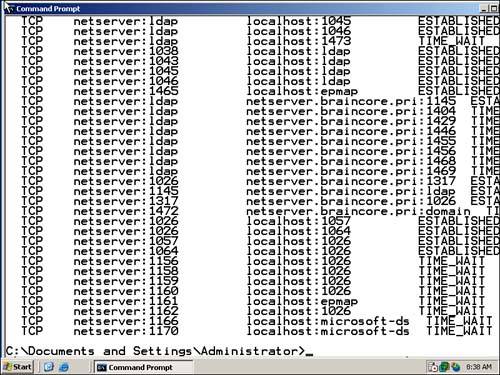
The new Netstat tool can display active TCP connections, along with the process ID (PID) of the process handling the connection. This enormously useful new feature can enable you to track down IP ports that aren't supposed to be open, troubleshoot connectivity problems, and much more. Simply run Netstat and, as shown in Figure 10.10, the output will include process IDs for each open connection.
Figure 10.10. Given the output from Netstat, you can use the Task Manager to look up PIDs and determine the names of the related processes.
Native Support for xDSL
Built-in native support for xDSL recognizes the growing popularity of xDSL connections for branch offices and other business applications. The new support, referred to as permanent virtual circuit encapsulation, includes an intermediate device driver that appears to the operating system as an Ethernet interface but actually uses a DSL/Asynchronous Transfer Mode (ATM) permanent virtual circuit (PVC) to carry TCP/IP frames. This is a common implementation used by many xDSL carriers and enables Windows Server 2003 to support TCP/IP over PPP over ATM and TCP/IP over PPPoE, using vendor-supplied DSL/ATM miniport drivers. The practical advantage of all this is that future xDSL implementations will be of dispensing with specialized DSL modems and will rely on less expensive add-in cards, which will connect Windows Server 2003 directly to the DSL network.
Wireless Improvements
Windows Server 2003 also sports a host of wireless networking improvements. Many of these improvements are better used on client computers than on servers because servers tend to be connected to high-speed wired networks. However, smaller environments can use wireless-connected servers and can benefit from these enhancements:
Support for 802.1X? This is a standard for wireless port-based network access control that provides better network security.
Wireless Zero Configuration? Allows Windows Server 2003 to automatically configure supported wireless network adapters, select a wireless network connection, and automatically switch to ad-hoc networking mode when an infrastructure network is unavailable.
Better roaming support? This includes the ability to automatically request DHCP information when associating with a new wireless network, reauthenticating automatically when necessary, and so forth.
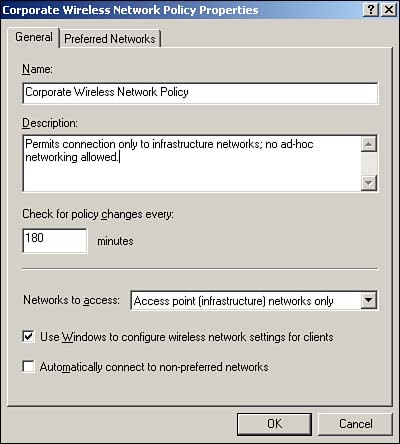
Group policy support for wireless network policies? Allows centralized configuration of wireless networking policies. These policies can include preferred networks, privacy settings, and 802.1X settings. These settings can be applied along with other group policies to members of a site, a domain, or an organizational unit (OU) through Active Directory. Figure 10.11 shows the new policies in the Group Policy snap-in.
Figure 10.11. Wireless group policies provide centralized configuration capabilities for increasingly popular wireless networks.
Missing Protocols
Finally, a few older networking protocols were removed from Windows Server 2003: The Direct Link Control (DLC) protocol, which was primarily used to connect to older Hewlett-Packard JetDirect network print servers, and the NetBEUI protocol. Note that NetBIOS still exists; NetBIOS is a session-level protocol. NetBEUI was a nonroutable, nonconfigurable transport protocol. The 64-bit editions of Windows Server 2003 also remove support for IrDA, an infrared communications protocol; IPX/SPX (and all IPX/SPX-dependent services); and the Open Shortest Path First (OSPF) routing protocol.
Additionally, Microsoft has removed support for RPC over NetBEUI, RPC over NetBIOS over TCP/IP, RPC over NetBIOS over IPX, RPC over IPX, and RPC over MSMQ. The 64-bit editions also eliminate RPC over SPX and RPC over AppleTalk.


