RRAS Enhancements
The Routing and Remote Access Service (RRAS) included in Windows Server 2003 provides several functions that enable Windows to accept VPN connections, accept dial-up connections, act as a network router, provide Internet connectivity to an entire network (including NAT), and much more. Additionally, RRAS's snap-in has received a minor facelift for Windows Server 2003, making the service easier to configure and manage.
As always, RRAS includes robust remote access policies to control access to the server's connectivity features, static routing capability, dynamic routing protocols, a variety of remote access authentication protocols, and so forth.
 |
To learn more about RRAS and how it works, visit www.samspublishing.com and enter this book's ISBN number (no hyphens or parentheses) in the Search field; then click the book's cover image to access the book details page. Click the Web Resources link in the More Information section, and locate article ID# A011001. |
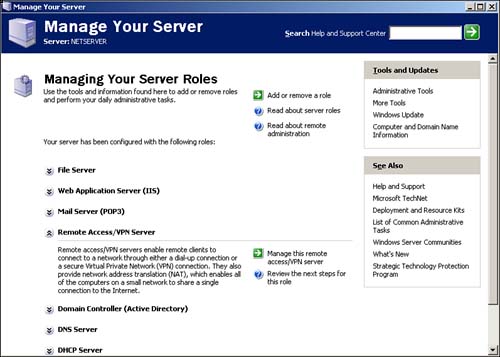
You can also configure RRAS as a NAT/firewall server by using the new Manage Your Server application, shown in Figure 10.6. This capability lets administrators configure their servers' operations from a single application and reduces the complexity of many basic configuration tasks. The Manage Your Server application also provides buttons that open the traditional management consoles, providing a central location for new administrators to locate Windows Server 2003's various management tools.
Figure 10.6. Manage Your Server enables you to configure a server for new roles, automatically adding new services (such as RRAS) and software as required.
Some of RRAS's other significant improvements include
Better EAP-TLS configuration? A new dialog box allows you to more easily configure smart card and other certificate properties for RRAS authentication parameters. You can now configure multiple RADIUS servers and multiple root certification authorities, providing better integration with multiple networks or very large networks.
RRAS includes a new NetBIOS over TCP/IP proxy? This provides remote access clients with name resolution capabilities without having to use a discreet DNS or WINS server. Using the proxy, RRAS can receive name resolution requests from the client, resolve those requests internally, and pass the response back to the client?all without the need to deploy a WINS or DNS server on the network. This new feature is especially useful to small businesses that would otherwise not require a DNS or WINS server.
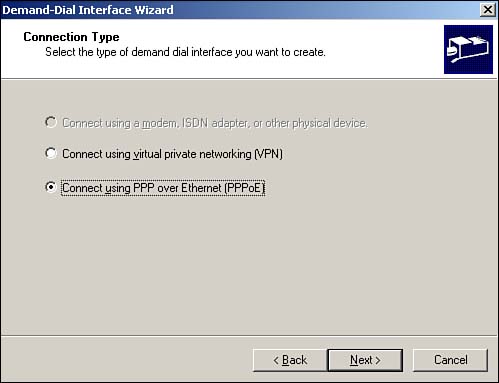
Demand-dial connections can now use PPPoE in addition to regular modems and Ethernet connections? This enables RRAS to automatically create network connections over broadband services, such as cable modems or xDSL modems. This feature lets you easily establish VPNs over a cable or xDSL connection or utilize RRAS's NAT and firewall capabilities to share a single cable or xDSL connection with an entire small network. Figure 10.7 shows a new demand-dial interface being created to use a PPPoE interface.
Figure 10.7. PPPoE connections are generally used with xDSL or cable modem providers.
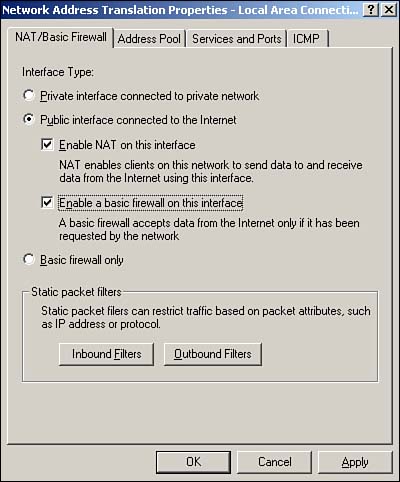
A major new functional improvement in RRAS is the NAT/Basic Firewall feature. This feature combines the ICS and ICF features into a single interface, allowing you to designate a particular network interface as a shared Internet connection and provide basic firewall capabilities for it. Unlike the basic ICS feature, NAT/Basic Firewall provides you with full control over RRAS's DHCP allocator, enabling you to customize the IP addresses RRAS provides to network clients. To create a new NAT/Basic Firewall interface, right-click Nat/Basic Firewall in the RRAS snap-in and select New Interface from the pop-up menu. You'll see a configuration dialog box similar to the one shown in Figure 10.8, which enables you to configure the interface as a shared connection, a shared connection with firewall capabilities, or a basic firewall. Although these capabilities aren't new to Windows, having them available from a single, unified interface with such easy administration is definitely a major improvement.
Figure 10.8. The new NAT/Basic Firewall interface makes configuring shared Internet connections for smaller offices easy.
RRAS also includes a number of VPN-specific enhancements. In Windows 2000, VPN servers dynamically register the names and IP addresses for all network interfaces with a DNS server. This creates problems when internal clients attempt to access server resources because they can receive the server's external IP address in a DNS query. Additionally, Windows 2000 enables NetBIOS on all network interfaces, which presents potential security problems if the server's external interface is connected to an unsecured network. In Windows Server 2003, the default registration behavior is changed, so dynamic DNS registration is disabled for both internal and external interfaces, and NetBIOS is disabled for the external interface. This new behavior requires you to manually create DNS host entries for your VPN servers but gives you full control over the IP address internal clients receive when they query the server's name. The new behavior also improves security by automatically disabling NetBIOS on the external interface.
|
To learn more about VPNs and how they work, visit www.samspublishing.com and enter this book's ISBN number (no hyphens or parentheses) in the Search field; then click the book's cover image to access the book details page. Click the Web Resources link in the More Information section, and locate article ID# A011002. |
Another improvement isn't specifically targeted at VPNs, but rather at all demand-dial connections, including client-to-server VPN connections. In Windows 2000, RRAS could bridge from its external interface?including dial-up connections?only to its internal interface, which connects to the corporate network. In the case of an Internet-connected server, RRAS could not provide both corporate network and Internet access to demand-dial clients. In Windows Server 2003, however, RRAS has been extended so that its internal interface can be added as a private interface to the NAT service included in RRAS. The practical effect of this change is that RRAS can provide NAT services for both internal clients and demand-dial clients, including VPN clients.
One "disimprovement" for VPN support comes in Windows Server 2003 ? Web Edition, which can support only one VPN connection using either L2TP/IPSec or PPTP. All other editions of Windows Server 2003 can support multiple simultaneous VPN connections. The intent of this change is to allow Windows Server 2003, Web Edition to accept a VPN connection for administrative purposes, but to otherwise function solely as a Web server.


