Web Services Support
Web Services, as we've already described, are essentially reusable software applications that are accessible through Internet technologies, such as the HTTP protocol. For example, suppose that one of the developers at your company's headquarters creates a Web service that provides access to your company's customer database. All your company's other developers can immediately take advantage of this service by incorporating it into other applications. No other developer will ever again need to write code to access the customer database because he can simply use the existing Web service. One important enabling technology behind Web services is XML, and more specifically the SOAP protocol. SOAP stands for Simple Object Access Protocol, and it's simply a protocol that enables one application to use another application's services across the Web (or any other TCP/IP-based network). Another important standard is the Web Services Description Language (WSDL), which is a standard for describing how Web services work and what specific capabilities a service offers. Developer tools such as Visual Studio enable developers to create Web services and export their capabilities in WSDL; other developers can import the WSDL into their own applications to use Web services with little additional coding.
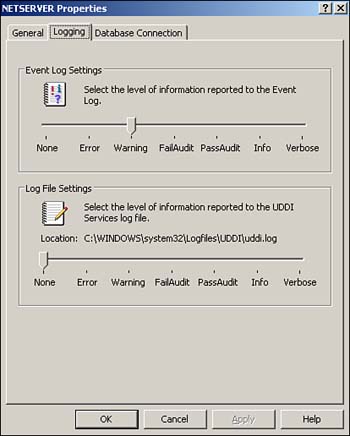
Of course, keeping track of all these WSDL files can be cumbersome, so Windows Server also includes UDDI. When you install UDDI, it attaches itself to IIS and can install a copy of the Microsoft Database Engine (MSDE), a scaled-down version of Microsoft SQL Server 2000. UDDI essentially stores WSDL information in SQL Server and provides an HTTP-accessible means of adding and retrieving WSDL information. Visual Studio .NET includes built-in UDDI support, allowing it to import and export WSDL to and from UDDI directly. That's plenty interesting if you're a developer, but even administrators need to be aware of UDDI and the impact it can have on software developers. Specifically, administrators need to install UDDI, which is an optional component of Windows Server. Administrators also need to decide whether UDDI will use an existing SQL Server or if it should install its own copy of the MSDE for storage purposes. Finally, administrators are responsible for troubleshooting and maintaining UDDI. One key troubleshooting tool is UDDI logging, which administrators configure from within the UDDI Console. As shown in Figure 9.7, you can select a variety of logging levels that provide progressively higher levels of detail.
Figure 9.7. The UDDI Console is installed along with UDDI itself, which is an optional component of Windows Server.
Web Services offers a significant benefit to administrators: easy deployment. When developers create Web services with the .NET Framework, and most especially with ASP.NET, they allow administrators to easily deploy and manage applications. For example, suppose a developer writes a new ASP.NET application and deploys it to a test server. When testing is finished, you need to deploy it to any number of Web servers. With older ASP applications, that could be pretty complex and involve Registry keys, DLL registration, and much more. Under ASP.NET, you basically just copy the files from one server to another. The .NET Framework itself takes care of the rest, recompiling assemblies as necessary on-the-fly. When developers update the application, you just copy the new files. There's no need to unregister DLLs, uninstall applications, and reinstall everything; a simple file copy is all that's needed for most ASP.NET applications.


