New Networking Services
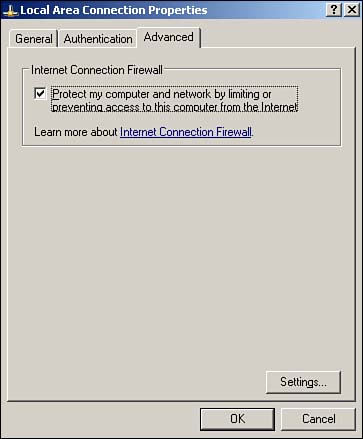
Windows Server 2003 now includes the Internet Connection Firewall (ICF), an entry-level firewall designed to protect specified network adapters from unauthorized network traffic. This feature is most frequently used in small environments, in conjunction with ICS. The combination of ICF and ICS provides small offices with the capability to share a single Internet connection through Windows Server 2003, while also providing protection from Internet-based hackers. Note that ICF is not available in the 64-bit edition of Enterprise Edition or in any edition of Datacenter Edition. As shown in Figure 10.4, ICF can be enabled by simply selecting a check box in the network connection's properties dialog box.
Figure 10.4. ICF can be used to protect any network connection on a server.
By default, ICF allows all outgoing traffic to pass through the firewall, and allows all replies to outgoing traffic to enter the network. This behavior accommodates the most common use of ICF, which is to protect an internal network from the Internet. You can also configure ICF to permit specific types of traffic, allowing ICF to protect an internal Web or mail server, if desired. Figure 10.5 shows the Advanced Settings dialog box, which you access by clicking the Settings button in the network connection's Properties dialog box.
Figure 10.5. This dialog box allows you to configure incoming traffic and ICF logging.
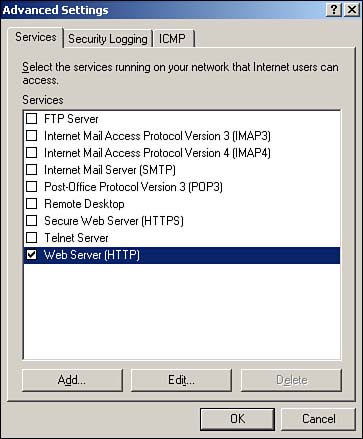
The Advanced Settings dialog box includes three tabs:
Services? This tab enables you to specify the network protocols, such as HTTP or FTP, that ICF should allow into your network from the outside. The list includes several common protocols, and you can add your own to accommodate specific applications available on your network.
Security Logging? This tab allows you to enable ICFG logging and select a location for the log file. You can configure ICF to log all successful connections and dropped connections, providing a comprehensive log of firewall activity.
ICMP? This tab allows you to configure the Internet Control Message Protocol (ICMP) traffic that ICF will allow to enter your network. ICMP is the protocol behind common troubleshooting tools such as ping, and blocking ICMP traffic prevents outsiders from gaining information about your internal network's infrastructure. However, you might need to temporarily enable ICMP traffic to troubleshoot connectivity problems.
CautionICF is worth what you pay for it, which isn't much. Don't confuse ICF for more powerful and robust firewall solutions such as Checkpoint Firewall1 or Microsoft's own Internet Security and Acceleration Server. If you need to protect a medium- to large-size network, need the highest possible network throughput, or need powerful intrusion detection capabilities or other enterprise-class features, don't rely on ICF. |


