General Group Policy Changes
Even though Group Policy fundamentals are untouched in Windows Server 2003, a few general Group Policy tweaks can have huge consequences for the implementation of group policies.
WMI Filtering
A new feature for controlling the scope of group policies is the ability to filter the Group Policy based on WMI settings. As shown in Figure 6.1, a new WMI Filter tab is available on the Group Policy Object (GPO) for specifying WMI filters. Windows Management Instrumentation (WMI) is Microsoft's implementation of the Web-Based Enterprise Management (WBEM) initiative, which is intended to define standards for gathering and sharing enterprise management information. Both Windows 2000 and, to a greater degree, Windows Server 2003 contain several built-in WMI providers for gathering information about the system. WMI filters enable you to gather environment-specific information such as hardware, software, and configuration settings about machines or users. By using WMI filters, you can more finely control the scope of your group policies.
Figure 6.1. Controlling the scope of Group Policy with WMI filtering.
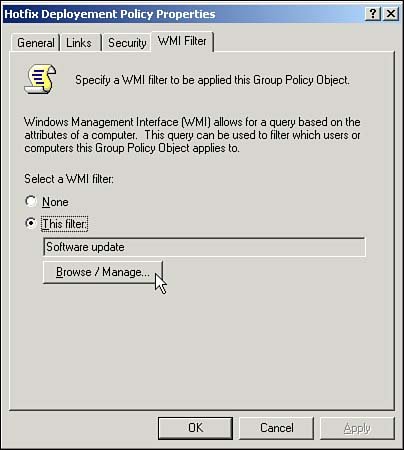
For example, a patch needs to be applied to a particular software application, but there are different patches for different operating systems: one for Windows 95, one for Windows 2000, yet another patch for Windows XP, and so on. Previously, if you wanted to do this with Group Policy, you had to come up with some way of determining the affected systems, and then add the computers to an organizational unit (OU) or group, and either apply the GPO to the OU or filter it based on the group. With WMI filters, you can simply create one Group Policy for each patch and filter each Group Policy to apply to the appropriate operating system. How's that for ease of administration?
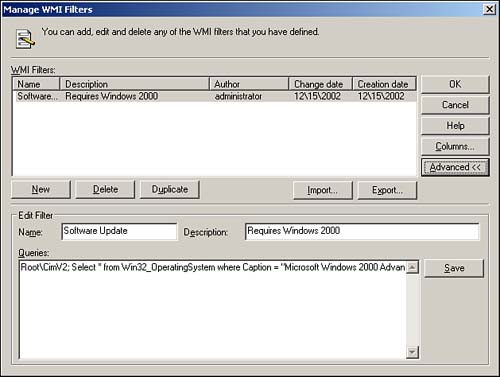
NoteThe trick with WMI filtering is writing the WMI script on which the filter is based. Figure 6.2 shows a sample WMI filter that detects whether Windows 2000 is installed. Figure 6.2. Configuring a WMI filter to detect whether Windows 2000 is installed.
|
Cross-Forest Support
Group policies in Windows Server 2003 now have cross-forest support. Before you get too excited, this does not mean that you can link GPOs created in a domain in one forest to objects (sites, domains, or OUs) in another. What it does mean, however, is that after root trusts are established, GPOs from trusted forests can be detected and processed. For example, when a user (Mary) from one forest (Forest1) logs on to a machine (ComputerA) that is a member of another forest (Forest2), the resulting group policies are those applied to ComputerA in Forest2 and those applied to Mary in Forest1. Additionally, you can allow cross-forest profiles so the user in the previous example would get his roaming profile as well.
For more information on the new cross-forest root trusts and how they are used, see Chapter 5, "Active Directory," p. 65.
Software Deployment
On the surface, the Software Installation section looks the same as Windows 2000. However, a few subtle alterations exist in the software package creation process that can dramatically affect software deployments.
The first is merely a cosmetic change. When creating packages in the Software Installation section of Group Policy, you can now modify the Support Information URL. As shown in Figure 6.3, the support information URL is displayed when you click the support information link for an application in Add or Remove Programs.
Figure 6.3. The support information URL link for the Remote Administration Application in Add or Remove Programs.
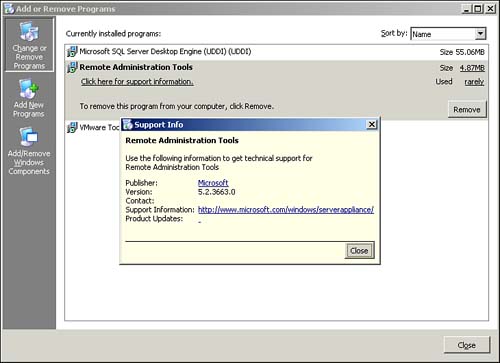
Previously, the support URL information was specified in the software distribution package file being loaded. Therefore, to specify a different URL, you had to create a different package. The ability to customize the URL when creating the software distribution in Group Policy enables administrators to provide users with support information regardless of the package. For example, the same software package can be used and the users directed to different support centers simply by specifying different support URLs when creating the package in the GPO.
A new choice for assigning applications to users is the option called Install This Application At Logon. This option fully installs the assigned application when the user logs on instead of on first use. This is particularly useful for users who are not always connected to the network. They can connect once and have the software installed immediately. Previously, applications assigned to users were installed on first use or from Add/Remove Programs. In the case of mobile users, they might not actually use it for the first time until much later, after they have disconnected from the network. In that case, the software would attempt to install but would be unable to do so because the network would no longer be available. This new option prevents this scenario because the software is installed when the policy applies and the user is still connected to the network.
CautionBe careful when implementing this policy: You might not want your users to get the application over dial-up. Imagine installing a 500MB application over 56K lines. It'll be done sometime next week. You can use other Group Policy settings to mitigate this by detecting slow WAN links and preventing the installation of software. |
The Software Installation section of Group Policy has added support for 64-bit operating systems because a 64-bit version of Windows is available now. Specifically, the following options are available:
You can make 32-bit x86 Windows Installer applications available to Win64 machines.
You can make 32-bit x86 down-level (ZAP) applications available to Win64 machines.
These options enable the installation of regular 32-bit applications on their 64-bit cousins.
CautionUse these options only if you have already tested the 32-bit application and know it works on your 64-bit systems. Poorly performing 32-bit applications can severely impact the performance of your 64-bit systems. |
For more information on 64-bit operating systems, see Chapter 15, "64-bit Windows," p. 253.
Another new option when loading packages to be deployed with Group Policy is Include OLE Class and Product Information. This option specifies whether to deploy information about the Component Object Model (COM) components the application might need. By specifying this option, the application can dynamically install any of the required COM components if necessary by simply querying Active Directory.
NoteAlthough it is still in the documentation of Windows Server 2003 RC1, the option Remove Previous Installs of This Product from Computers (or for Users), If the Product Was Not Installed by Group Policy-Based Software Installation is no longer available. This feature was always iffy at best. Sometimes it worked; sometimes it didn't depending on the application and how it was originally installed. As of this writing, it looks as if Microsoft will not include this option, although it could change its mind and leave it in. |


