The .NET Framework
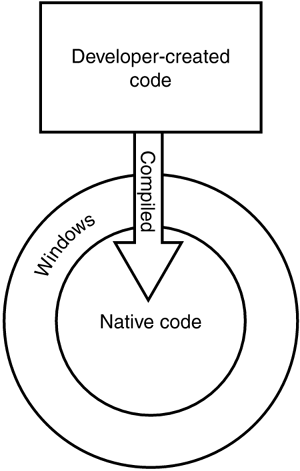
The .NET Framework represents an entirely new way of thinking about software development. You're probably familiar?even if you don't realize it?with the "old way" of creating software applications, which is illustrated in Figure 9.1. Developers would use a tool such as Visual Basic 6.0 to create software applications. When they were finished, the tool compiled their program code into native code, a form of program code that can execute directly on the operating system. Physically, Visual Basic code exists in simple text files, which the operating system can't execute. Compiled programs, however, exist in familiar EXE files, which can execute directly on the operating system. This software development technique has been around in one form or another since the beginning of computer programming and is capable of producing applications with very good performance.
Figure 9.1. Traditional software development produces executables for a specific operating system and hardware platform.
There are a number of problems with this traditional programming model:
Executables produced in this fashion only run on a specific operating system and hardware platform? As enterprises continue to implement a wider variety of hardware and operating systems?including portable devices like Pocket PCs?developers have to work harder to make their programs run throughout the enterprise. Each new operating system/hardware combination requires specialized development tools and often requires developers to start programming from scratch for each platform.
Very few popular programming tools take full advantage of the object-oriented nature of Windows? Object-oriented programming saves time and money by allowing developers to create small sections of code to perform specific tasks and then easily reuse that code in several different projects. A powerful object-oriented language also allows developers to reuse functionality inherent to the operating system, such as drawing windows and buttons, accessing files and networks, and so forth.
Different programming languages have different strengths and weaknesses, and developers have to choose one and pretty much stick with it? Each language typically operates in a completely different fashion, making it very difficult for developers to switch back and forth between languages when working on different projects. As a result, developers tend to pick one language and stick with it, even if it isn't ideal for the task at hand.
The purpose of the .NET Framework is to address all these issues. For starters, Microsoft has provided new, .NET-compatible versions of its popular Visual Basic and C++ programming languages and introduced a new language named C#, which is similar in many respects to the popular Java programming language from Sun Microsystems. Although each of these languages has a different syntax, or grammar, they all offer the same basic capabilities. For example, developers who wanted to interface closely with the operating system used to choose Visual C++ as their language, often because languages such as Visual Basic didn't provide close operating system integration. Under .NET, that's no longer true: Each of the .NET languages provides the same capabilities, allowing developers to work in whatever language they're most comfortable with. Even better, all the languages can be used from within the same development tools (such as Visual Studio .NET), so that developers can switch languages without having to learn an entirely new set of tools.
The .NET Framework's changes go beyond developer convenience, though. When compiling a Visual Basic 6 application, developers produce an executable file. In Visual Basic .NET (or any other .NET language), however, compiling is simply an automated process in which the .NET Framework translates the developer's program code into a universal programming language called the Microsoft Intermediate Language (MSIL, or just IL). What's more, IL doesn't even execute directly on the operating system. Instead, IL is executed inside a virtual machine called the common language runtime (CLR). The CLR actually reads the IL and compiles it into a form of native code. This final compilation occurs when the program is executed and is referred to as just in time (JIT) compilation. The CLR improves performance by saving the compiled program and reusing it until the original code is changed and recompiled into IL by the developer; at that time, the CLR recompiles the new IL and executes it. Figure 9.2 illustrates the new development environment the .NET Framework uses.
Figure 9.2. .NET applications have a number of extra steps involved in their execution.
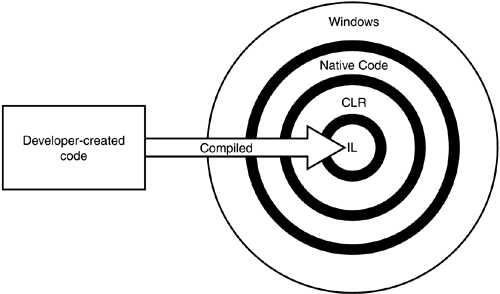
So, what's the purpose of this extra complexity? Developers no longer write code for a specific operating system. Instead, they write for the CLR itself, which allows their code to execute more or less unchanged on any platform for which a CLR is available. Microsoft already provides a CLR for Windows and a Compact CLR for Pocket PCs and other Windows CE devices. The future might bring Linux- or Unix-compatible CLRs, allowing .NET applications to run (hopefully) unchanged on a completely different operating system. This capability solves another traditional development problem by allowing developers to write one program that runs on all of an enterprise's various computing devices.
This business with the CLR and cross-platform compatibility should sound familiar because it's what Java advocates have been preaching since their product was introduced. Java uses a similar development model in which developers write Java-specific code, which is executed by a Java Virtual Machine (JVM). So long as a JVM is available for a specific platform, that platform can run virtually all Java applications. If you've used Java applications, however, you might have noticed that they don't perform quite as quickly as native-code applications written in Visual Basic 6.0, Visual C++ 6.0, or other traditional programming languages. That performance decrease is inherent in any virtual machine technology: Rather than executing an application directly on the operating system, both Java and .NET execute the application within a virtual machine (the CLR in the case of .NET), and the virtual machine itself is executed by the operating system. In other words, the virtual machine represents an extra layer of code that has to be executed, which reduces performance.
Although .NET applications tend to perform pretty well, they can't compete with native-code applications, especially those written in Visual C++ (the language Windows itself is written in). For that reason, you won't see Microsoft using the .NET Framework to develop the next versions of its .NET Enterprise Servers, such as Exchange Server and SQL Server. Those will continue to be written in native code for a specific platform. Perhaps some future version of the CLR, combined with the ever more powerful hardware being created, will enable powerful server applications to be written in .NET, but that day is probably a long way off.
So, what does an administrator need to know about the .NET Framework? Prior to Windows Server 2003, the .NET Framework itself had to be installed before .NET applications could be installed and executed; Windows Server 2003, however, comes with the .NET Framework built right in, so your developers can immediately start installing and executing .NET applications on your servers. So, although deployment is a piece of cake, an additional administrative effort is involved because the .NET Framework adds whole new levels of security and management to your servers. In fact, Windows Server supports an entirely new console called the .NET Framework Configuration Console, shown in Figure 9.3.
Figure 9.3. The .NET Framework Configuration console enables you to modify the behavior and other properties of the .NET Framework.
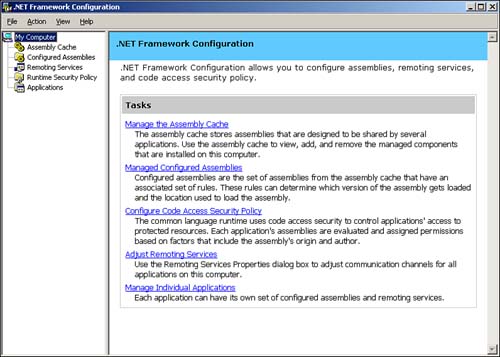
This new console allows you to manage five aspects of the .NET Framework:
Assembly Cache? Assemblies are basically modules of code that are shared by several applications. For example, a developer might create a logon routine and use it in all his corporation's custom applications. The Assembly Cache acts as a storage area for these assemblies, making them available to the applications running on the server.
Configured Assemblies? Assemblies from the assembly cache can be organized into sets and associated with different rules. These rules determine which version of assemblies are loaded and which location is used to load the assemblies.
Code Access Security Policy? The .NET CLR includes a complete set of code access security policies that control applications' access to protected resources. This extra layer of security ensures that only authorized applications can get to sensitive server and network resources and prevents unauthorized applications from wreaking havoc on your network.
Remoting Services? These services enable applications to communicate with applications on other computers, and the console allows you to adjust the communications properties.
Individual Applications? You can configure each .NET application with its own set of configured assemblies and remoting services, customizing the behavior of each application to meet your precise needs.
You might find yourself wondering whether many of these tasks are more properly suited to a developer rather than an administrator. Only time will tell if that's the case, but we firmly believe that administrators are responsible for the overall operation, efficiency, and security of the enterprise network, and that places these five configuration tasks firmly in the administrator's realm. Developers often become too focused on a particular task and don't take the health and well-being of the entire network into consideration, leaving it to the administrator to make sure everything is configured safely and efficiently. With that in mind, we'll spend the next five sections briefly covering each of the major .NET Framework configuration tasks.
Managing the Assembly Cache
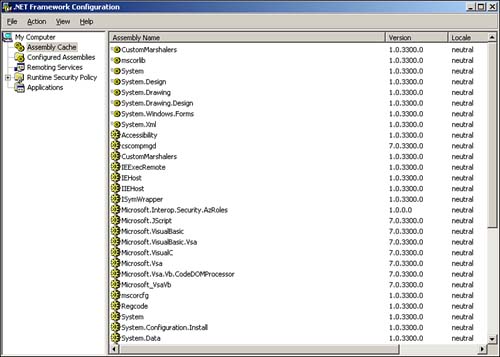
Adding an assembly is pretty easy?just right-click Assembly Cache and select Add from the pop-up menu. As shown in Figure 9.4, the console displays a complete list of available assemblies. You'll need to rely on your developers to tell you which assemblies are required by their applications and to provide those assemblies for installation on your server.
Figure 9.4. Windows Server comes with a long list of preinstalled assemblies.
CautionWindows Server doesn't attempt to validate or verify the assemblies you add. Before adding an assembly, make sure it has been thoroughly tested and that it functions correctly, unless of course you're adding it to a test server for testing purposes. |
One great feature about the assemblies list is the inclusion of each assembly's version number. This feature enables you to quickly determine which version of an assembly is running, thereby ensuring that the correct assemblies required by .NET applications are available on the server.
TipAsk your developers to maintain written documentation about with which assemblies and versions their applications have been tested. Such documentation can help narrow down application problems very quickly. |
Managing Configured Assemblies
Adding a configured assembly is also pretty straightforward. Right-click Configured Assemblies in the console and select Add from the pop-up menu. Select an assembly from the assembly cache, and then specify the assembly's configuration properties, as shown in Figure 9.5.
Figure 9.5. Assembly properties include a binding policy and codebase information.
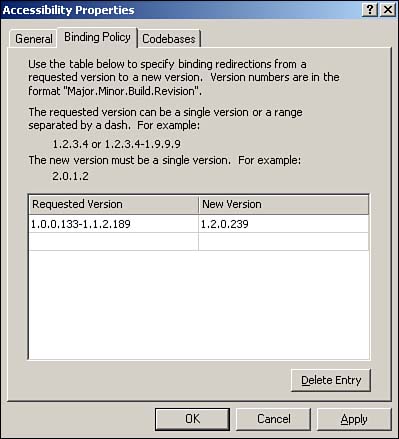
A binding policy tells the server how to handle requests for different versions of the assembly. Multiple versions of an assembly can reside in the assembly cache at the same time; which version an application gets when it requests the assembly depends on the binding policy you set. The example in Figure 9.5 is for an assembly named Accessibility. Any application requesting version 1.0.0.133?1.1.2.189 of the assembly is given version 1.2.0.239, which must reside in the assembly cache. Binding policy enables you to actively manage backward compatibility because you can specify which version of the assembly will be used with a given request for a particular version.
TipHave your developers document the assembly versions their applications will request and provide you with a list of compatible assembly versions. This documentation will enable you to configure the proper binding policy for the .NET applications running on your servers. |
Codebases are network-accessible versions of assemblies, which enable applications to load assemblies that aren't available in the server's assembly cache. You must specify the version of the assembly that an application might request and then provide a URL?either an http:// URL or a file:// URL?where a compatible assembly is located.
Managing the Runtime Security Policy
Windows Server groups security policies into three levels: per-enterprise, per-machine, and per-user. You can establish different security policies at each level. The security policy is basically a combination of code groups and permission sets. A code group simply organizes code into manageable groups. Permission sets define sets of permissions for code, such as the capability to access the file system, network, and other resources. It's important to understand that the effective permissions on any particular assembly are the combination of the enterprise, machine, and user policy levels. Each assembly might belong to different code groups at each level and will receive the most restrictive combination of permissions from all three levels. You can think of this behavior as similar to user groups and file permissions: Users can belong to multiple groups and receive the combination of permissions available to each group to which they belong.
Windows Server includes a default All_Code code group at each policy level. As shown in Figure 9.6, the membership condition of this group is simply All Code. You can define other code groups with different membership conditions, such as "all code in a certain folder" or "all code from a particular publisher." You then assign a permission set (Windows Server includes several predefined sets) to determine what the code within the group is allowed to do. There's even a default Nothing permission set, which prevents code from executing at all. This can be useful for preventing the execution of code that is known to be harmful.
For more information on the .NET Framework security permissions, see Chapter 4, "Security," p. 45.
Figure 9.6. Code groups and permission sets enable you to define precisely what different applications can do on your servers.
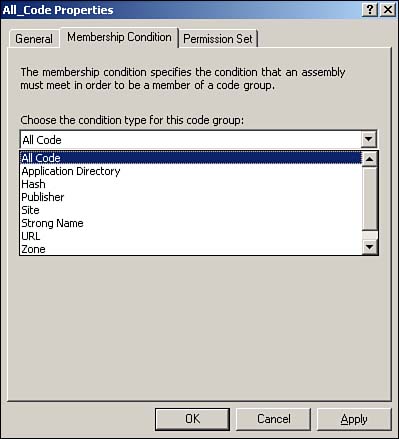
You can think of code groups as similar to domain user groups. Rather than explicitly placing applications within a code group, as you do with users, you specify rules. It's as if you could specify a rule that places all users whose names begin with D in a particular user group. And you can think of permission sets as preconfigured sets of file permissions. By assigning a permission set to a code group, you grant specific privileges to the code contained within the group.
Managing Remoting Services
Remoting Services allows applications to communicate with applications located on other computers. These communications take place via communications channels. By default, Windows Server provides two channels: TCP and HTTP. Neither of these channels provides any significant properties that you need to configure. Other communications channels can be installed on a server to allow communication over different networks or with different levels of security; these channels might provide properties that you need to configure through the Remoting Services portion of the .NET Framework Configuration Console.
Managing Individual Applications
To add a new application to the console, right-click the Applications item and select Add from the pop-up menu. The console displays a list of recently executed applications, from which you can select an application to add. You can also select any other application if the one you want isn't displayed on the list. For each application you add, you can do the following:
Modify the application's properties? This includes publisher policy, a private folder path used to locate additional assemblies, and so forth. Your developers will need to help you configure these properties if they should change from the defaults.
View the application's dependencies? This is a list of all assemblies used within the application. This feature can be useful when you're installing an application written by a third party or a poorly documented application because it helps you track down the assemblies the application needs to run properly.
Manage Remoting Services for this particular application? Applications that use Remoting Services need additional configuration information here, which your developers should be able to provide to you.
Fix the application? This great tool examines the application and looks for problems with its dependencies. The tool can even modify the application's configuration file to fix certain problems. This tool is useful when installing a poorly documented application to check for dependency issues that can otherwise be difficult to track down.
You can also configure a private set of configured assemblies for the application, enabling you to create a custom configuration that affects only this particular application, rather than a generic configuration that affects all applications on the server.


