Architecture and Memory Management
IIS's architecture has always had a lot of challenges. Think about it: IIS is designed to execute applications written by other software developers with varying levels of experience. The learning curve for Web development isn't that steep, so relatively inexperienced developers are often in the position of creating corporate Web applications. As a result, those applications often contain the types of errors normally associated with inexperienced developers, including memory leaks, imperfect code access violations, and so forth. As the host process, IIS has to be reliable and scalable even when running these imperfect applications. Prior versions of IIS had certain design limitations, such as their use of memory and their interaction with the Windows operating system; IIS 6 revises much of IIS's underlying architecture to provide a more reliable, scalable application hosting environment.
IIS 5 uses a single process, Inetinfo.exe. This process can accept incoming HTTP requests and farm them out to one or more other processes by using dllhost.exe. This architecture limits the amount of exception handling that IIS can perform and also limits its overall capability to deal with poorly written Web applications. IIS 6, on the other hand, uses a new architecture built around a kernel-mode driver, http.sys. This driver listens for incoming HTTP requests and handles them. By running in kernel mode, rather than user mode, http.sys can interact with Windows at a much lower level, providing better performance. Essentially, http.sys provides the core functionality for a generic Web server; application handling is done by completely separate pieces of code, ensuring that Web applications have no effect on the core Web server code.
Two other new concepts are worker processes and application pools. IIS 6 contains a new Web service DLL, which is loaded into memory by one or more worker processes, which are separate processes from the core Web server process running http.sys. These processes can load Internet Services Application Programming Interface (ISAPI) filters and extensions, such as the ISAPI extensions used to implement ASP and ASP.NET. By keeping these filters and extensions in the separate worker processes, the core Web server process remains protected against poorly written applications. Application pools accept incoming HTTP requests from http.sys and deliver those requests to one or more Web applications based on the applications' URLs. A single application pool can feed multiple worker processes and provide a means for administrators to manage the separation between multiple Web applications running on a single server.
Putting It All Together
So, here's how it all works: The http.sys driver listens for incoming requests and queues them up. The driver maintains one request queue for each configured application pool, so that each pool's requests can be delivered independently. For example, suppose you're running Application A and Application B on the same server. Users access Application A by using the URL http://servera, and they access Application B by using http://serverb, although both URLs point to the same physical Windows Server 2003 server. The http.sys driver separates incoming requests by their destination URLs, lining up the requests in the application pool for each application (assuming each application is configured to use a separate application pool). Any poorly written code in Application A will not affect http.sys because it runs in kernel mode and contains 100% Microsoft code. Even if Application A completely crashes, http.sys will continue to queue up incoming requests for Application B. This process is illustrated in Figure 7.2, which shows two application pools configured to handle three applications.
Figure 7.2. Applications within a pool can be completely different, such as the first pool shown, which runs an ASP application and an ASP.NET application.
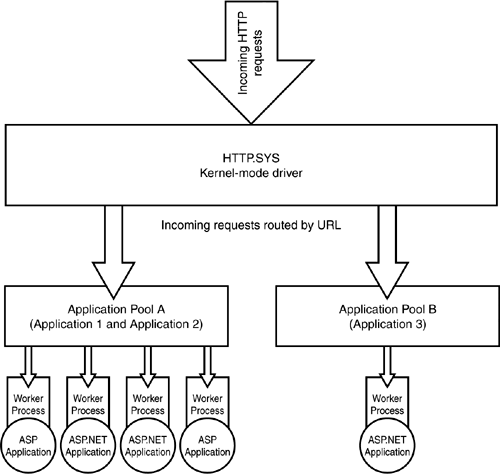
Each application pool can be serviced by multiple worker processes, which actually execute the Web application's code, such as an ASP or ASP.NET application. If one of the applications does crash, the WWW service will eventually notice that the worker process is no longer servicing requests from its application pool. In response, the WWW service creates a new, identical worker process to service any outstanding requests. The failed process will eventually be terminated after a set amount of time (which we'll discuss later).
Another key architectural component is the new WWW Service Administrator and Monitoring component. Like http.sys, this component contains 100% Microsoft code and never loads third-party code, helping to ensure its reliability. This component is primarily responsible for configuring IIS and managing IIS's processes. The component reads IIS configuration information from the IIS metabase and initializes the http.sys driver's namespace with one entry for each configured application. This initialization informs http.sys that there is an application pool that responds to each namespace entry, so that http.sys can start new worker processes for the application pool. Note that http.sys requests worker processes only when there is a demand for them; if you have configured eight applications on your Web server, worker processes will exist only for applications that are actually receiving HTTP requests. This behavior conserves server resources for applications that are actually being used.
Worker Process Isolation
IIS 6's new worker process isolation mode enables IIS to run application code in an isolated section of memory, without the negative performance hit experienced in previous versions of IIS.
NoteIIS 6 also supports a backward-compatible process isolation mode, called IIS 5 isolation, which I'll discuss later. |
The http.sys driver routes requests to the appropriate application pool queue, and worker processes running in user mode pull those requests directly from http.sys. This behavior eliminates unnecessary communication between the separate processes; normally, such cross-process communication is a major contributing factor to slow application performance. In fact, previous versions of IIS handled cross-process communication so poorly that many application developers created in-process applications to avoid the performance problems. In-process applications ran in IIS's main memory space, and if the application crashed, so did IIS. IIS 6 doesn't offer this as an option, ensuring the integrity of the core http.sys driver. Because all application code executes in isolated worker processes, applications can crash (or be deliberately unloaded) all they want, without affecting the core Web server code.
Isolating these worker processes has side benefits, as well, such as the ability to throttle the CPU utilization that a particular process can consume. This capability enables you to limit (to a degree) the server resources consumed by a particular Web application, without crippling the core Web server code in http.sys.
Keep in mind that multiple applications can be assigned to a single application pool. For example, Web hosting companies might create a unique application pool for each customer, assigning all of that customer's applications to one pool. Any failed application might take down the entire pool, but only that one customer would be affected.
TipAs we'll describe later in this chapter, applications can be assigned or reassigned to an application pool on-the-fly, without restarting the application or the Web server. |
IIS 6's complete isolation of applications suggests interesting new load-balancing capabilities in the future. For example, suppose you administer a Web farm that runs two different Web applications and contains three Web servers. If Application A on Server 1 crashes, IIS could communicate that to load-balancing software, which could direct all incoming Application A requests to Servers 2 and 3. Incoming requests for Application B could still be load-balanced across all three servers, providing maximum load-balancing efficiency.
TipYou can configure a new IIS 6 features known as rapid fail protection to completely disable processes that fail frequently. For example, if a particular worker process fails and is subsequently restarted 10 times in a short period of time, the application is obviously misbehaving. IIS can disable the application pool, returning a 503: Service Unavailable error to users and preventing the application from consuming any additional server resources. You can also manually place applications in this out-of-service mode for maintenance or to stop runaway applications. |
Bear in mind, too, that a single application pool can be serviced by multiple independent worker processes. Microsoft refers to this as a Web garden because it's a bit like a Web farm where multiple servers handle a single Web site. In this case, the so-called garden exists entirely on a single server, with multiple isolated processes responding identically to incoming requests for the application's services. IIS automatically handles the distribution of requests between worker processes.
Backward Compatibility
IIS 6 also supports an IIS 5.0 Isolation Mode, a backward-compatible architecture that retains the http.sys kernel-mode driver but runs all user-mode processes within a single process hosted by Inetinfo.exe. This mode is designed to support multiple-instance applications, applications that rely on session state being persisted in-process, and so forth. Essentially, http.sys delivers all incoming requests to Inetinfo.exe, which operates similarly to the architecture in IIS 5.0. Your Web developers should be able to tell you whether their applications require this backward-compatible architecture. Be advised, however, that IIS 5.0 Isolation Mode does not include the additional reliability of IIS 6's native architecture, and you can't use both isolation modes at the same time on a single computer.


