WebDAV and Remote Sharing
Another benefit for file sharing in Windows Server 2003 is an extension to WebDAV. The new WebDAV redirector allows file sharing using normal HTTP, which in turn enables access to network shares across the Internet through firewalls and proxy servers. This new feature is implemented as the Web Sharing tab on the properties of the folder to be shared. Simply select the Web site and click Share This Folder, as shown in Figure 8.5. (IIS has to be installed first.)
For more information on IIS 6, see Chapter 7, "Internet Information Services," p. 101.
Figure 8.5. Enabling remote file sharing by creating a virtual directory that is accessible via WebDAV.
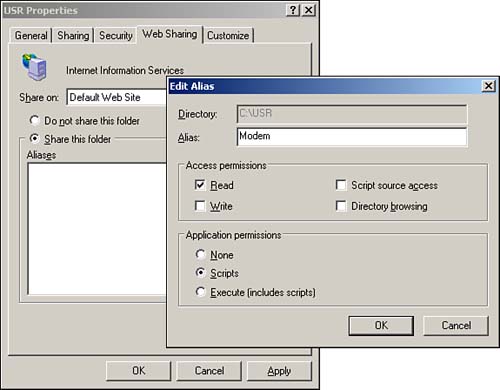
Next, give the Web share a name?the Alias?and designate the permissions (read, write, script source access, directory browsing, scripts, and scripts and executables). Doing so creates a new application (a virtual directory enabled as an application) in the specified Web site. Windows XP clients can then map a drive to this WebDAV-enabled virtual directory, which makes the file share available to any application without requiring anything special.


