Compressed Folders
The next new feature we'll look at is compressing files and folders. This provides the utilitarian function of saving disk space by reducing the amount of physical disk space occupied by files. Windows NT has always had a mechanism for saving disk space by compressing files: the NTFS file compression attribute feature. With Windows Server 2003, Microsoft introduces another method for compressing files?compressed (zipped) folders. This section discusses the two mechanisms and how they differ.
NTFS Folder Compression
NTFS file and folder compression is implemented as a file-level attribute. A check box in the properties of a volume, folder, or file designates it as compressed. If enabled, the operating system handles the compressing and uncompressing of the file without any user intervention. Whenever a file or folder with the compressed attribute enabled is opened, the operating system automatically uncompresses it. When the file is saved, the OS automatically compresses it again, completely transparent to the user. However, all this compressing and uncompressing of files adds extra processing overhead because the OS has to constantly uncompress and recompress files whenever they're opened and closed. The benefits of freeing up disk space and ease of use for the user must be balanced against the extra processing load when determining whether to use NTFS compression. Another drawback to NTFS compression is that, because it is a file system attribute, it is compressed only on the file system. The implication of this is that, if you access the file across the network, it is first uncompressed by the operating system and then sent across the network in an uncompressed format. Thus, no network bandwidth improvement occurs because the file is sent across the network as if it were never compressed. In actuality, degradation in the file transfer occurs because of the extra processing to uncompress the file. Yet another drawback to NTFS compression is that it is incompatible with the Encrypting File System (EFS) NTFS attribute introduced in Windows 2000. You can enable either the file compression attribute or the file encryption attribute, but not both.
For more information about EFS, see "Encrypting File System," p. 141.
NoteTo compress a file, you need at least as much disk space available as the uncompressed file size. For example, if you attempt to copy a 100MB file to a compressed location with 80MB free, even if the file can be compressed to 50MB, you will be unable to copy the file because it must be copied first and then compressed. |
Compressed (Zipped) Folders Feature
Windows Server 2003 still has the NTFS file compression attribute, just like previous versions do. However, it now has the new Compressed Folders feature. This feature is more akin to third-party compression utilities such as WinZip or its earlier cousin PKZIP. As shown in Figure 3.1, Compressed Folders is implemented as a pop-up menu option. Just select the files or folders you want to compress, right-click, select Send To, and then select Compressed (Zipped) Folder.
Figure 3.1. Right-click a file or folder to create a Zip file with the new Compressed Folders feature.
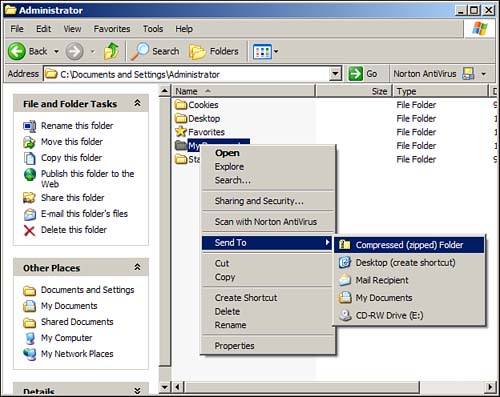
This creates a separate (Zip) file containing all the files and folders you selected. You can use this new feature to individually compress files and folders for archival purposes. Unlike NTFS file compression, though, user intervention is required to compress and uncompress the files with this method. It really creates compressed copies of the file(s), whereas NTFS compression compresses the original file. Additionally, because it is a utility doing the compression and not a file-level attribute, you can compress any file or folder?even those on FAT partitions. The true benefit is the ability to take the Zip archive that is created and move it elsewhere, such as across the network. This gives you the capability to transport the files in a compressed format. You can then use this to minimize your network traffic when copying the archive to another location or make it small enough to fit on some other archival media, such as CD-ROM, Zip, or floppy disk, for transport elsewhere. These are just a couple examples of the uses of compressed files. Another common use is to compress multiple files and wrap them up in a single package, which is particularly useful for emailing large documents or pictures to friends or support personnel.
TipIn addition to being able to create and read your own Zip files, the Compressed Folders feature enables you to extract Zip archives, even those created with other Zip applications. |
NoteThe Compressed Folders feature is not available on 64-bit versions of Windows Server 2003. |
 |
For a comparison of the Compressed Folders feature and third-party compression utilities such as WinZip, visit www.samspublishing.com and enter this book's ISBN number (no hyphens or parenthesis) in the Search field; then click the book cover image to access the book details page. Click the Web Resources link in the More Information section, and locate article ID# A010301. |


