Architecture
Active Directory includes a number of architectural changes. Although most of these are invisible if you don't look for them, it's valuable to understand what they do and how they work so you can manage and plan your domains more effectively.
Partitioning
A new feature of Active Directory in Windows Server 2003 is the capability to support application partitions. These partitions are sections of Active Directory that don't have to be replicated to every domain controller in a domain.
For example, suppose you have a new line-of-business application that stores information in Active Directory. Only two of your branch offices use this application, and they each have their own domain controllers. You can instruct the application to store its information in a separate Active Directory partition and then configure that partition to replicate only to those two branch offices' domain controllers. You'll reduce replication traffic to other domain controllers, as well as saving hard drive space and memory on other domain controllers.
You create and manage partitions entirely from the command line using the Ntdsutil utility (hopefully, a future update to Windows will include a GUI for this functionality). The process isn't complicated, but you do have to be careful because Ntdsutil doesn't provide much in the way of error-checking or undo capabilities. For step-by-step instructions, consult Windows Server 2003's online Help and Support Center and search for "application partitions."
You'll also need to do some planning for your partitions because they get their own names. For example, in a domain named braincore.net, you might create an application partition named application.braincore.net. The fact that the partition looks like a child domain lets applications?even those that don't know about partitions?easily store information there, but you need to be careful not to conflict with your domain naming scheme. Again, planning details can be found in the Help and Support Center.
Schema Deactivation
In Windows 2000, you can extend the Active Directory schema to include custom classes and attributes. Many applications, including Microsoft Exchange 2000 Server, take advantage of this capability to store application data in Active Directory. The problem is that you can't subsequently delete the custom classes and attributes if you stop using the application.
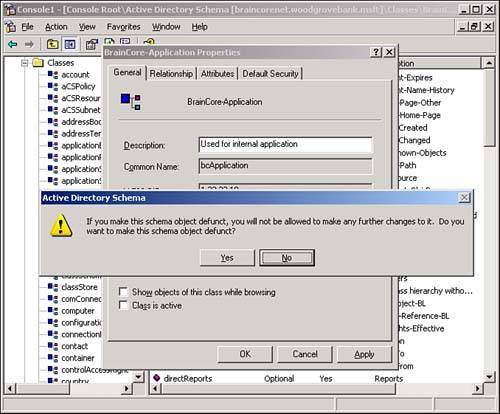
Windows Server 2003 still doesn't allow you to delete classes and attributes, but it comes one step closer. As shown in Figure 5.9, you can use the Active Directory Schema console to make classes or attributes defunct. To do so, you modify the properties for the attribute or class and simply clear the Active check box. You'll receive a warning message and, if you click OK, the class or attribute will be made defunct, meaning it cannot be used to create any new objects.
Figure 5.9. Use the Schema console to mark classes and attributes as defunct.
Note that no Schema console is configured by default. You must follow these steps to get to this new feature:
Open a command-line window and change it to the Windows\System32 folder.
Type regsvr32 schmmgmt.dll and press Enter.
Type mmc and press Enter.
From the File menu, select Add/Remove Snap-Ins.
Click Add.
Locate and double-click the Schema snap-in.
Close all dialog boxes, and you'll have a new Schema console ready for use. Be sure to save the console for future use by selecting File, Save As.
Even though you still can't delete schema classes and attributes, you can at least ensure that they won't be used in new object definitions. Perhaps a future version of Windows will allow you to remove defunct classes after a period of time.
Replication Improvements
Windows Server 2003 offers some major improvements to replication, providing better performance in Windows Server 2003 domains. The major improvements include the following:
Under Windows 2000, global catalog (GC) replication is very inefficient whenever changes occur to the Active Directory schema? Any schema changes require every GC server in an entire forest to dump the GC completely and rebuild it from scratch, which is a significant operation in large forests. In Windows Server 2003, with forests running in the Windows Server 2003 functional level, GC servers are capable of replicating schema changes. That means schema changes are no longer the nightmare they once were, requiring special planning and all-night sessions waiting for replication and GC rebuilds to complete. Instead, schema changes can be replicated change-by-change to each GC in the forest, creating less replication traffic, user impact, and administrator stress.
In Windows 2000, changing the membership of a group requires domain controllers to rereplicate the entire group? Therefore, adding a new user to a group with 5,000 members requires a lot more replication traffic than you might think. Windows Server 2003 domain controllers are capable of replicating the changes only to group members and adding a new user or removing a user one at a time, rather than rereplicating the entire group. This improved replication occurs only between Windows Server 2003 domain controllers; any Windows 2000 domain controllers in your domain will continue to replicate the entire group when changes to its membership occur.
Windows Server 2003 includes new replication algorithms that improve performance and help decrease latency between domain controllers? It also includes a new Intra-Site Topology Generator (ITSG) that generates the replication topology between Active Directory sites. You must be running an all-2003 domain to take advantage of these improvements, however, because they're enabled only in domains running in the Windows Server 2003 functional level.


