What's New
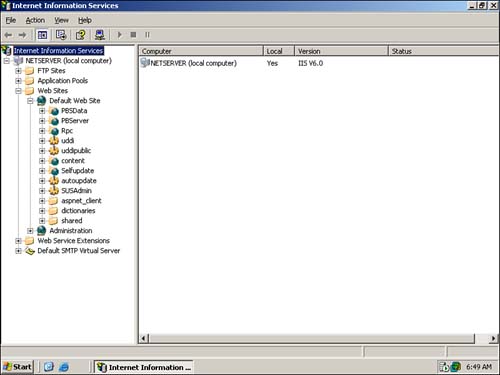
A quick glance at the IIS console reveals the tip of the huge iceberg of changes contained within IIS 6. As Figure 7.1 shows, the console sports a slightly different graphical look, using the more photorealistic icons first introduced in Windows XP. The changes are more than skin deep, though, as indicated by the console's Application Pools and Web Service Extensions folders.
Figure 7.1. The new IIS snap-in sports a revised look and entirely new areas of functionality.
Of all of Windows Server 2003's major features, IIS 6.0 is perhaps the biggest set of changes over Windows 2000. IIS has been completely revamped to be a more powerful, reliable, and secure Web server platform.
NoteAs we've mentioned elsewhere in this book, Windows Server 2003 is the server equivalent to Windows XP. However, Windows XP Professional contains IIS 5.1, which is a relatively minor revision over the IIS 5.0 contained in Windows 2000. |
Briefly, IIS 6.0's major improvements include
Built-in application health monitoring, enabling Web server administrators to more effectively monitor the status of their Web applications.
Changes to the way IIS processes incoming HTTP requests make the product more secure and less vulnerable to the many request-based attacks used against earlier versions of IIS.
IIS is completely locked down by default, requiring manual steps to enable advanced technologies that might create security vulnerabilities.
IIS's metabase, the database that contains IIS's configuration settings, is now fully XML based and includes new management tools that make it easier for administrators to directly manipulate the metabase.
Microsoft's .NET Framework is included with Windows Server 2003, making it an out-of-the-box solution for .NET-based Web services applications built on IIS 6.
These changes are all designed to address fairly major functional deficiencies found in earlier versions of IIS. One of the most important alterations is the complete change in Microsoft's philosophy regarding IIS because IIS is not a default installation option in Windows Server 2003. Instead, administrators must specifically decide to install IIS. And, after installed, IIS is by default configured in a fully locked-down model, requiring administrators to take additional steps to enable more advanced features.
What's an Application Server These Days?You'll see documentation from Microsoft referring to application servers. In the past, administrators used this term to refer to any server running an application, such as Microsoft SQL Server or Microsoft Exchange Server. In Microsoft's new terminology, application server refers to a server that provides a platform for applications, namely IIS, ASP.NET, COM, the Microsoft Data Engine (MSDE), and so forth. This new application server role replaces the role of Web server in Microsoft's universe. |
 |
To learn more about prior versions of IIS, and for a brief overview of IIS, visit www.samspublishing.com and enter this book's ISBN number (no hyphens or parentheses) in the Search field; then click the book's cover image to access the book details page. Click the Web Resources link in the More Information section, and locate article ID# A010701. You can also check out http://support.microsoft.com/default.aspx?scid=KB;EN-US;q224609&, which includes an IIS version comparison chart. |


