The POP3 and SMTP Services
IIS 6 includes an optional SMTP service, and Windows Server 2003 includes a related POP3 service. The SMTP service enables IIS to send email by using the Simple Mail Transport Protocol (SMTP). The POP3 service enables you to create mailboxes that can receive and store incoming email. Users can then log on to their mailboxes to retrieve their mail, much as they would for a regular Internet service provider (ISP).
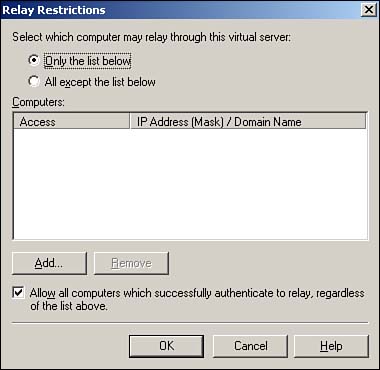
IIS 6's SMTP service is very similar to the SMTP service provided in IIS 5. Of particular importance, however, is the Relay Restrictions, shown in Figure 7.17. This dialog box can be accessed by right-clicking the SMTP virtual server, selecting Properties from the pop-up menu, and then clicking the Relay Restrictions button on the Access tab. By default, IIS is configured to relay email only from computers on the list, which, as shown, is empty by default?preventing relaying entirely. Notice, however, that the check box at the bottom of the dialog box is selected by default, allowing all authenticated computers and users to relay email.
Figure 7.17. SMTP relaying is a major cause of network saturation, server overutilization, and security issues.
Why is relaying bad? SMTP relaying enables a user to connect to an SMTP server, compose an email destined for a recipient who doesn't have a mailbox on that server, and then disconnect. The server automatically relays the message, making it seem as if the message came from within your organization. In effect, relaying enables an SMTP server to be "hijacked," and it enables the hijacker to send free email that's practically untraceable. Much of the Internet's unsolicited email is sent through SMTP relaying. SMTP relaying increases network traffic, increases your servers' resource utilization, and decreases the availability of your server for your own users. Relaying can also land you in legal trouble because many ISPs take legal action for unsolicited email against the owners of the SMTP server from which the mail originated.
SMTP has one legitimate use: Users with POP3 email clients, such as Outlook Express, need an SMTP server to send outgoing email. Therefore, IIS defaults to allow authenticated computers to relay because it allows IIS to accept outgoing email from legitimate users and deliver that email to its final destination (or to another SMTP server that will handle the final delivery).
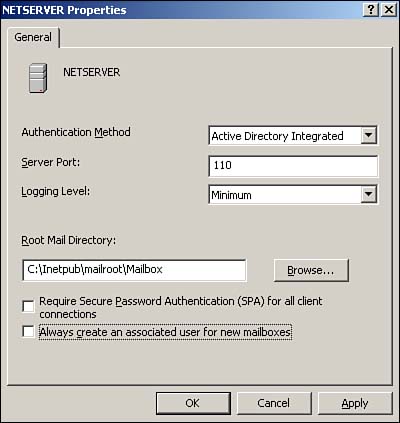
Windows Server 2003 also includes a POP3 service, which you administer through its own MMC snap-in. Figure 7.18 shows the basic properties for the POP3 service, which include the server's authentication method, server port, and logging level. The standard POP3 port of 110 shouldn't usually be modified because most users' POP3 client software looks for the server on port 110. You do need to select an appropriate authentication mode, so the POP3 service can provide users with access to their mailboxes. In a domain, the default Active Directory Integrated authentication method is best because it allows users to access their mailboxes by using their domain user accounts.
Figure 7.18. Note the option to require Secure Password Authentication (SPA), which is supported only by Microsoft Outlook and Outlook Express.
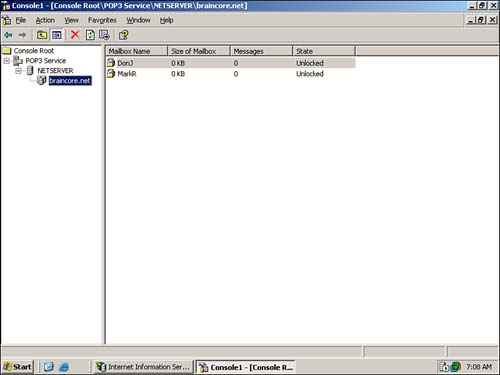
POP3 is designed to associate a single mailbox with a user. As shown in Figure 7.19, you can create mailboxes for as many users as desired and monitor their mailbox usage. Because POP3 mailboxes store messages as text files on disk (rather than in a database such as Exchange Server), you can use the built-in disk quotas feature of Windows to limit the size of a user's mailbox. See the POP3 service's online help file for more information on this technique.
Figure 7.19. After a mailbox is created, the server accepts incoming email for that user and stores the email in the mailbox.
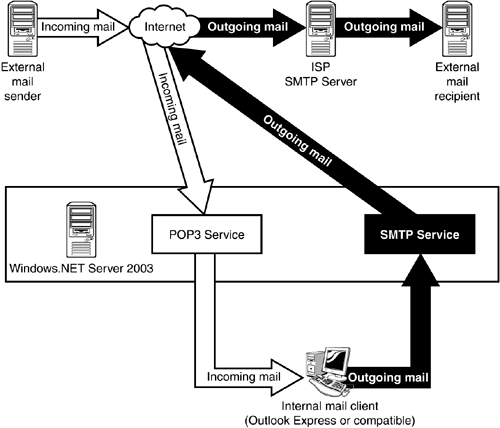
The relationship between the POP3 and SMTP services is illustrated in Figure 7.20. Users use the POP3 service to retrieve email that the server received on their behalf, and they use the SMTP service to send outgoing email. Each service provides half of the total email equation.
Figure 7.20. POP3 and SMTP work together to provide a complete, very basic email system for very small organizations.
With its SMTP and POP3 service, can Windows Server 2003 completely replace mail servers like Microsoft Exchange? Hardly. The SMTP and POP3 services provide the minimum functionality necessary for a working email system and don't provide anywhere near the level of features offered by full messaging systems such as Exchange, Lotus Notes, and other products.


