Recipe 4.8 Drawing Regular Polygons
4.8.1 Problem
You want to draw a regular polygon (a polygon in which all sides are equal length) at runtime.
4.8.2 Solution
Create a custom MovieClip.drawRegularPolygon( ) method using the Drawing API and invoke it on a movie clip.
4.8.3 Discussion
You can create a method to draw a regular polygon using basic trigonometric ratios to determine the necessary angles and coordinates of the segments.
The drawRegularPolygon( ) accepts five parameters:
- sides
-
The number of sides in the polygon
- length
-
The length of each side in pixels
- rotation
-
The number of degrees by which the polygon should be rotated
- x
-
The x coordinate of the center of the polygon
- y
-
The y coordinate of the center of the polygon
Define the custom drawRegularPolygon( ) method on MovieClip.prototype to make it available to all movie clip instances:
// Include the custom Math library from Chapter 5 to access Math.degToRad(  ).
#include "Math.as"

MovieClip.prototype.drawRegularPolygon = function (sides, length, rotation, x, y) {

  // Convert rotation from degrees to radians.
  rotation = Math.degToRad(rotation);

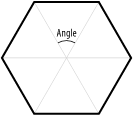
  // The angle formed between the segments from the polygon's center as shown in
  // Figure 4-5. Since the total angle in the center is 360 degrees (2p radians),
  // each segment's angle is 2p divided by the number of sides.
  var angle = (2 * Math.PI) / sides;

  // Calculate the length of the radius that circumscribes the polygon (which is also
  // the distance from the center to any of the vertices).
  var radius = (length/2)/Math.sin(angle/2);

  // The starting point of the polygon is calculated using trigonometry, where radius
  // is the hypotenuse and rotation is the angle.
  var px = (Math.cos(rotation) * radius) + x;
  var py = (Math.sin(rotation) * radius) + y;

  // Move to the starting point without yet drawing a line.
  this.moveTo(px, py);

  // Draw each side. Calculate the vertex coordinates using the same trigonometric
  // ratios used to calculate px and py earlier.
  for (var i = 1; i <= sides; i++) {
    px = (Math.cos((angle * i) + rotation) * radius) + x;
    py = (Math.sin((angle * i) + rotation) * radius) + y;
    this.lineTo(px, py);
  }
}
Figure 4-5 shows the angle used when calculating how to draw a regular polygon.
Figure 4-5. Drawing a regular polygon
Once you have defined the drawRegularPolygon( ) method and included it in your Flash document, you can quickly draw regular polygons with any number of sides (with a minimum of three sides, of course, for it to be a valid polygon.) Remember, as with all the other drawing methods in this chapter, you must define a line style prior to invoking the drawRegularPolygon( ) method.
// Create the movie clip into which to draw the polygon.
this.createEmptyMovieClip("polygon_mc", 1);

// Use a 1-pixel, black, solid line style for the border.
polygon_mc.lineStyle(1, 0x000000, 100);

// Draw a regular nonagon (a nine-sided polygon) with sides of length 30.
polygon_mc.drawRegularPolygon(9, 30);
As with all the custom methods in this chapter that define shapes, you can create a filled polygon by invoking beginFill( ) or beginGradientFill( ) before drawRegularPolygon( ) and invoking endFill( ) after drawRegularPolygon( ).
this.createEmptyMovieClip("polygon_mc", 1);
polygon_mc.lineStyle(1, 0x000000, 100);       // Define a black, 1-pixel border.
polygon_mc.beginFill(0x00FF00);               // Define a solid green fill.
polygon_mc.drawRegularPolygon(9, 30)
polygon_mc.endFill(  );


