Filtering Table Data
In a table you can apply filters to fields to limit what records you view. This is very helpful if you want to view just the data associated with a subset of the records. For example, you might want to view just the data associated with sales managers.
Filtering by Selection
The Filter by Selection feature allows you to select text and then filter the data in the table to that selected text. To use the Filter by Selection feature, follow these steps:
Open a table in Datasheet view.
Select the record and field in the table that contain the value on which you want to filter.
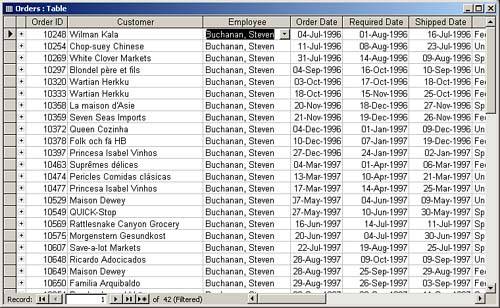
 Click the Filter by Selection button. The data is filtered to only the specified rows. For example, in Figure 2.9, the data shows only orders associated with Steven Buchanan.
Figure 2.9. Data filtered to show orders for Steven Buchanan.
Removing Filters
 After you have applied filters, you might want to remove them so that you can once again view all rows or apply a different filter. The process is very simple. You simply click the Remove Filter button on the toolbar.


