Modifying the Sort Order of a Query
You might want to modify the sort order designated by the designer of a query. As described in the following sections, you can sort on a single field or you can sort on multiple fields and you can sort in ascending order or you can sort in descending order. For example, you might want to sort in ascending order by company name in a company table but in descending order by sales amount in a sales table so that the highest sales amount appears first. An example where you might want to sort on multiple fields would be employee last name combined with employee first name.
Sorting on a Single Field
Sorting on a single field is a very simple process. It works like this:
Open the desired query in Design view.
Click in the Sort row of the field you want to sort by.
Click the drop-down arrow button to display the choices for the sort order (see Figure 3.6).
Figure 3.6. Selecting the sort order of a query.
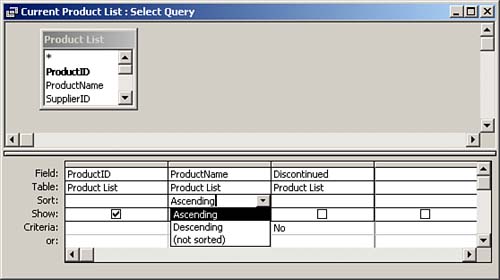
Select the sort order:
Ascending? A to Z or 0 to 9
Descending? Z to A or 9 to 0
Not Sorted? No sorting
Click the Run button. The data appears in the designated sort order.
Sorting on More Than One Field
The process for sorting on more than one field is slightly more complicated than the process of sorting on one field. It works like this:
Repeat steps 1?4 in the previous section, "Sorting on a Single Field," for the first field that you want to sort by.
Click in the Sort row of the second field that you want to sort by.
Click the drop-down arrow button to display the choices for sort order.
Select the sort order.
Click the Run button.
Moving a Field on the Query Grid
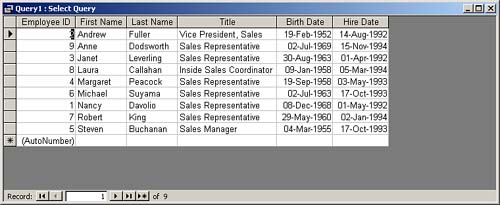
Access sorts the data in the query grid from left to right, meaning that if the first name field appears on the query grid before the last name field (see Figure 3.7), the data appears in order by first name and then within first name by last name (see Figure 3.8). Because you probably want the data in order by last name and then by first name, you need to move the Last Name field so that it appears before the First Name field. This is the process:
Click the gray selector bar that contains the field name. This selects the entire column.
Drag the field to the new location. Access moves the field (in this case, the Last Name field is moved before the First Name field).
Figure 3.7. The query grid with the First Name field before the Last Name field.
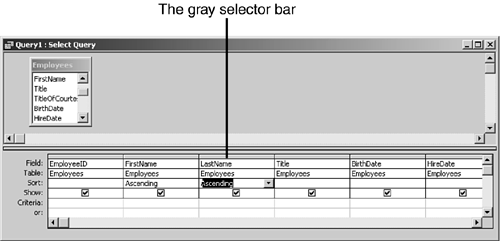
Figure 3.8. Datasheet view with the First Name field before the Last Name field.
The resulting query grid is shown in Figure 3.9. The resulting output is shown in Figure 3.10.
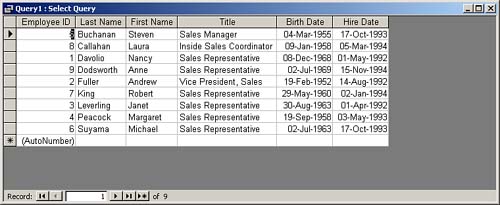
Figure 3.9. The query grid with the Last Name field before the First Name field.
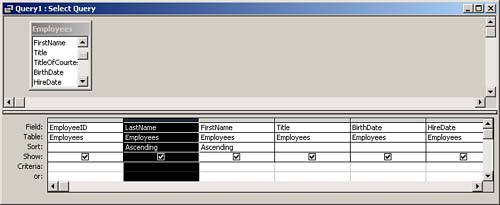
Figure 3.10. Datasheet view with the Last Name field before the First Name field.