Opening a Query in Design View
A query has an underlying design, which you can think of as the blueprint for the query. This blueprint?not the result of running the query?is what Access stores in the database when you save a query. The following sections explore the various methods that you can use to view a query in Design view.
Viewing the Design of a Query from the Database Window
It is not necessary to first run a query to view its design. You can go directly into Design view of a query from the Database window. Here's how:
Select the query whose design you want to view.
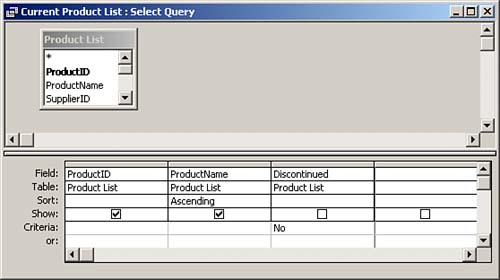
Click the Design tool on the Database window toolbar. The query appears in Design view (see Figure 3.2).
Figure 3.2. The Current Product List query in Design view.
Viewing the Design of a Query While in Datasheet View
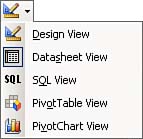
It is easy to toggle back and forth between Datasheet view and Design view. You accomplish it by using the View tool on the Query Design and Query Datasheet toolbars. Notice in Figure 3.3 that the View tool allows you to toggle between the various views available for a query. This makes it very easy for you to switch from Design view to Datasheet view and back as needed.
Figure 3.3. The View tool, which allows you to toggle between views.