System Tools
The Tools menu on the EM toolbar can be used to access additional tools not necessarily related to EM, but often accessed while working with EM.
Query Analyzer
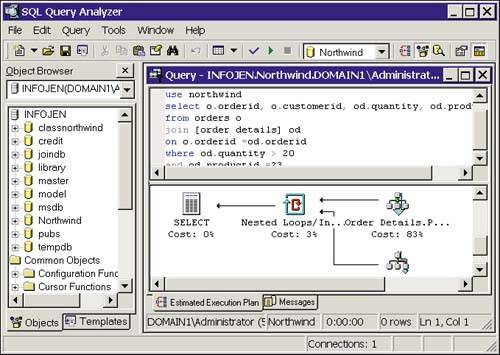
Query Analyzer, introduced in SQL 7.0, has been revamped for SQL 2000 with the addition of an object browser and templates for object creation. From this tool, queries can be built, run, saved as scripts, and analyzed for performance. Refer to Chapters 6, "SQL Server Query Analyzer and SQL Debugger," and 36, "Query Analysis," for an in-depth look at this very powerful tool. Figure 4.20 shows the Query Analyzer.
Figure 4.20. The Query Analyzer.
SQL Profiler
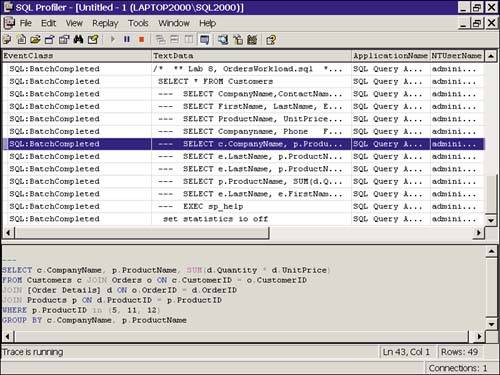
Another tool that has been updated for SQL Server 2000 is the SQL Profiler. The Profiler "records" events happening on your server and lets you save them to a file or table for later analysis. Figure 4.21 shows the Profiler with a sample trace capturing T-SQL activity. Chapter 7, "Using the SQL Server Profiler," is the place to go for details.
Figure 4.21. The SQL Profiler.
Managing SQL Server Error Messages
Selecting Manage SQL Server Messages from the Tools menu brings up the dialog box shown in Figure 4.22.
Figure 4.22. Managing SQL Server messages.
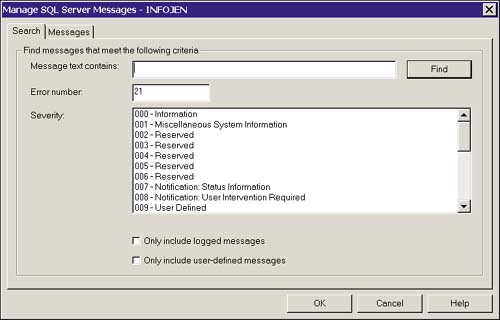
From here, you can search for SQL Server error messages by severity, error number, or the text it contains. After a message has been located, it appears in the Messages tab, as shown in Figure 4.23.
Figure 4.23. The SQL Server Messages tab.
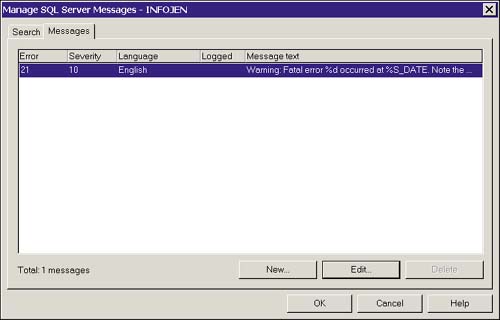
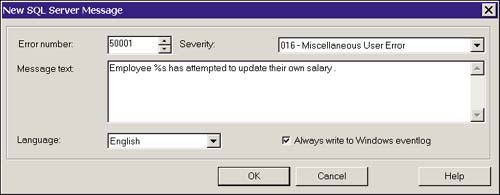
Messages can also be edited from here, using the Edit button; however, the only change allowed to built-in error messages is to configure whether they write to the Event Log. You can create and later edit user-defined error messages as well. These also can be set to write to the application log. This is a key point, as an error that writes to the application log can fire an alert. Because an alert can run a job, the functionality you can build in here is endless. User-defined error messages use error numbers 50,000 and above, can use substitution parameters, and are generally called with a raiserror statement from the application or from a trigger. Figure 4.24 illustrates creating a user-defined error.
Figure 4.24. Creating a user-defined error.