Starting, Stopping, and Pausing SQL Server
Although SQL Server should be set to automatically start when the operating system starts, sometimes you will want to manually start, stop, or pause the SQL Server services. Pausing the SQL Server service prevents new connections but allows existing connections to remain. This is useful to prevent new connections before a planned outage, or during testing and maintenance. Pausing the SQL Server Agent suspends scheduled activities and alerts from occurring.
The SQL Server services can be started, stopped, and paused using the following:
SQL Server Service Manager
SQL Server Enterprise Manager
The Services applet in the Control Panel
The net command from the command prompt
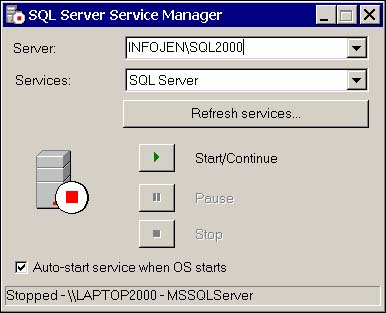
Service manager can be accessed from the Services Manager icon on the Windows Task Bar or from the SQL Server program group. Figure 8.7 shows the Service Manager.
Figure 8.7. The SQL Server Service Manager.
From within Enterprise Manager, right-click the server name and select Start, Stop, or Pause from the pop-up menu. When using the Services applet in the Control Panel, right-clicking the appropriate service will also provide you with these options. If you choose to use the command line, the syntax for a default instance is net start, net pause, net continue, net stop, and the name of the service. For example, to start the SQL Server service, the command is net start mssqlserver. For a named instance, the format is net start mssql$instancename.
NOTESQL Server can also be started directly from the command prompt by running SQLSERVR.EXE from the binn folder of the instance you want to start. Unlike any of the previously mentioned startup options, this starts SQL Server independently of the Service Control Manager, so the application does not run as a Windows service. This means that SQL Server can't be stopped or paused from the Services applet, Service Manager, Enterprise Manager, or by using NET commands. If SQL Server is started in this manner, you must shut down SQL Server before logging off. To shut down, press Ctrl+C in the command prompt window that SQL Server was started from. This method of starting SQL Server is generally used only for troubleshooting startup or configuration problems. |
Connecting to SQL Server
The final test of your installation will be connecting to SQL Server. You can choose to use either a GUI tool, such as Query Analyzer or Enterprise Manager, or a command prompt tool, such as osql. My personal preference is to fire up the Query Analyzer and run a simple query against the pubs database, first using a Windows login, and then, if the server is in mixed mode, using a SQL login.


