SQL Server Profiler Architecture
SQL Server 2000 and SQL Server 7.0 were dramatically changed to allow a more granular level of auditing against SQL Server. The most dramatic of these changes came with the advent of SQL Server 7.0, but SQL Server 2000 has been further enhanced to provide even more information.
SQL Server 2000 has both a server and a client-side component for tracing activity on the server. The SQL Trace facility is the server-side component that manages queues of events that are initiated by Event Producers on the server. Extended-stored procedures can be used to define the server-side events that are to be captured. These procedures are discussed later in this chapter in the section, "Defining Server-Side Traces."
The SQL Profiler is the client-side tracing facility. It comes with a fully functional GUI that allows for real-time auditing of SQL Server events. When it is used to trace server activity, a server-side consumer sends OLE DB row sets to a client-side consumer. The basic elements involved in this process are shown in Figure 7.1.
Figure 7.1. SQL Server Profiler's architecture.
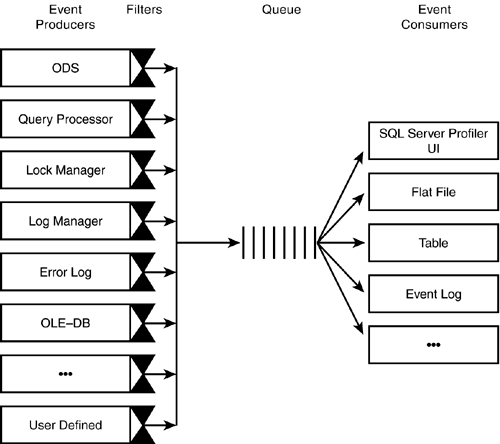
The figure illustrates the following four steps in the process:
-
Event producers, such as the Query Processor, Lock Manager, ODS, and so on, submit events for the SQL Server Profiler.
-
The filters define the information to submit to SQL Server Profiler. A producer will not send events if the event is not included in the filter.
-
SQL Server Profiler queues all of the events.
-
SQL Server Profiler writes the events to each defined consumer, such as a flat file, a table, the Profiler client window, and so on.
In addition to obtaining its trace data from the event producers listed in step 1, you can also configure SQL Profiler so that it obtains its data from a previously saved location. This includes trace data that was saved in a file or table. The "Saving and Exporting Traces" section, later in this chapter, covers using trace files and trace tables in more detail.


