Improving Computer Security
Improving Computer Security
To improve computer security and harden the operating system against attack, Windows Vista modifies many areas of the local computer security configuration. Some of the most far reaching changes have to do with security settings for local policies, which can be managed through Active Directory Group Policy or through Local Group Policy. To manage Active Directory Group Policy, you can use the Group Policy Object Editor or the Group Policy Management Console. To manage Local Group Policy on a local computer, you can access security settings by using the Security Configuration Management console. The sections that follow discuss changes to Audit Policy, User Rights Assignment, and Security Options.
Navigating Audit Policy Changes
Audit Policy is used to collect information regarding resource and privilege use. By enabling auditing policies, you can configure security logging to track important security events, such as when a user logs on to the computer or when a user changes account settings.
You can follow these steps to access Audit Policy in the Local Security Settings console:
-
Click Start, point to All Programs, Accessories, and then click Run.
-
Type secpol.msc in the Open text box, and then click OK.
-
Expand the Local Polices node in the left pane, and then click the Audit Policy node, as shown in Figure 10-5.
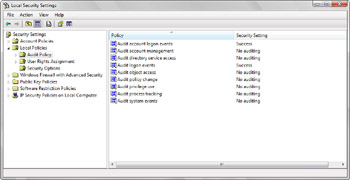
Figure 10-5: Using the Local Security Settings console to manage Audit Policy
Table 10-1 provides an overview of the default Audit Policy configuration used in Windows XP and Windows Vista. As the table shows, in Windows XP, auditing is not enabled by default. In Windows Vista, however, successful logons are tracked for all types of accounts.
|
Policy |
Default Security Setting in Windows XP |
Default Security Setting in Windows Vista |
|---|---|---|
|
Audit Account Logon Events |
No auditing |
Success |
|
Audit Account Management |
No auditing |
No auditing |
|
Audit Directory Service Access |
No auditing |
No auditing |
|
Audit Logon Events |
No auditing |
Success |
|
Audit Object Access |
No auditing |
No auditing |
|
Audit Policy Change |
No auditing |
No auditing |
|
Audit Privilege Use |
No auditing |
No auditing |
|
Audit Process Tracking |
No auditing |
No auditing |
|
Audit System Events |
No auditing |
No auditing |
Navigating User Rights Assignment Changes
User Rights Assignment policies determine what a user or group can do on a computer. Follow these steps to access User Rights Assignment policies in the Local Security Settings console:
-
Click Start, point to All Programs, Accessories, and then click Run.
-
Type secpol.msc in the Open text box, and then click OK.
-
Expand the Local Polices node in the left pane, and then click the User Rights Assignment node, as shown in Figure 10-6.
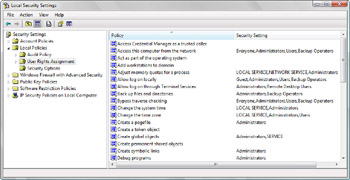
Figure 10-6: Using the Local Security Settings console to manage User Rights Assignment policies
As Table 10-2 shows, the default user rights have changed substantially between Windows XP and Windows Vista. A key reason for these changes has to do with User Account Control. User Account Control provides a new layer of protection for computers by ensuring that there is true separation of user and administrator accounts. Because of User Account Control, there are many changes to user rights assignment in Windows Vista.
|
Policy |
Default Security Setting in Windows XP |
Security Setting in Windows Vista |
|---|---|---|
|
Access Credential Manager As A Trusted Caller |
Not Applicable |
No default setting |
|
Access This Computer From The Network |
Everyone, Administrators, Users, Power Users, Backup Operators |
Everyone, Administrators, Users, Backup Operators |
|
Act As Part Of The Operating System |
No default setting |
No default setting |
|
Add Workstations To Domain |
No default setting |
No default setting |
|
Adjust Memory Quotas For A Process |
LOCAL SERVICE, NETWORK SERVICE, Administrators |
LOCAL SERVICE, NETWORK SERVICE, Administrators |
|
Allow Log On Locally |
Not Applicable |
Guest, Administrators, Users, Backup Operators |
|
Allow Logon Through Terminal Services |
Administrators, Remote Desktop Users |
Administrators, Remote Desktop Users |
|
Back Up Files And Directories |
Administrators, Backup Operators |
Administrators, Backup Operators |
|
Bypass Traverse Checking |
Everyone, Administrators, Users, Power Users, Backup Operators |
Everyone, Administrators, Users, Backup Operators |
|
Change The System Time |
Administrators, Power Users |
LOCAL SERVICE, Administrators |
|
Change The Time Zone |
Not Applicable |
LOCAL SERVICE, Administrators, Users |
|
Create A Pagefile |
Administrators |
Administrators |
|
Create A Token Object |
No default setting |
No default setting |
|
Create Global Objects |
Administrators, INTERACTIVE, SERVICE |
Administrators, SERVICE |
|
Create Permanent Shared Objects |
No default setting |
No default setting |
|
Create Symbolic Links |
No default setting |
Administrators |
|
Debug Programs |
Administrators |
Administrators |
|
Deny Access To This Computer From The Network |
SUPPORT, Guest |
Guest |
|
Deny Logon As A Batch Job |
No default setting |
No default setting |
|
Deny Logon As A Service |
No default setting |
No default setting |
|
Deny Logon Locally |
SUPPORT, Guest |
Guest |
|
Deny Logon Through Terminal Services |
No default setting |
No default setting |
|
Enable Computer And User Accounts To Be Trusted For Delegation |
No default setting |
No default setting |
|
Force Shutdown From A Remote System |
Administrators |
Administrators |
|
Generate Security Audits |
LOCAL SERVICE, NETWORK SERVICE |
LOCAL SERVICE, NETWORK SERVICE |
|
Impersonate A Client After Authentication |
Administrators, SERVICE |
Administrators, SERVICE |
|
Increase A Process Working Set |
No default setting |
Users |
|
Increase Scheduling Priority |
Administrators |
Administrators |
|
Load And Unload Device Drivers |
Administrators |
Administrators |
|
Lock Pages In Memory |
No default setting |
No default setting |
|
Log On As A Batch Job |
SUPPORT, Administrator |
Administrators, Backup Operators |
|
Log On As A Service |
NETWORK SERVICE | |
|
Log On Locally |
Guest, Administrators, Users, Power Users, Backup Operators |
Not applicable |
|
Manage Auditing And Security Log |
Administrators |
Administrators |
|
Modify An Object Label |
Not Applicable |
No default setting |
|
Modify Firmware Environment Values |
Administrators |
Administrators |
|
Perform Volume Maintenance Tasks |
Administrators |
Administrators |
|
Profile Single Process |
Administrators, Power Users |
Administrators |
|
Profile System Performance |
Administrators |
Administrators |
|
Remove Computer From Docking Station |
Administrators, Users, Power Users |
Administrators, Users |
|
Replace A Process Level Token |
LOCAL SERVICE, NETWORK SERVICE |
LOCAL SERVICE, NETWORK SERVICE |
|
Restore Files And Directories |
Administrators, Backup Operators |
Administrators, Backup Operators |
|
Shut Down The System |
Administrators, Users, Power Users, Backup Operators |
Administrators, Users, Backup Operators |
|
Synchronize Directory Service Data |
No default setting |
No default setting |
|
Take Ownership Of Files Or Other Objects |
Administrators |
Administrators |
When you compare the user rights assigned in Windows Vista to those assigned in Windows XP, you’ll see many changes. Windows Vista phased out the Power Users group and now maintains this group only for backward compatibility with legacy applications. As a result, the Power Users group is not granted user rights in Windows Vista.
Windows Vista includes several new user rights, including:
-
Access Credential Manager As A Trusted Caller Allows a user or group to establish a trusted connection to Credential Manager. In Windows Vista, Credential Manager is used to manage a user’s credentials. A credential is an association of all the information needed for logging on and being authenticated on a particular server or at a particular site, such as a user name and password or certificate. Credentials provide identification and proof of identification. Examples of credentials are user names and passwords, smart cards, and certificates.
-
Allow Log On Locally Allows a user or group to log on at the keyboard. This user right was originally named Log On Locally and has been renamed in Windows Vista so that there are now both Allow Log On Locally and Deny Log On Locally user rights.
-
Change The Time Zone Allows a user or group to change the time zone. As users have this right by default, users are able to change the computer’s time zone without using administrator privileges.
In Windows Vista, users—or more specifically, processes started by users—can now increase the working set for a process. This change is important for applications that run using standard user credentials. Why? The working set of a process is the amount of physical memory assigned to that process by the operating system. Windows Vista restricts the tasks that applications can perform and the system areas to which they can write. If user privileges could not be used to increase the working set of a process, an application running in standard user mode could run out of memory.
Navigating Security Options Changes
Security Options enable or disable security settings for a computer. Follow these steps to access Security Options in the Local Security Settings console:
-
Click Start, point to All Programs, Accessories, and then click Run.
-
Type secpol.msc in the Open text box, and then click OK.
-
Expand the Local Polices node in the left pane, and then click the Security Options node, as shown in Figure 10-7.
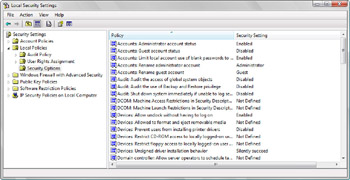
Figure 10-7: Using the Local Security Settings console to manage Security Options
As Table 10-3 shows, the default security options have changed substantially between Windows XP and Windows Vista. As with User Rights Assignment, many of the changes are because of User Account Control.
|
Policy |
Default Security Setting in Windows XP |
Security Setting in Windows Vista |
|---|---|---|
|
Accounts: Administrator Account Status |
Not Applicable |
Enabled |
|
Accounts: Guest Account Status |
Not Applicable |
Disabled |
|
Accounts: Limit Local Account Use Of Blank Passwords To Console Logon Only |
Enabled |
Enabled |
|
Accounts: Rename Administrator Account |
Administrator |
Administrator |
|
Accounts: Rename Guest Account |
Guest |
Guest |
|
Audit: Audit The Access Of Global System Objects |
Disabled |
Disabled |
|
Audit: Audit The Use Of Backup And Restore Privilege |
Disabled |
Disabled |
|
Audit: Shut Down System Immediately If Unable To Log Security Audits |
Disabled |
Disabled |
|
DCOM: Machine Access Restrictions In Security Descriptor Definition Language (SDDL) Syntax |
Not Defined |
Not Defined |
|
DCOM: Machine Launch Restrictions In Security Descriptor Definition Language (SDDL) Syntax |
Not Defined |
Not Defined |
|
Devices: Allow Undock Without Having To Log On |
Enabled |
Enabled |
|
Devices: Allowed To Format And Eject Removable Media |
Administrators |
Not Defined |
|
Devices: Prevent Users From Installing Printer Drivers |
Disabled |
Disabled |
|
Devices: Restrict CD-ROM Access To Locally Logged-On User Only |
Disabled |
Not Defined |
|
Devices: Restrict Floppy Access To Locally Logged-On User Only |
Disabled |
Not Defined |
|
Devices: Unsigned Driver Installation Behavior |
Warn But Allow Installation |
Silently Succeed |
|
Domain Controller: Allow Server Operators To Schedule Tasks |
Not Defined |
Not Defined |
|
Domain Controller: LDAP Server Signing Requirements |
Not Defined |
Not Defined |
|
Domain Controller: Refuse Machine Account Password Changes |
Not Defined |
Not Defined |
|
Domain Member: Digitally Encrypt Or Sign Secure Channel Data (Always) |
Enabled |
Enabled |
|
Domain Member: Digitally Encrypt Secure Channel Data (When Possible) |
Enabled |
Enabled |
|
Domain Member: Digitally Sign Secure Channel Data (When Possible) |
Enabled |
Enabled |
|
Domain Member: Disable Machine Account Password Changes |
Disabled |
Disabled |
|
Domain Member: Maximum Machine Account Password Age |
30 Days |
30 Days |
|
Domain Member: Require Strong (Windows 2000 Or Later) Session Key |
Disabled |
Disabled |
|
Interactive Logon: Do Not Display Last User Name |
Disabled |
Disabled |
|
Interactive Logon: Do Not Require Ctrl+Alt+Del |
Not Defined |
Not Defined |
|
Interactive Logon: Message Text For Users Attempting To Log On | ||
|
Interactive Logon: Message Title For Users Attempting To Log On |
Not Defined |
Not Defined |
|
Interactive Logon: Number Of Previous Logons To Cache (In Case Domain Controller Is Not Available) |
10 Logons |
10 Logons |
|
Interactive Logon: Prompt User To Change Password Before Expiration |
14 Days |
14 Days |
|
Interactive Logon: Require Domain Controller Authentication To Unlock Workstation |
Disabled |
Disabled |
|
Interactive Logon: Require Smart Card |
Not Defined |
Disabled |
|
Interactive Logon: Smart Card Removal Behavior |
No Action |
No Action |
|
Microsoft Network Client: Digitally Sign Communications (Always) |
Disabled |
Disabled |
|
Microsoft Network Client: Digitally Sign Communications (If Server Agrees) |
Enabled |
Enabled |
|
Microsoft Network Client: Send Unencrypted Password To Third-Party SMB Servers |
Disabled |
Disabled |
|
Microsoft Network Server: Amount Of Idle Time Required Before Suspending Session |
15 Minutes |
15 Minutes |
|
Microsoft Network Server: Digitally Sign Communications (Always) |
Disabled |
Disabled |
|
Microsoft Network Server: Digitally Sign Communications (If Client Agrees) |
Disabled |
Disabled |
|
Microsoft Network Server: Disconnect Clients When Logon Hours Expire |
Enabled |
Enabled |
|
Network Access: Allow Anonymous SID/Name Translation |
Not Applicable |
Disabled |
|
Network Access: Do Not Allow Anonymous Enumeration Of SAM Accounts |
Enabled |
Enabled |
|
Network Access: Do Not Allow Anonymous Enumeration Of SAM Accounts And Shares |
Disabled |
Disabled |
|
Network Access: Do Not Allow Storage Of Credentials Or .NET Passports For Network Authentication |
Disabled |
Disabled |
|
Network Access: Let Everyone Permissions Apply To Anonymous Users |
Disabled |
Disabled |
|
Network Access: Named Pipes That Can Be Accessed Anonymously |
COMNAP, COMNODE, SQL\QUERY, SPOOLSS, LLSRPC, Browser |
SQL\QUERY, SPOOLSS, Netlogon, Lsarpc, Samr, Browser |
|
Network Access: Remotely Accessible Registry Paths |
(Multiple paths defined as accessible) |
Not Defined |
|
Network Access: Remotely Accessible Registry Paths And Sub-Paths |
Not Applicable |
Not Defined |
|
Network Access: Restrict Anonymous Access To Named Pipes And Shares |
Not Applicable |
Enabled |
|
Network Access: Shares That Can Be Accessed Anonymously |
COMCFG, DFS$ | |
|
Network Access: Sharing And Security Model For Local Accounts |
Guest Only – Local Users Authenticate As Guest |
Classic – Local Users Authenticate As Themselves |
|
Network Security: Do Not Store LAN Manager Hash Value On Next Password Change |
Disabled |
Enabled |
|
Network Security: Force Logoff When Logon Hours Expire |
Disabled |
Disabled |
|
Network Security: LAN Manager Authentication Level |
Send LM & NTLM Responses |
Send NTLMv2 Response Only |
|
Network Security: LDAP Client Signing Requirements |
Negotiate Signing |
Negotiate Signing |
|
Network Security: Minimum Session Security For NTLM SSP Based (Including Secure RPC) Clients |
No Minimum |
No Minimum |
|
Network Security: Minimum Session Security For NTLM SSP Based (Including Secure RPC) Servers |
No Minimum |
No Minimum |
|
Recovery Console: Allow Automatic Administrative Logon |
Disabled |
Disabled |
|
Recovery Console: Allow Floppy Copy And Access To All Drives And All Folders |
Disabled |
Disabled |
|
Shutdown: Allow System To Be Shut Down Without Having To Log On |
Enabled |
Enabled |
|
Shutdown: Clear Virtual Memory Pagefile |
Disabled |
Disabled |
|
System Cryptography: Force Strong Key Protection For User Keys Stored On The Computer |
Not Applicable |
Not Defined |
|
System Cryptography: Use FIPS Compliant Algorithms For Encryption, Hashing, And Signing |
Disabled |
Disabled |
|
System Objects: Default Owner For Objects Created By Members Of The Administrators Group |
Object Creator |
Object Creator |
|
System Objects: Require Case Insensitivity For Non-Windows Subsystems |
Enabled |
Enabled |
|
System Objects: Strengthen Default Permissions Of Internal System Objects (for example, Symbolic Links) |
Enabled |
Enabled |
|
System Settings: Optional Subsystems |
Not Applicable |
Posix |
|
System Settings: Use Certificate Rules On Windows Executables For Software Restriction Policies |
Not Applicable |
Disabled |
|
User Account Control: Behavior Of The Elevation Prompt For Administrators In Admin Approval Mode |
Not Applicable |
Prompt For Consent |
|
User Account Control: Behavior Of The Elevation Prompt For Standard Users |
Not Applicable |
Prompt For Credentials |
|
User Account Control: Detect Application Installations And Prompt For Elevation |
Not Applicable |
Enabled |
|
User Account Control: Only Elevate Executables That Are Signed And Validated |
Not Applicable |
Disabled |
|
User Account Control: Run All Administrators In Admin Approval Mode |
Not Applicable |
Enabled |
|
User Account Control: Switch To The Secure Desktop When Prompting For Elevation |
Not Applicable |
Enabled |
|
User Account Control: Virtualize File And Registry Write Failures To Per-User Locations |
Not Applicable |
Enabled |
Some of the most significant security changes in Windows Vista have to do with the following default settings for network access and network security:
-
Remote registry access In Windows XP, multiple registry paths are remotely accessible by default. In Windows Vista, no areas of the registry are remotely accessible by default. This change improves registry security. Additionally, Windows Vista includes a new security option to manage access to registry subpaths.
-
Anonymous access to named pipes and shares Windows Vista adds a security option to restrict anonymous access to named pipes and shares. This change blocks anonymous access to named pipes and shares.
-
Sharing and security model for local accounts In Windows XP, the default sharing and security model for local accounts is to authenticate local users as guests. In Windows Vista, local users are authenticated as themselves. This change enhances security by ensuring that users must have appropriate permissions to access all areas of the file system.
-
Storing LAN Manager hash values In Windows XP, when a user changes a password, the LAN Manager hash value used to help in subsequent authentication can be stored on the computer. Windows Vista ensures that these hash values are not stored on the computer. This improves security by requiring a user to obtain a new hash value anytime a password is changed.
-
LAN Manager authentication In Windows XP, client computers use LM and NTLM authentication and never use NTLM version 2 session security. In Windows Vista, client computers use NTLM version 2 authentication only and can also use NTLM version 2 session security if the server supports it. Because NTLM version 2 is more secure than LM and NTLM, the authentication process is more secure.


