Safeguarding Your Computer
Safeguarding Your Computer
To keep pace with constantly evolving security threats, the Windows operating system must also evolve and provide new ways of protecting your computer. Windows Vista meets this challenge by expanding the security offerings of Windows XP in a variety of ways and by providing entirely new security features, such as Windows Service Hardening and Network Access Protection. Together these features offer additional layers of protection for your computer.
Getting to Know the Windows Vista Expanded Security Features
Windows Vista expands the security features offered in earlier versions of Windows in several ways. To ensure that organizations have a wide variety of authentication mechanisms to choose from, Windows Vista includes a new authentication architecture that is both extensible and customizable. Because the new architecture makes it easier for third-party developers to extend and customize the Windows Vista authentication mechanisms, this should lead to more choices for smart cards, biometrics, and other forms of strong authentication.
Windows Vista provides enhancements to the Kerberos authentication protocol and smart card logons. Deployment and management tools, such as self-service personal identification number (PIN) reset tools, make smart cards easier to manage. Windows Vista also has improved support for data protection at the document, file, folder, and machine level.
With integrated rights management, you can enforce policies regarding document access and usage. The Encrypting File System (EFS), which provides user-based file and folder encryption, has been enhanced to allow storage of encryption keys on smart cards, providing better protection of encryption keys. To extend the level of data encryption protection beyond files and folders, Windows Vista includes support for Trusted Platform Modules and BitLocker Drive Encryption. On a computer with appropriate enabling hardware, these features validate boot integrity and provide full disk encryption, which helps protect data from being compromised on a lost or stolen machine.
Getting Started with Network Access Protection
Business versions of Windows Vista include Network Access Protection (NAP) to prevent a Windows Vista–based client from connecting to your private network if the client lacks current security updates and virus signatures or otherwise fails to meet your computer health requirements. NAP is designed to protect client computers as well as your network from vulnerabilities that could otherwise be exploited if NAP wasn’t used and enforced.
 |
When remote access connections and wireless networks were new, they were popular targets for people who wanted to break into those networks. So, members of the security community put their heads together and developed some near-bullet-proof techniques for keeping the bad guys out—even if the “bad guy” was just a computer that hadn’t been patched.
Many of us forgot our Ethernet networks, and did not provide the same security protections. Somehow, we felt safe inside our offices because wired networks are more difficult for an attacker to connect to. However, mobile users can still connect to a wired network and spread worms and viruses. Finally, with NAP, we have a good way to help protect wired, wireless, and remote access connections from traditional hackers as well as malicious software.
Tony Northrup
Author, MCSE, and MVP—For more information, see http://www.northrup.org.
|
Understanding Network Access Protection
Network Access Protection can be used to protect your network from local clients as well as remote access clients. At the heart of this feature are three components:
-
Network Access Protection Agent A software component that allows a client running Windows to participate in Network Access Protection. This agent runs as a service on computers running Windows Vista.
-
NAP Client Configuration A configuration tool that is used to define and enforce NAP requirements on clients. This tool is also used to specify health registration settings and designate trusted servers.
-
NAP Server Configuration A configuration tool that is used to manage NAP and define NAP policy.
The Network Access Protection Agent reports the health status of a client computer to a server called a Health Registration Authority. The report includes details about the client’s overall security health, such as whether the client has current security updates and up-to-date virus signatures installed. The security mechanism by which a client computer communicates with a Health Registration Authority is configured through a designated Request Policy.
Request Policies can be configured to use:
-
Any of a variety of private key algorithms, including asymmetric key algorithms based on Rivest-Shamir-Adleman (RSA), Digital Signal Algorithm (DSA), and other security specifications.
-
Any of a variety of signed and unsigned hash algorithms, including RSA MD5 hashing and DSA SHA1 hashing.
-
Any of a variety of Cryptographic Service Providers, including the Microsoft Enhanced
Cryptographic Provider version 1.0, the Microsoft Enhanced RSA and AES Cryptographic Provider, and the Microsoft Enhanced DSS and Diffie-Hellman Cryptographic Provider.
You can access the NAP Client Configuration tool, shown in Figure 10-3, by following these steps:
-
Click Start, and then click Control Panel.
-
In Control Panel, click the System And Maintenance category heading link, and then click Administrative Tools.
-
Double-click NAP Client Configuration.
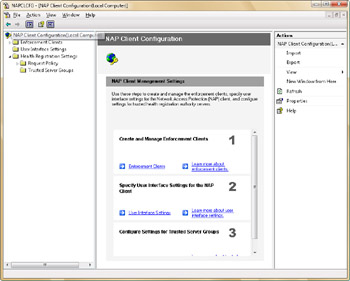
Figure 10-3: Using the NAP Client Configuration console to manage NAP
Using Network Access Protection
Using the NAP Client Configuration tool, administrators can configure separate enforcement policies for Dynamic Host Configuration Protocol (DHCP) clients, remote access clients, and terminal services clients. Enforcement policy can also be configured for virtual private network (VPN) clients that use Extensible Authentication Protocol (EAP).
Administrators can use NAP to enforce health requirements for all computers that are connected to an organization’s private network, regardless of how those computers are connected to the network. You can use NAP to improve the security of your private network by ensuring that the latest updates are installed before users connect to your private network. If a client computer does not meet the health requirements, you can:
-
Prevent the computer from connecting to your private network.
-
Provide instructions to users on how to update their computers. (In some cases, you can update their computers automatically.)
-
Limit access to your network so that users with out-of-date computer security can access only designated servers on your network.
To allow NAP to be enforced when a computer is acting as a DHCP client, follow these steps:
-
Start the NAP Client Configuration tool.
-
In the left panel, select Enforcement Clients.
-
Double-click DHCP Quarantine Enforcement Client.
-
In the DHCP Quarantine Enforcement Client Properties dialog box, select the Enable This Enforcement Client check box, as shown in Figure 10-4.
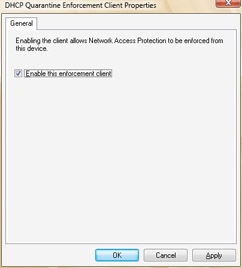
Figure 10-4: Enforcing NAP when DHCP is used
You can enable enforcement for other types of connections using a similar procedure:
-
To enforce remote access NAP, open NAP Client Configuration tool, double-click Remote Access Quarantine Enforcement Client, and then select the Enable This Enforcement Client check box.
-
To enforce terminal services NAP, open NAP Client Configuration tool, double-click TS Gateway Quarantine Enforcement Client, and then select the Enable This Enforcement Client check box.
-
To enforce VPN protection, NAP Client Configuration tool, double-click EAP Quarantine Enforcement Client, and then select the Enable This Enforcement Client check box.
You configure the actual NAP policies that apply to clients by using the NAP Server Configuration tool.
Understanding Windows Service Hardening
Earlier versions of Windows grant wide access to the system-level services running on the computer. Many of these services run under the LocalSystem account, where any breach could:
-
Grant wide access to the data on the computer.
-
Allow malicious programs to modify the system configuration.
-
Open the computer to other types of attacks.
Windows Vista uses Windows Service Hardening to provide an additional layer of protection so that services cannot be compromised. Following the security principle of defense-in-depth, Windows Service Hardening:
-
Restricts critical Windows services from performing abnormal activities that affect the file system, registry, network, or other resources that could be used to allow malicious software to install itself or attack other computers. Services can be restricted from replacing system files or modifying the registry. Unnecessary Windows privileges, such as the ability to perform debugging, have also been removed on a per-service basis.
-
Limits the number of services that are running and operational by default to reduce the overall attack surface in Windows. Some services are now configured to start manually as needed rather than automatically when the operating system starts.
-
Limits the privilege level of servers by limiting the number of services that run in the
LocalSystem account. Some services that previously ran in the LocalSystem account now run in a less privileged account, such as the Local Service or Network Service account. This reduces the overall privilege level of the service, which is similar to the benefits derived from User Account Control (UAC). (UAC is discussed in Chapter 9.)
Windows Service Hardening introduces entirely new features, which are used by Windows services as well. Like user accounts, each service has a security identifier that is used to manage the security permissions granted to the service. Per-service security identifiers (SIDs) enable per-service identity. Per-service identity, in turn, enables access control partitioning through the existing Windows access control model, covering all objects and resource managers that use access control lists (ACLs). Services can now apply explicit ACLs to resources that are private to the service, and this prevents other services as well as the user from accessing those resources.
All services now have write-restricted access tokens. A write-restricted access token can be used in cases where the set of objects written to by the service is bounded and can be configured. Write attempts to resources to which the service was not granted explicit access fail. Further, services are assigned a network firewall policy to prevent network access outside the normal bounds of the service program. The firewall policy is linked directly to the per-service SID.
While Windows Service Hardening cannot prevent a vulnerable service from being compromised, it does go a long way toward limiting how much damage an attacker can do in the unlikely event the attacker is able to identify and exploit a vulnerable service. When combined with other Windows Vista components and other defense-in-depth strategies, such as Windows Firewall and Windows Defender, computers running Windows Vista have much more protection than computers running earlier versions of Windows.


