Getting Help
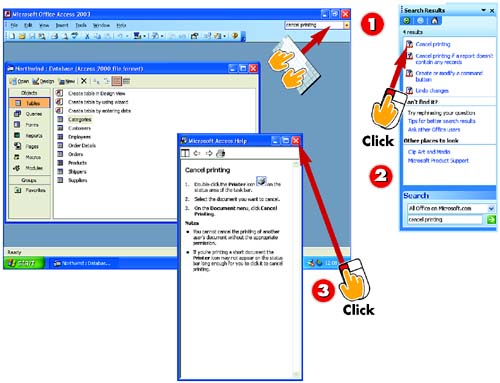

In the help box on the menu bar, type cancel printing and press Enter.

A Search Results task pane opens, displaying Help topics that contain the search phrase you entered in step 1. Click the Cancel printing entry.

A window containing the Help information opens. Read the information in the window, and click the Close button in the window's upper-right corner to close it.
INTRODUCTION
Access includes an easy-to-use Help system. One way to access Help is to type a question in the help box found on the right side of the menu bar; another is to use the Help menu. In this task, you'll find out how to use both of these tools to get help canceling a print job.
TIP
Search Window Options
Use options in the Search Results task pane to try other matches, get search tips, rephrase the search, or search online. Use Help window options to print the help information, view related links, and go back and forth among viewed topics.
TIP
Maximizing the Window
If necessary, click the Help window's Maximize button to see more of the help information.
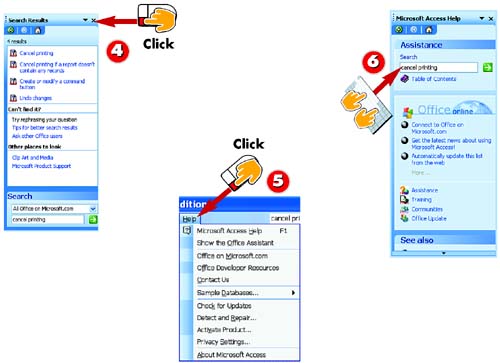

To close the Search Results pane, click the Close button in its upper-right corner.

Another way to get help is using the Help menu. Click Help on menu bar and choose Microsoft Access Help from the menu that appears. (Alternatively, press F1 on your keyboard.)

The Microsoft Access Help pane opens; type cancel printing in the Search box and press Enter. You see the same results as you did when you searched using the help box.
TIPUsing What's This? Another way to find help in Microsoft Access is to use the program's What's This? feature. To do so, press the F1 key on your keyboard; the mouse pointer changes to an arrow with a question mark. Then, click an object about which you want to find information; in most cases, a description of the object appears. Close the description by clicking on another part of the screen or by pressing the Esc key. |


