Applying a Smart Tag
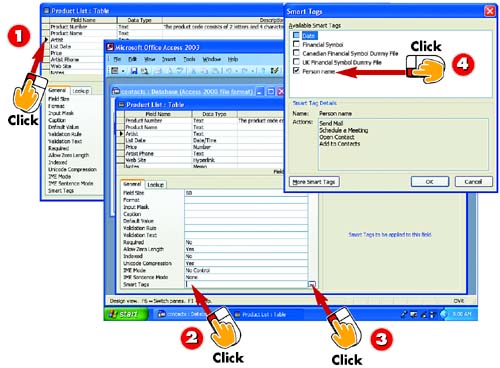

After you've opened the table you want to change in Design view, click in the field to which you want to apply a Smart Tag (in this example, the Artist field).

In the property sheet, click in the Smart Tags field. A button featuring an ellipsis appears to the right of the field.

Click the ellipsis button.

The Smart Tags dialog box opens. In the Available Smart Tags list, click the check box next to the type of Smart Tag you want to apply (in this example, Person Name) and click OK.
INTRODUCTION
One new feature of Office 2003 is Smart Tags, which enables you to use data from several applications at once. In many Office 2003 applications, Smart Tags appear when you complete an action that commonly occurs in conjunction with another action. For example, if you type a person's name, a Smart Tag appears; you can click it to select any number of options, such as sending an email, scheduling a meeting, and so on. In this task, you'll learn how to add Smart Tags to your database so that users can take advantage of the flexibility they offer.
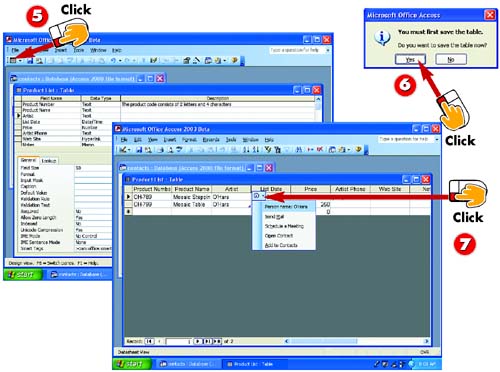

Click the View button on the Standard toolbar in the main Access window to toggle to Datasheet view.

Before it changes to Datasheet view, Access prompts you to save the changes to the table; click Yes to do so.

When you click the field in the table to which the Smart Tag was applied, a Smart Tag appears; click the down arrow to display the list of available actions.
HINTActions Vary The Smart Tag's available actions vary depending on the type of Smart Tag you select in the Smart Tags dialog box (refer to step 4). Common data table field Smart Tags include Date, Financial Symbols (in various styles), and Person Name. |
TIPDisplaying Additional Smart Tags To view other available Smart Tags, click the More Smart Tags button in the Smart Tags dialog box. |


