Using a Form to Select Records
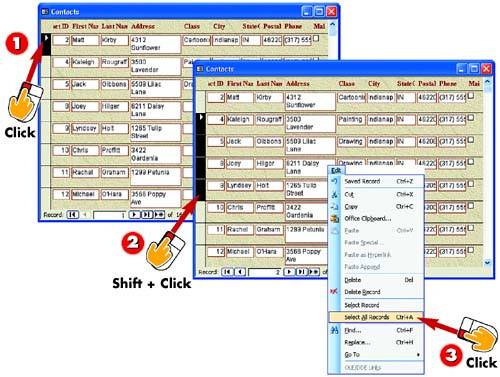

To select a single record, click the table cell where the record selector column (farthest to the left) and the record row intersect. An arrow appears next to the selected record.

To select a series of records, click to select the first record, press and hold down the Shift key, and click the last record. The first and last records, and all records in between, are selected.

To select all records, open the Edit menu and choose Select All Records.
INTRODUCTIONWhen you want to work with a single record (perhaps to delete that record) or a set of records, you start by selecting the record. In a form that displays one record at a time, you can display that record and then make any changes. If the form uses a layout similar to a datasheet, however, you can select a single record, a set of records that are next to each other, or all records. (You can select multiple records only in the datasheet-type form.) |
TIPUsing the Select All Shortcut If you prefer, you can press Ctrl+A to select all records. |


