Selecting an Entry
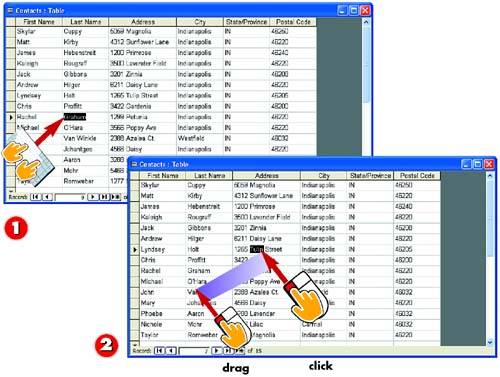

To select an entire entry, press Tab to move to the field containing that entry.

To select just part of an entry, click in the field, position the insertion point at the start of the entry you want to select, and click and drag across the desired entry. Just that part is selected.
INTRODUCTIONWhen you want to select the entire entry in a field?for example, to edit or delete that entry?you can press the Tab key on your keyboard one or more times to move to the field you want to select. When you reach the field, the entire entry will be selected. If you select an entry and type, any text you type replaces the selected entry. In some cases, however, you may want to select just part of an entry?for example, if you need to change or delete only part of the entry. To select part of an entry, you click in the field and drag to select the entry, similar to how you selects text in a word-processing document. |
TIPUsing the Keyboard You can also use the keyboard to select an entry. To do so, move the insertion point to the start of the text you want to select. Press and hold down the Shift key, and then use the arrow keys on your keyboard to highlight the text. |


