Copying an Entire Record
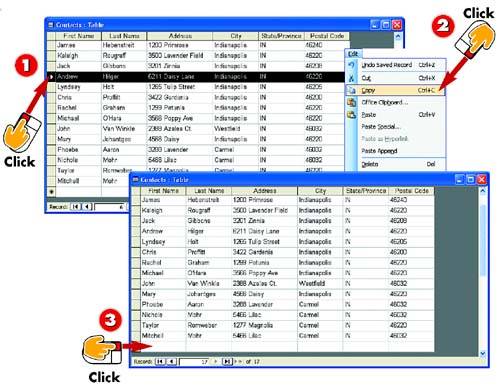

Select the record you want to copy.

Open the Edit menu and choose Copy.

Click in the blank row at the bottom of the database table.
INTRODUCTION
As another shortcut for entering similar records, you can copy an entire record. You can then edit any of the fields to create a unique record. For example, suppose that you are entering records for several individuals from the same company. Because most of the fields in the record will be the same?company name, company address, and so on?you could create one record, copy it, paste it into your table several times (once for each record you need to create), and then modify the fields in the new records as needed to make each one unique.
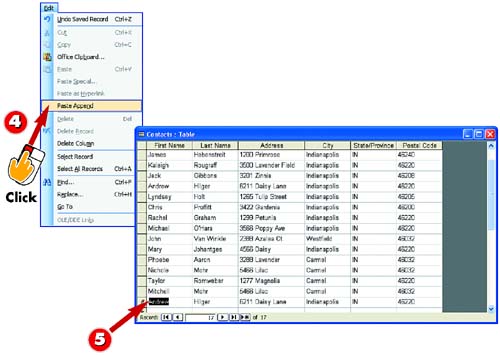

Open the Edit menu and choose Paste Append.

The copied record is pasted. Edit the record as needed.
TIPMoving a Record You use this same basic process to move, rather than copy, a record from one location to another. Instead of opening the Edit menu and choosing Copy, use Edit, Cut. Then move to the location where you want to place the record, open the Edit menu, and choose Paste Append. |


