Using a Form to Add a New Record
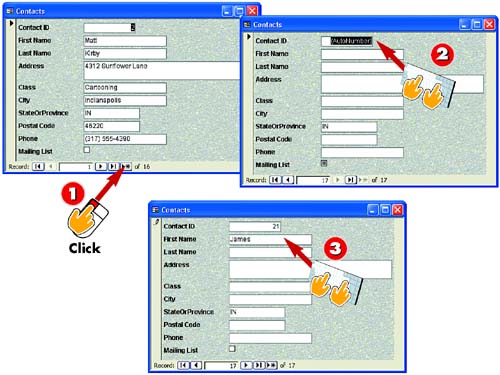

After you've opened the form you want to use to add a new record, click the form's New Record button.

The form changes to contain a blank record with the first field selected. In this case, the first field is an AutoNumber field, so press the Tab key on your keyboard to move to the next field.

The insertion point moves to the next field (here, the First Name field). Type an entry (in this case, James) and press the Tab key.
INTRODUCTION
One of the main purposes of a form is to enter new records. To create a new record, you simply display a blank record and then complete the fields.
TIP
AutoNumber Fields
Some tables include an AutoNumber field, whose value is automatically entered and incremented. That is, you do not type an entry into this field; Access does it for you. Press Tab to move to the next field.
TIP
Using the Toolbar
If you prefer, you can click the New Record button in the Standard toolbar found in the main Access window to begin entering a new record.
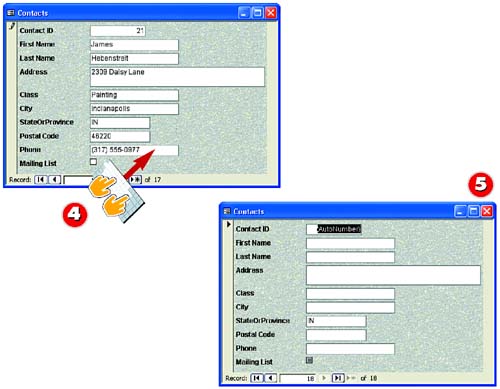

Continue typing entries and pressing the Tab key until the record is complete.

When you press Tab after completing the last field, Access saves the record and displays a new blank one, ready for your entries.
TIPViewing All Records When you click the New Record button in a column/row form layout, Access hides all existing records so that you can focus on just the record you are working on. To redisplay all records, open the Records menu and choose Remove Filter/Sort. |
TIPModifying a Form After you've used a form a few times, you may notice ways in which the form could be improved. Fortunately, Access enables you to change the form's design. This part includes several tasks on modifying the form's design. |
TIPDefault Entries If you set up any default entries for the table on which your form is based, those fields in the form will already be complete, for example, here "IN" for the StateOrProvince field. You can always override the entry by typing a new one. |


