What Is Excel?
Microsoft Excel is a spreadsheet program that's designed to record and analyze numbers and data. Excel takes the place of a calculator, a ruled ledger pad, pencils and pens, and a green eyeshade. The program makes it easy for you to juggle numbers, formulas, and text. Excel's advanced publishing tools enable you to present your work in a polished, professional-looking format.
Spreadsheet program?
 A computer program used primarily for accounting and financial purposes. Data in spreadsheet programs is organized by rows and columns.
No job is too large or small for Excel. You can use the program to add a column of numbers or to create a complex budget or sales model for your company. You can create exciting charts. You can set up a modeling program and play "what if?" using various forecasting scenarios. You can also use Excel as a database program and create a standard form to collect and record data.
Excel's collaborative features make it a great program on which colleagues can work together. You can work with your co-workers, located across the floor or across the world, to develop and design a budget or analysis of profits. You can even save your work as a Web page and publish it to the Web for others to view. With the Web as a backdrop, people who have never worked with Excel can contribute to the design and development of a file.
Use Excel anytime you want to work with numbers. Like any other software, you need to have some idea of what you expect before you begin. Do you want to create a complex analysis or simply total a row of numbers? The data you record needs to be accurate; the old saying "garbage in, garbage out" definitely applies. For example, if you're using Excel to keep track of your checking account balance and you enter an incorrect amount for a check you've written, you'll probably soon be hearing from the bank!
Store Your Data in Workbooks
The files you create in Excel are called workbooks. In turn, your workbook consists of individual worksheets. A workbook can contain one or multiple worksheets. Worksheets can relate to other worksheets, or they can be independent entities. Within each worksheet, you can enter text and numbers, perform calculations, organize data, and more.
Worksheet?
The place where you enter your data.
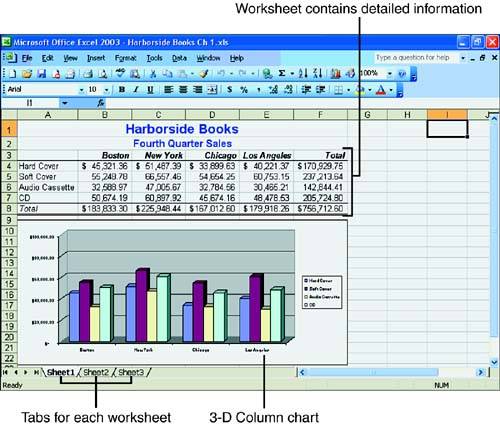
Figure 1.1 shows a workbook that contains three worksheets. In the example, the first worksheet contains detailed product sales information.
Figure 1.1. The workbook is divided into individual worksheets.
 | The terms Excel document, Excel workbook, and Excel file are used interchangeably in this book. |


