Typing Data in a Cell
As you learned during Hour 1, "Getting Started," the intersection of a row and a column is called a cell. When you're working in an Excel worksheet, one cell is highlighted to display the position of your cursor. The address of the cell?described by the column letter and row number?is displayed in the Name box. The highlighted cell is where the data you type appears in the worksheet.
Name box?
 An area on the worksheet that displays the current location of the cursor.
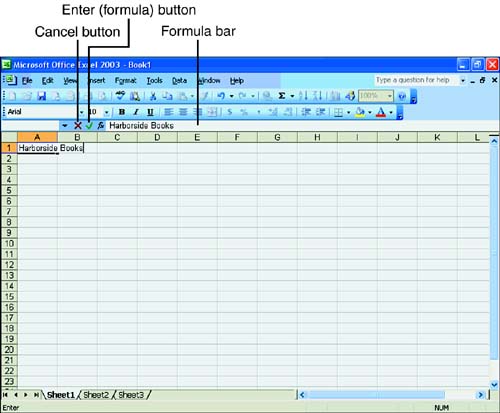
When the cell in which you want to enter your data is highlighted, simply begin typing. As you type, your text appears in the cell and in the Formula bar, as shown in Figure 2.1. When you're done typing, press the Enter key or click the green check mark (called the Enter button) next to the Formula bar to place the data in the cell. If you change your mind about the entry, click the Cancel button. When you're ready to enter data in another cell, move to that cell, type your data, and press Enter.
Figure 2.1. Data appears in the Formula bar and the cell as you're typing.
 | Make sure that you're located in the cell in which you want to enter data before you begin typing. If you're not careful, it's easy to overwrite important information. |
Types of Excel Data
You can make three basic types of entries into cells:
Labels
Values
Formulas
Labels are text entries that contain no numeric value. Labels can consist of text or even contain numbers. For example, a cell that contains an address like 991 Northwest Ninth Street is still considered a label.
Values are numbers that you enter into cells. Because Excel is a number-crunching program, it understands how to use values when performing calculations. Numbers can be straight integers, like the number 4, or can contain decimals or fractions.
Formulas perform calculations in your worksheets. Formulas can contain numbers, cell references, and arithmetic operators. The result of a formula appears in the worksheet in the cell in which you entered the formula. For example, if cell A16 contains the formula =1+1, the number 2 will appear in the cell.
 | You learn more about formulas in Hour 5, "Letting Excel Do the Math." |


