Referencing Cells
In addition to typing values into your worksheets, you can enter references to cells. Using cell references is often more effective than typing actual values when you want to build formulas. If a value in a referenced cell changes, the formula that points to the reference is updated automatically. Best of all, one cell can be referenced in an unlimited number of formulas. A cell reference does not need to contain an operator unless you want to use it to perform a calculation.
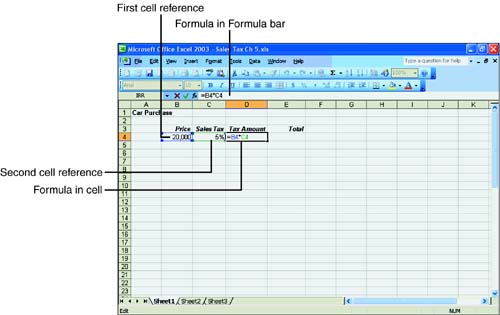
For example, if you're calculating the amount of sales tax due on a car purchase, you can reference the cell that contains the current sales tax percentage in each formula. If the sales tax percentage changes or you enter it incorrectly, updating the percentage amount also updates the car purchase formula, as shown in Figure 5.6.
Figure 5.6. Referencing the sales tax percentage in a formula.
Each time you reference a cell while you're building a formula, you need to type an operator. Otherwise, Excel won't store the cell reference, and your formula will be incomplete.
 | Don't press the Enter key while you're still constructing a formula by pointing to cells. Pressing Enter is equivalent to clicking the green check mark and tells Excel that the formula is complete. |
If you need to edit a formula, press F2 and make your changes. You can type the values and cell references, or you can point to them with the mouse. Click the Enter button when the formula is complete.
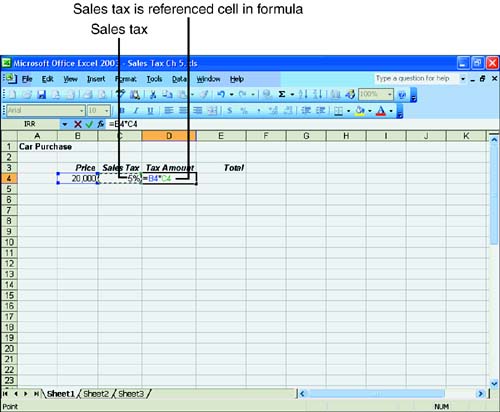
Excel uses color coding to assist you when you're editing a cell, as illustrated in Figure 5.7. Each cell reference and the cell it refers to in the worksheet are displayed in the same color. You can use the color coding to identify which references in the formula match which cells in the worksheet.
Figure 5.7. Press F2 to edit a formula.