Task 2: Understanding the Start Menu
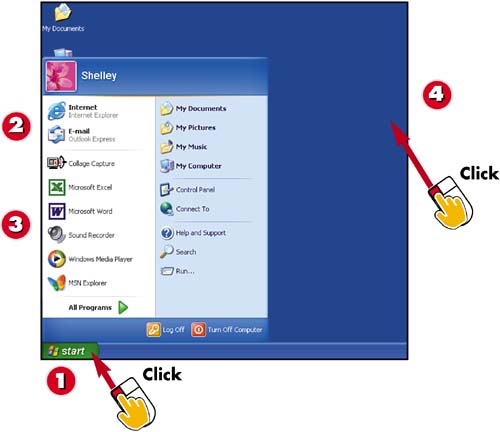

To open the Start menu, click the Start button.

At the top of the menu, you see the programs you use for the Internet and e-mail.

The Start menu lists the programs you last used here. You can click any of the listed programs to start that program. To display additional programs, click the All Programs button.

Press Esc or click outside the Start menu to close it.
INTRODUCTIONThe Start menu is where you can access common programs and folders. The Start menu in Windows XP has a new look, so if you are upgrading for a previous version, take a look at how the Start menu is organized. If you are new to Windows XP, you can get a good sense of how to use the Start menu from this task. |
TIPYour Menu Is Different What you see in your Start menu will be different than what appears here. You see the programs you last used and your selected Internet and e-mail programs. |
TIPStart a Program For help on starting a program, see Part 2, "Working with Programs," which covers the various ways you can start a program, including from the Start menu. |


