Task 6: Printing a File from a File Window
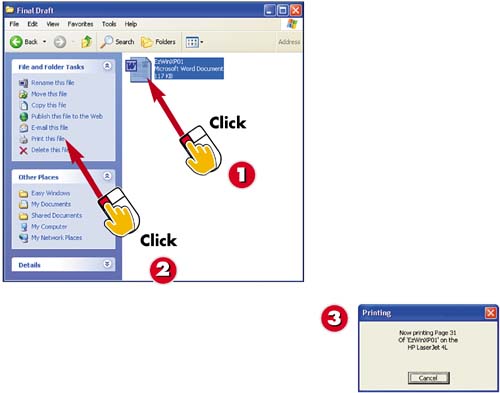

Select the file(s) you want to print.

Click the Print this file link.

Windows opens the associated program and prints the file(s). You see a status message as the file(s) are printed.
INTRODUCTIONIf do not want to open a document and then print from the program, you can print from a folder window. Printing from a folder window is helpful when you want to print several files; you can select all of the files and print them with one command. |
TIPPrinter Setup Windows XP uses the default printer you have selected. For more information on setting up printers and printing, see Part 5, "Working with Printers, Scanners, and Digital Cameras." |
TIPE-mail a File You can e-mail a file by selecting it, clicking E-mail this file, and then completing the mail window (entering the address and any text to accompany the file attachment). See Part 7, "Sending Faxes and E-mail" for more information. |


