Task 5: Selecting a Folder
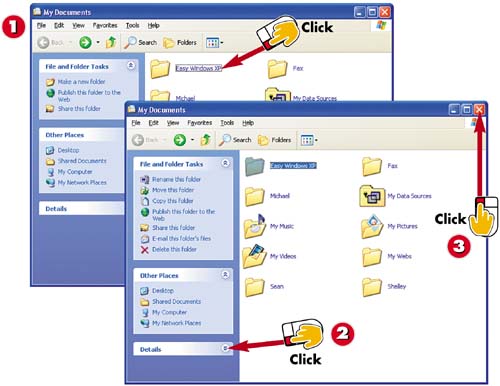

Click the folder you want to select.

In the File and Folder Tasks list, you see folder-related tasks. Click
 to display Details about the folder.
Click the Close button to close the folder window.
INTRODUCTIONWhen you are working with folders, you start by selecting a folder. You can then rename, delete, copy, or move the folder. When you select a folder, you see commands for all the folder-related tasks. You can also view detailed information about the selected folder. |
TIPHide and Display Panes You can hide or display any of the areas in the Explorer Bar of a window. Click the Expand button |
 to collapse and hide the area.


